Don't miss your chance to take the Fabric Data Engineer (DP-700) exam on us!
Learn moreWe've captured the moments from FabCon & SQLCon that everyone is talking about, and we are bringing them to the community, live and on-demand. Starts on April 14th. Register now
Hi everyone,
I would like to compare the same period of the current year and the prior year (example YTD march 23 - march 22).
Can I use the function PREVIOUSYEAR?
And how ?
Thanks in advanced.
@vr83 if the answer is correct, I ask you to accept it as a solution, otherwise I am available for further clarification.
BBF
@vr83 Hi!
Yes, you can use the PREVIOUSYEAR function in DAX to compare the same period of the current year and the prior year. Here is an example formula that you can use to achieve this:
YTD Prior Year =
CALCULATE(
[Total Sales],
PREVIOUSYEAR(Dates[Date]) <= Dates[Date] &&
YEAR(PREVIOUSYEAR(Dates[Date])) = YEAR(MAX(Dates[Date]))
)
The calculation is based on the following conditions:
You will need to replace [Total Sales] with your own measure and Dates[Date] with your own date column.
BBF
homestly I don't know why it doesn't work.
Probably because my record are maybe different.
So in this case how can I write the correct formula using what you've write?
YTD Prior Year =
CALCULATE(
[Total Sales],
PREVIOUSYEAR(Dates[Date]) <= Dates[Date] &&
YEAR(PREVIOUSYEAR(Dates[Date])) = YEAR(MAX(Dates[Date]))
)
Thansk
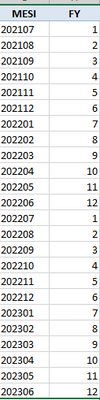
@vr83 Firstly, you have to create a column with only the Year and one with only the Month:
Hi,
I've tried the formula but it doesn't work...
If you have recently started exploring Fabric, we'd love to hear how it's going. Your feedback can help with product improvements.
A new Power BI DataViz World Championship is coming this June! Don't miss out on submitting your entry.
Share feedback directly with Fabric product managers, participate in targeted research studies and influence the Fabric roadmap.
| User | Count |
|---|---|
| 9 | |
| 8 | |
| 3 | |
| 2 | |
| 2 |
| User | Count |
|---|---|
| 23 | |
| 13 | |
| 10 | |
| 6 | |
| 5 |