Join us at FabCon Atlanta from March 16 - 20, 2026, for the ultimate Fabric, Power BI, AI and SQL community-led event. Save $200 with code FABCOMM.
Register now!The Power BI Data Visualization World Championships is back! Get ahead of the game and start preparing now! Learn more
Hello. I work in a hospital and we want to compare the actual discharge date of a patient with accuracy of our estimate from earlier. I have two tables related (1:many) by a patient ID number (MRN).
Table 1 - Yesterdays DCs
Table 2 - DC Info - This table give patient information on a daily basis. There are multiple/duplicate MRN in this table and I am interested in Expected Dischrg when Report Date/Time is latest.
Can you help me with a measure that will give the percentage of MRNs that have the correct Expected Dischrg date?
Example:
Below, you can see, on 3/24, we discharged 9 patients where we had predicted they would discharge on 3/24. And there where 20 patients discharged where we had the estimate wrong.
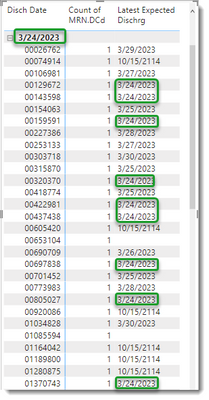
Side note - Not to sidetrack, but a second question...I think the column above is misleading or wrong, "Latest Expected Dischrg" is not the same as "last reported" Expected Dischrg which would be more accturate.
Thank you!
@MattRo , You need have common MRN dimension, post that you need have measures
measure =
var _diff = datediff(max(Table1[DesChg]), max(Table2[Expected DesChg]), day)
return
countx(values(MRN[MRN]), if(_diff <>0 , [MRN], blank() ) )
Now you can divide ot with countrows(filter(Table, Table1[DesChg] <> Blank()))
@amitchandak
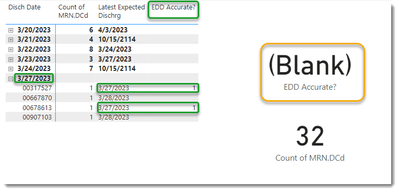
Using your measure, I managed to come up with this which identifies the matches. I think I am on the right track, but I am not able to sum. Any ideas?
using this measure:
@amitchandak Hi. Thanks for the response! Could you elaborate on "You need to have a common MRN dimension"? Do you mean I need to create a separate table containing MRN only? What would the purpose be given that I already have a table with a column of all unique MRN values? Thank you.
The Power BI Data Visualization World Championships is back! Get ahead of the game and start preparing now!
Check out the November 2025 Power BI update to learn about new features.
| User | Count |
|---|---|
| 19 | |
| 11 | |
| 9 | |
| 4 | |
| 4 |
| User | Count |
|---|---|
| 35 | |
| 32 | |
| 20 | |
| 12 | |
| 10 |