cancel
Showing results for 
Search instead for 
Did you mean: 

The Power BI Data Visualization World Championships is back! Get ahead of the game and start preparing now! Learn more

Reply
venal
Memorable Member
Memorable Member

How to calculate working days

Hi,


SalesIDRegionOrderDateDeliveryDateWorkingDays
SO1001Dubai1/7/202130/7/202122
SO1002UK7/7/202123/7/202113
SO1003Colombia21/7/202128/7/20216


How to calculate Working Days.

1. Dubai - Exclude "Friday & Saturday"

2. UK & Colombia - Exclude "Saturday & Sunday".


I have created a "Calendar" table with the below query.

calendar dim = CALENDAR(IF(MONTH(TODAY()) > 3, CONCATENATE(YEAR(TODAY())-1, "-04-01"), CONCATENATE(YEAR(TODAY())-2, "-04-01")), TODAY())


Can you please help us.

5 REPLIES 5
venal
Memorable Member
Memorable Member

Hi Team,


Thank you everyone for your suggestions.


One more validation need to add, For example Dubai national holidays need to exclude and in the same way other region national holidays also exclude.


Please find the below sample data.

RegionHoliday
Dubai1/1/2021
Dubai11/5/2021
Dubai12/5/2021
Dubai13/5/2021
Dubai14/5/2021
Dubai15/5/2021
Dubai19/7/2021
Dubai20/7/2021
Dubai21/7/2021
Dubai22/7/2021
Dubai12/8/2021
Dubai18/10/2021
Dubai19/10/2021
Dubai30/11/2021
Dubai2/12/2021
UK1/1/2021
UK2/4/2021
UK5/4/2021
UK3/5/2021
UK31/5/2021
UK30/8/2021
UK27/12/2021
UK28/12/2021


Thank you in advance.


Regards,

@venal 

CNENFRNL
Community Champion
Community Champion

PQ solution,


let
    Source = Table.FromRows(Json.Document(Binary.Decompress(Binary.FromText("i45WCvY3NDAwVNJRcilNSswE0ob65vpGBkYgIWMDGDtWB6rSCCgc6g0kzBHKjIwxlBkDhZ3zc/JzkzITQSqQDDWygKuOBQA=", BinaryEncoding.Base64), Compression.Deflate)), let _t = ((type nullable text) meta [Serialized.Text = true]) in type table [SalesID = _t, Region = _t, OrderDate = _t, DeliveryDate = _t]),
    #"Changed Type" = Table.TransformColumnTypes(Source,{{"SalesID", type text}, {"Region", type text}, {"OrderDate", type date}, {"DeliveryDate", type date}}, "fr"),
    #"Added Custom" = Table.AddColumn(
        #"Changed Type",
        "NetWorkday_PQ",
        each let l = List.Dates([OrderDate],Duration.Days([DeliveryDate]-[OrderDate])+1,#duration(1,0,0,0))
            in
                if [Region] = "Dubai" then
                    List.Accumulate(l,0,(s,c)=>s+Number.From(Date.DayOfWeek(c,Day.Sunday)<5))
                else List.Accumulate(l,0,(s,c)=>s+Number.From(Date.DayOfWeek(c,Day.Monday)<5))
    )
in
    #"Added Custom"

 

Screenshot 2021-08-31 121908.png


DAX solution

Screenshot 2021-08-31 122032.png


Thanks to the great efforts by MS engineers to simplify syntax of DAX! Most beginners are SUCCESSFULLY MISLED to think that they could easily master DAX; but it turns out that the intricacy of the most frequently used RANKX() is still way beyond their comprehension!

DAX is simple, but NOT EASY!

Greg_Deckler
Community Champion
Community Champion

@venal You should be able to modify this approach: https://community.powerbi.com/t5/Quick-Measures-Gallery/Net-Work-Days/m-p/367362#M109


Follow on LinkedIn
@ me in replies or I'll lose your thread!!!
Instead of a Kudo, please vote for this idea
Become an expert!: Enterprise DNA
External Tools: MSHGQM
YouTube Channel!: Microsoft Hates Greg
Latest book!:
DAX For Humans

DAX is easy, CALCULATE makes DAX hard...

Hi @Greg_Deckler ,


Thank you for the response.


In the above scenario, weekoffs are changing as per region.


Ex:- I have a data for Dubai, Please refer the above snippet and suggest.


Thank you in advance.


@venal 

Hi @venal 


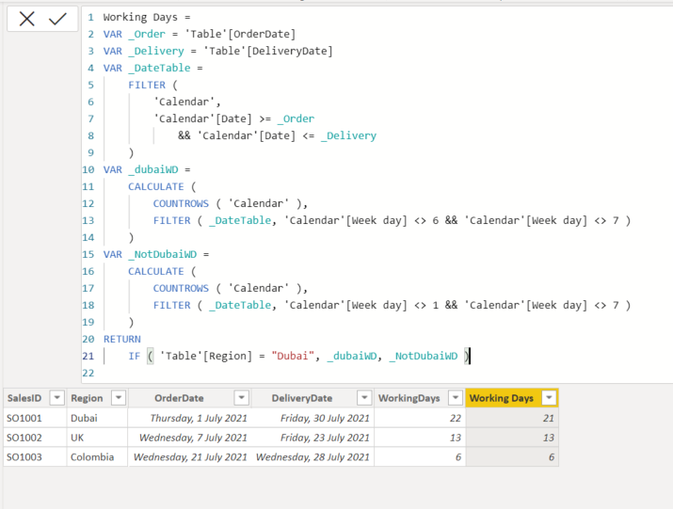
Add a Week Day column to your calendar table by using this measure:

Week day = WEEKDAY('Calendar'[Date])

Then Try this code to add Working Days column into the main table:

Working Days = 
VAR _Order = 'Table'[OrderDate]
VAR _Delivery = 'Table'[DeliveryDate]
VAR _DateTable =
    FILTER (
        'Calendar',
        'Calendar'[Date] >= _Order
            && 'Calendar'[Date] <= _Delivery
    )
VAR _dubaiWD =
    CALCULATE (
        COUNTROWS ( 'Calendar' ),
        FILTER ( _DateTable, 'Calendar'[Week day] <> 6 && 'Calendar'[Week day] <> 7 )
    )
VAR _NotDubaiWD =
    CALCULATE (
        COUNTROWS ( 'Calendar' ),
        FILTER ( _DateTable, 'Calendar'[Week day] <> 1 && 'Calendar'[Week day] <> 7 )
    )
RETURN
    IF ( 'Table'[Region] = "Dubai", _dubaiWD, _NotDubaiWD )


Output:


VahidDM_0-1630329973489.png


Did I answer your question? Mark my post as a solution!

Appreciate your Kudos VahidDM_1-1630329991583.png !!


Helpful resources

Announcements
Power BI DataViz World Championships

Power BI Dataviz World Championships

The Power BI Data Visualization World Championships is back! Get ahead of the game and start preparing now!

December 2025 Power BI Update Carousel

Power BI Monthly Update - December 2025

Check out the December 2025 Power BI Holiday Recap!

FabCon Atlanta 2026 carousel

FabCon Atlanta 2026

Join us at FabCon Atlanta, March 16-20, for the ultimate Fabric, Power BI, AI and SQL community-led event. Save $200 with code FABCOMM.