Join us at FabCon Atlanta from March 16 - 20, 2026, for the ultimate Fabric, Power BI, AI and SQL community-led event. Save $200 with code FABCOMM.
Register now!The Power BI Data Visualization World Championships is back! Get ahead of the game and start preparing now! Learn more
Hi experts,
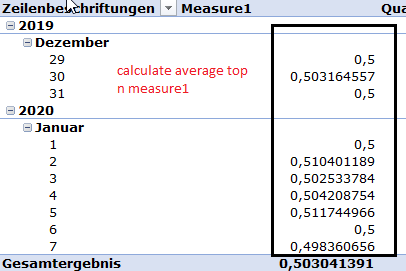
I have a claculated measure, which is strongly related to Date-Values. In a Time range, I would like to sort asc this measure and then calculate the average of n values of it.
n is:
Quantile:=
var CalculateQuantil= ROUNDUP(DISTINCTCOUNT(Table1[Date_SID]) * 0,2;0)
return CalculateQuantiland then:
How can I do that in dax?
Solved! Go to Solution.
@Fariba1984 , refer
Top 80/20 , percent /percentile
https://blog.enterprisedna.co/implementing-80-20-logic-in-your-power-bi-analysis/
https://forum.enterprisedna.co/t/testing-the-pareto-principle-80-20-rule-in-power-bi-w-dax/459
https://finance-bi.com/power-bi-pareto-analysis/
https://community.powerbi.com/t5/DAX-Commands-and-Tips/Calculate-the-sum-of-the-top-80/td-p/763156
Hi,
Are you trying to balancing the data in bin buckets or just try to get the averages, I need to create a balancing funcinality like quantile but I was not been able to do it, do you know if there are any functions in PBI,
thanks?
I think this thread will answer your question.@sturlaws, give the DAX with the PBIX file that you can download.
https://community.powerbi.com/t5/DAX-Commands-and-Tips/calculate-average-for-Top-3-5-10/td-p/904215
@Fariba1984 , refer
Top 80/20 , percent /percentile
https://blog.enterprisedna.co/implementing-80-20-logic-in-your-power-bi-analysis/
https://forum.enterprisedna.co/t/testing-the-pareto-principle-80-20-rule-in-power-bi-w-dax/459
https://finance-bi.com/power-bi-pareto-analysis/
https://community.powerbi.com/t5/DAX-Commands-and-Tips/Calculate-the-sum-of-the-top-80/td-p/763156
Thank you sir for yor post:
I am trying the following Dax:
Quantil:=
var CalculateQuantil= ROUNDUP(DISTINCTCOUNT(Table[Date_SID]) * 0,2;0)
return
CALCULATE([Measure1];
FILTER(VALUES(Table[Date_SID]);
RANKX(VALUES(Table[Date_SID]);[Measure1];True()) <= CalculateQuantil))but I get this error:
Error: Calculation error in measure 'Table Analysis'[Quantil]: Function 'RANKX' does not support comparing values of type Number with values of type True/False. Consider using the VALUE or FORMAT function to convert one of the values.
What is my mistake?
@Fariba1984 This looks like a measure aggregation problem. See my blog article about that here: https://community.powerbi.com/t5/Community-Blog/Design-Pattern-Groups-and-Super-Groups/ba-p/138149
The pattern is:
MinScoreMeasure = MINX ( SUMMARIZE ( Table, Table[Group] , "Measure",[YourMeasure] ), [Measure])
MaxScoreMeasure = MAXX ( SUMMARIZE ( Table, Table[Group] , "Measure",[YourMeasure] ), [Measure])
AvgScoreMeasure = AVERAGEX ( SUMMARIZE ( Table, Table[Group] , "Measure",[YourMeasure] ), [Measure])
etc.
The Power BI Data Visualization World Championships is back! Get ahead of the game and start preparing now!
Check out the November 2025 Power BI update to learn about new features.
| User | Count |
|---|---|
| 20 | |
| 10 | |
| 9 | |
| 4 | |
| 4 |
| User | Count |
|---|---|
| 33 | |
| 31 | |
| 19 | |
| 12 | |
| 11 |