FabCon is coming to Atlanta
Join us at FabCon Atlanta from March 16 - 20, 2026, for the ultimate Fabric, Power BI, AI and SQL community-led event. Save $200 with code FABCOMM.
Register now!- Power BI forums
- Get Help with Power BI
- Desktop
- Service
- Report Server
- Power Query
- Mobile Apps
- Developer
- DAX Commands and Tips
- Custom Visuals Development Discussion
- Health and Life Sciences
- Power BI Spanish forums
- Translated Spanish Desktop
- Training and Consulting
- Instructor Led Training
- Dashboard in a Day for Women, by Women
- Galleries
- Data Stories Gallery
- Themes Gallery
- Contests Gallery
- QuickViz Gallery
- Quick Measures Gallery
- Visual Calculations Gallery
- Notebook Gallery
- Translytical Task Flow Gallery
- TMDL Gallery
- R Script Showcase
- Webinars and Video Gallery
- Ideas
- Custom Visuals Ideas (read-only)
- Issues
- Issues
- Events
- Upcoming Events
The Power BI Data Visualization World Championships is back! Get ahead of the game and start preparing now! Learn more
- Power BI forums
- Forums
- Get Help with Power BI
- DAX Commands and Tips
- Re: How to calculate a turnover with the first pri...
- Subscribe to RSS Feed
- Mark Topic as New
- Mark Topic as Read
- Float this Topic for Current User
- Bookmark
- Subscribe
- Printer Friendly Page


- Mark as New
- Bookmark
- Subscribe
- Mute
- Subscribe to RSS Feed
- Permalink
- Report Inappropriate Content
How to calculate a turnover with the first price found in a table?
Hi! I am trying to calculate a turnover not based on the price that appears on each row of my fact table, but based on the first price found.
Example:
| Month | Quantity | Price | Turnover |
| 1 | 145 | 1,187 | 172,115 |
| 2 | 149 | 1,187 | 176,863 |
| 3 | 182 | 1,187 | 216,034 |
| 4 | 155 | 1,187 | 183,985 |
| 5 | 111 | 1,187 | 131,757 |
| 6 | 128 | 1,187 | 151,936 |
| 7 | 105 | 1,187 | 124,635 |
| 8 | 142 | 1,187 | 168,554 |
| 9 | 118 | 1,163 | 137,234 |
| 10 | 162 | 1,163 | 188,406 |
| 11 | 175 | 1,163 | 203,525 |
| 12 | 155 | 1,163 | 180,265 |
| 2,035,309 |
For the turnover, I would have something like:
Solved! Go to Solution.


- Mark as New
- Bookmark
- Subscribe
- Mute
- Subscribe to RSS Feed
- Permalink
- Report Inappropriate Content
Thanks for the data.
I changed the formula to take different Material into account.
Create a column
EarlyPrice Revenue = VAR _CurrMaterial = FactPrices[Material]
  RETURN
   FactPrices[Quantity] * CALCULATE(SUM(FactPrices[Price]) ,
                                    FILTER(FactPrices,
                                            FactPrices[Material] = _CurrMaterial &&
                                            FactPrices[DateKey] = MIN(FactPrices[DateKey])
                                            )
   )
- Mark as New
- Bookmark
- Subscribe
- Mute
- Subscribe to RSS Feed
- Permalink
- Report Inappropriate Content
You could add a column. I'm not sure if SELECTCOLUMNS function is better or worse than LOOKUPVALUE in terms of efficiency but it should get you the answer
Column 2 = VAR _minRow = TOPN(1, Table4, Table4[Month], 1)

   VAR _firstPrice = SELECTCOLUMNS(_minRow, "pr", Table4[Price] )

  RETURN

     _firstPrice * Table4[Quantity]
- Mark as New
- Bookmark
- Subscribe
- Mute
- Subscribe to RSS Feed
- Permalink
- Report Inappropriate Content
Thanks!
I am still getting an error: "A table of multiple values was supplied where a single value was expected."
Last row doesn't accept a column. Any idea?
- Mark as New
- Bookmark
- Subscribe
- Mute
- Subscribe to RSS Feed
- Permalink
- Report Inappropriate Content
Is that with the sample data provided or your real data?
- Mark as New
- Bookmark
- Subscribe
- Mute
- Subscribe to RSS Feed
- Permalink
- Report Inappropriate Content
With the real data.
- Mark as New
- Bookmark
- Subscribe
- Mute
- Subscribe to RSS Feed
- Permalink
- Report Inappropriate Content
OK, do you want to provide a more realistic sample of data? It doesn't have to be real (if the data is confidential) but obviously the real data is more complex
- Mark as New
- Bookmark
- Subscribe
- Mute
- Subscribe to RSS Feed
- Permalink
- Report Inappropriate Content
Hi,
Let's take a more realistic example. I have a table FactPrices:
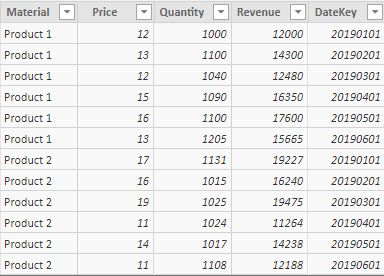
This table is related to dimDates with the dimension DateKey:

I want to calculate the total revenue based on the first price found for each Material.
What I want to achieve, in this example, is to calculate (12 (first price for Product 1) * 6535) + (17(first price for Product 2) * 6320).
I tried to create the following calculated table:
- Mark as New
- Bookmark
- Subscribe
- Mute
- Subscribe to RSS Feed
- Permalink
- Report Inappropriate Content
Could you post the data (not a picture) , so that i don't have to type it in. In a similar way to how you posted the initial data.
Or link your pbix.
Thanks
- Mark as New
- Bookmark
- Subscribe
- Mute
- Subscribe to RSS Feed
- Permalink
- Report Inappropriate Content
- Mark as New
- Bookmark
- Subscribe
- Mute
- Subscribe to RSS Feed
- Permalink
- Report Inappropriate Content
Thanks for the data.
I changed the formula to take different Material into account.
Create a column
EarlyPrice Revenue = VAR _CurrMaterial = FactPrices[Material]
  RETURN
   FactPrices[Quantity] * CALCULATE(SUM(FactPrices[Price]) ,
                                    FILTER(FactPrices,
                                            FactPrices[Material] = _CurrMaterial &&
                                            FactPrices[DateKey] = MIN(FactPrices[DateKey])
                                            )
   )
- Mark as New
- Bookmark
- Subscribe
- Mute
- Subscribe to RSS Feed
- Permalink
- Report Inappropriate Content
Thanks a lot, @HotChilli ! That's what I needed.
Do you need whether I could obtain the same result via a measure?

Helpful resources

Power BI Dataviz World Championships
The Power BI Data Visualization World Championships is back! Get ahead of the game and start preparing now!

Power BI Monthly Update - December 2025
Check out the December 2025 Power BI Holiday Recap!

FabCon Atlanta 2026
Join us at FabCon Atlanta, March 16-20, for the ultimate Fabric, Power BI, AI and SQL community-led event. Save $200 with code FABCOMM.

| User | Count |
|---|---|
| 19 | |
| 14 | |
| 7 | |
| 5 | |
| 5 |


| User | Count |
|---|---|
| 29 | |
| 18 | |
| 17 | |
| 11 | |
| 10 |


