FabCon is coming to Atlanta
Join us at FabCon Atlanta from March 16 - 20, 2026, for the ultimate Fabric, Power BI, AI and SQL community-led event. Save $200 with code FABCOMM.
Register now!- Power BI forums
- Get Help with Power BI
- Desktop
- Service
- Report Server
- Power Query
- Mobile Apps
- Developer
- DAX Commands and Tips
- Custom Visuals Development Discussion
- Health and Life Sciences
- Power BI Spanish forums
- Translated Spanish Desktop
- Training and Consulting
- Instructor Led Training
- Dashboard in a Day for Women, by Women
- Galleries
- Data Stories Gallery
- Themes Gallery
- Contests Gallery
- QuickViz Gallery
- Quick Measures Gallery
- Visual Calculations Gallery
- Notebook Gallery
- Translytical Task Flow Gallery
- TMDL Gallery
- R Script Showcase
- Webinars and Video Gallery
- Ideas
- Custom Visuals Ideas (read-only)
- Issues
- Issues
- Events
- Upcoming Events
The Power BI Data Visualization World Championships is back! Get ahead of the game and start preparing now! Learn more
- Power BI forums
- Forums
- Get Help with Power BI
- DAX Commands and Tips
- Re: How to add a column based on a particular valu...
- Subscribe to RSS Feed
- Mark Topic as New
- Mark Topic as Read
- Float this Topic for Current User
- Bookmark
- Subscribe
- Printer Friendly Page


- Mark as New
- Bookmark
- Subscribe
- Mute
- Subscribe to RSS Feed
- Permalink
- Report Inappropriate Content
How to add a column based on a particular value on another column
Ok, here is the problem, I think this is easy but just didn't figure out the solution by myself.
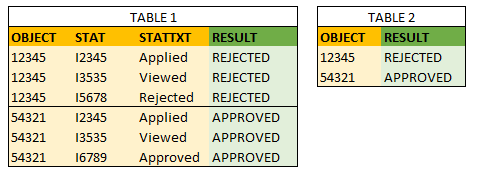
I have two tables, which are related by Object. My problem is TABLE 1.
In TABLE 1 the Object can get four kind of status:
1. Applied
2. Viewed
3. Approved OR Rejected
I would like to add a column to TABLE 1 (green RESULT column below) which gives the number 3. result for all rows within the same Object. So when I select an object in visualization, it gives me immediately the information if the Object is Approved or Rejected. I could also use that as a filter to search rejected objects.
Any ideas? Thank you!
/Theiren
Solved! Go to Solution.
- Mark as New
- Bookmark
- Subscribe
- Mute
- Subscribe to RSS Feed
- Permalink
- Report Inappropriate Content
This is the correct code. Your code should be avoided because it's using CALCULATE in a calculated column and this - as is known - generates a lot of context transitions that slow down the code.
[Final Result] = -- calculated column
var __object = T1[Object]
var __hasBeenApproved =
	NOT ISEMPTY(
		FILTER (
			T1,
			T1[Object] = __object
			&&
			T1[Result] = "approved"
		)
	)
retun
	if(
		__hasBeenApproved,
		"Approved",
		"Rejected"
	)
Best
Darek

- Mark as New
- Bookmark
- Subscribe
- Mute
- Subscribe to RSS Feed
- Permalink
- Report Inappropriate Content
[Final Result] = -- calculated column
var __object = T1[Object]
var __hasBeenApproved =
	NOT ISEMPTY(
		T,
		T1[Object] = __object
		&&
		T1[Result] = "approved"
	)
retun
	if(
		__hasBeenApproved,
		"Approved",
		"Rejected"
	)
Best
D.
- Mark as New
- Bookmark
- Subscribe
- Mute
- Subscribe to RSS Feed
- Permalink
- Report Inappropriate Content
Thank you for your swift reply @Anonymous ! Function ISEMPTY seems to take only "Table" as a parameter, is there a typo in your dax?
/Theiren
- Mark as New
- Bookmark
- Subscribe
- Mute
- Subscribe to RSS Feed
- Permalink
- Report Inappropriate Content
This is the correct code. Your code should be avoided because it's using CALCULATE in a calculated column and this - as is known - generates a lot of context transitions that slow down the code.
[Final Result] = -- calculated column
var __object = T1[Object]
var __hasBeenApproved =
	NOT ISEMPTY(
		FILTER (
			T1,
			T1[Object] = __object
			&&
			T1[Result] = "approved"
		)
	)
retun
	if(
		__hasBeenApproved,
		"Approved",
		"Rejected"
	)
Best
Darek
- Mark as New
- Bookmark
- Subscribe
- Mute
- Subscribe to RSS Feed
- Permalink
- Report Inappropriate Content
Thank you @Anonymous !!! It works now and I marked your reply as a solution. I am not prof enough to understand which actions slow down the code.
I also solved the slicer problem. For some reason if I used this new column as a slicer, it didn't work how I wanted (with info from other table), but when I brought the result to another table (where is only one object per row) it started to work. Thank you anyway! 🙂
/Theiren
- Mark as New
- Bookmark
- Subscribe
- Mute
- Subscribe to RSS Feed
- Permalink
- Report Inappropriate Content
__DAX is simple but is NOT easy__. There are many caveats and intricacies that will put people in difficult and hard-to-understand situations very often (unless they know exactly how DAX works) but there's always, ALWAYS, a logical explanation of what you see and it follows the rules to the very last letter.
Be prepared for that but do not get discouraged 🙂 There's always a way to get what you want.
Best
Darek
- Mark as New
- Bookmark
- Subscribe
- Mute
- Subscribe to RSS Feed
- Permalink
- Report Inappropriate Content
I created the following DAX:
ResultColumn =
var approved =
    CALCULATE(COUNTROWS(TABLE1),
    FILTER(TABLE1, EARLIER(TABLE1[OBJECT]) = TABLE1[OBJECT] && TABLE1[STAT] = "I6789"))
return
    IF(approved > 0, "Approved", "Rejected")
This gives me the result I was hoping to get. BUT, I am still wondering how to create a slicer of this (i.e. if I want to see only rejected objects). Anyway, I will close this thread now and maybe return the second issue later if needed.
/Theiren
- Mark as New
- Bookmark
- Subscribe
- Mute
- Subscribe to RSS Feed
- Permalink
- Report Inappropriate Content
Best
Darek
Helpful resources

Power BI Dataviz World Championships
The Power BI Data Visualization World Championships is back! Get ahead of the game and start preparing now!

Power BI Monthly Update - November 2025
Check out the November 2025 Power BI update to learn about new features.

FabCon Atlanta 2026
Join us at FabCon Atlanta, March 16-20, for the ultimate Fabric, Power BI, AI and SQL community-led event. Save $200 with code FABCOMM.

| User | Count |
|---|---|
| 19 | |
| 10 | |
| 9 | |
| 4 | |
| 4 |


| User | Count |
|---|---|
| 34 | |
| 32 | |
| 20 | |
| 12 | |
| 11 |


