cancel
Showing results for 
Search instead for 
Did you mean: 

The Power BI Data Visualization World Championships is back! Get ahead of the game and start preparing now! Learn more

Reply
Nou_admin1
Frequent Visitor

How to Using Logical Function in DAX and Display the Result with Actual Value

Hi Frnds,


I Created a Measure with existing tables and created a final result. In another Matrix Visual I would like to display the Final Result value which meets the Logical Function of Greater then 0 and Not Required if the Value fields which is less then or equal to 0.


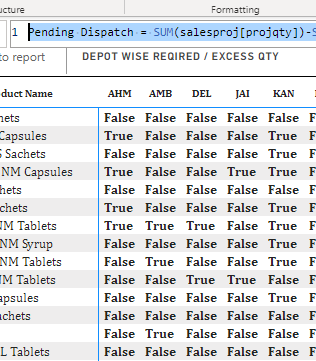
Pending Dispatch = SUM(salesproj[projqty])-SUM('Stock and Sales'[Total Sale Qty])-SUM('Stock and Sales'[Total Stock Qty])>0

with this Condition I am able to See the Result as below. But I don't want True or False as result.

Nou_admin1_0-1668755143356.png


Please suggest me a DAX Measure.


1 ACCEPTED SOLUTION

Aha, then try this:

Pending Dispatch = 
VAR = 
    _VALUE = SUM(salesproj[projqty])-SUM('Stock and Sales'[Total Sale Qty])-SUM('Stock and Sales'[Total Stock Qty])
RETURN
IF (_VALUE>0,_VALUE)

View solution in original post

4 REPLIES 4
FreemanZ
Super User
Super User

If not True/False, what do you expect?


What about 1 or blank?

Pending Dispatch = 
IF ( SUM(salesproj[projqty])-SUM('Stock and Sales'[Total Sale Qty])-SUM('Stock and Sales'[Total Stock Qty])>0, 1)

Thanks for your reply @FreemanZ .


Please see the below snap shot.  Want this value instead of True in that condition and Not required the Field which is less then 0 (negative value) or False condition. 


Ex: Refer the Column AHM in that want to display only the Row 2,4,6,7 and in AMB column want to display the Row 7,9,13 ....Viceversa... for the False statement column the result can show as blank or empty. 

Nou_admin1_0-1668756043178.png


Aha, then try this:

Pending Dispatch = 
VAR = 
    _VALUE = SUM(salesproj[projqty])-SUM('Stock and Sales'[Total Sale Qty])-SUM('Stock and Sales'[Total Stock Qty])
RETURN
IF (_VALUE>0,_VALUE)

Thanks @FreemanZ , I got what I expect from your Answer.  Thank you so much.

Helpful resources

Announcements
Power BI DataViz World Championships

Power BI Dataviz World Championships

The Power BI Data Visualization World Championships is back! Get ahead of the game and start preparing now!

December 2025 Power BI Update Carousel

Power BI Monthly Update - December 2025

Check out the December 2025 Power BI Holiday Recap!

FabCon Atlanta 2026 carousel

FabCon Atlanta 2026

Join us at FabCon Atlanta, March 16-20, for the ultimate Fabric, Power BI, AI and SQL community-led event. Save $200 with code FABCOMM.