Join us at FabCon Atlanta from March 16 - 20, 2026, for the ultimate Fabric, Power BI, AI and SQL community-led event. Save $200 with code FABCOMM.
Register now!The Power BI Data Visualization World Championships is back! Get ahead of the game and start preparing now! Learn more
Hi Community,
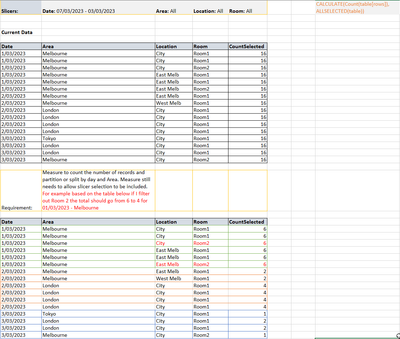
I am trying to do a count partitioned by date and area as shown below:
Currently using a formula to get the count selected:
CountSelected = CALCULATE(Count(table[rows]), ALLSELECTED(table))
I have tried using ALLEXCEPT function which somewhat works but that ignores my slicer selection unless im using it wrong.
Thanks in advance
Solved! Go to Solution.
Hi @databot_kd ,
Please try this measure.
CountSelected =
CALCULATE(
COUNTROWS('Table'),
ALLEXCEPT('Table','Table'[Date],'Table'[Area]),
VALUES('Table'[Room])
)
Best Regards,
Gao
Community Support Team
If there is any post helps, then please consider Accept it as the solution to help the other members find it more quickly. If I misunderstand your needs or you still have problems on it, please feel free to let us know. Thanks a lot!
How to get your questions answered quickly -- How to provide sample data in the Power BI Forum
This solution worked for me:
VAR SelectedDates = ALLSELECTED (table)
RETURN
CALCULATE (
COUNTROWS (table),
REMOVEFILTERS(),
VALUES(ftable[Date]),
SelectedDates
)
Hi @databot_kd ,
Please try this measure.
CountSelected =
CALCULATE(
COUNTROWS('Table'),
ALLEXCEPT('Table','Table'[Date],'Table'[Area]),
VALUES('Table'[Room])
)
Best Regards,
Gao
Community Support Team
If there is any post helps, then please consider Accept it as the solution to help the other members find it more quickly. If I misunderstand your needs or you still have problems on it, please feel free to let us know. Thanks a lot!
How to get your questions answered quickly -- How to provide sample data in the Power BI Forum
HELL OPLEASE TRY CALCULATE(Countrows(table),ALLSELECTED(table))
The Power BI Data Visualization World Championships is back! Get ahead of the game and start preparing now!
Check out the November 2025 Power BI update to learn about new features.
| User | Count |
|---|---|
| 20 | |
| 11 | |
| 10 | |
| 4 | |
| 4 |
| User | Count |
|---|---|
| 34 | |
| 31 | |
| 19 | |
| 12 | |
| 11 |