cancel
Showing results for 
Search instead for 
Did you mean: 

The Power BI Data Visualization World Championships is back! Get ahead of the game and start preparing now! Learn more

Reply
kldefens
Frequent Visitor

How do I create a measure to sum (total) up a distinct count?

Hi guys,

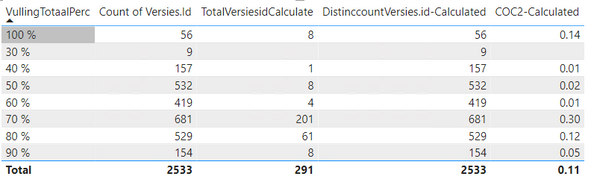
As you can see in the picture down below I created a table with different colums:


  • First column [VullingTotaalPerc] shows the percentage of version ID that are filled 100% and so on
  • Second column [Count of Versies.Id] shows the count (distinct) of the total version ID.
  • Third column [TotalVersiesIDCalculate] is a measure that I created that shows the count (distinct) of the total version ID but only for department X.
    Measure = TotalVersiesidCalculate = calculate(DISTINCTCOUNT(MKA[Versies.Id]),MKA[ProductieAfdeling]="COC2 en I&V")
  • Fourth column [DistinccountVersies.id-Calculated] is a measure that I created that show the count (distinct) of versies.ID.
    DistinccountVersies.id-Calculated = DISTINCTCOUNT(MKA[Versies.Id])
  • Fifth column [COC2-Calculated] is a measure that I created  -  [TotalVersiesIDCalculate] divided by [DistinccountVersies.id-Calculated] to show what the percentage is of the total amount.


The problem now is that when I use this formula: [TotalVersiesIDCalculate] / [DistinccountVersies.id-Calculated] the measure will divide 8 with 56 but what I want is that 8 will be divided by the total of 2533.

Can anyone help me out here?

Thnx!
kldefens_0-1670794047070.png


1 ACCEPTED SOLUTION
amitchandak
Super User
Super User

@kldefens , Try like


Divide([TotalVersiesIDCalculate], calculate([DistinccountVersies.id-Calculated], allselected()) )

Share with Power BI Enthusiasts: Full Power BI Video (20 Hours) YouTube
Microsoft Fabric Series 60+ Videos YouTube
Microsoft Fabric Hindi End to End YouTube

View solution in original post

1 REPLY 1
amitchandak
Super User
Super User

@kldefens , Try like


Divide([TotalVersiesIDCalculate], calculate([DistinccountVersies.id-Calculated], allselected()) )

Share with Power BI Enthusiasts: Full Power BI Video (20 Hours) YouTube
Microsoft Fabric Series 60+ Videos YouTube
Microsoft Fabric Hindi End to End YouTube

Helpful resources

Announcements
Power BI DataViz World Championships

Power BI Dataviz World Championships

The Power BI Data Visualization World Championships is back! Get ahead of the game and start preparing now!

December 2025 Power BI Update Carousel

Power BI Monthly Update - December 2025

Check out the December 2025 Power BI Holiday Recap!

FabCon Atlanta 2026 carousel

FabCon Atlanta 2026

Join us at FabCon Atlanta, March 16-20, for the ultimate Fabric, Power BI, AI and SQL community-led event. Save $200 with code FABCOMM.