cancel
Showing results for 
Search instead for 
Did you mean: 

The Power BI Data Visualization World Championships is back! Get ahead of the game and start preparing now! Learn more

Reply
Anonymous
Not applicable

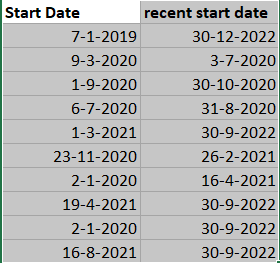
How do I count rows that consist of dates into a line graph? And possible even make a forecast?

I would like to have the start date (the amount of the same dates, counting) in a line graph as well as the recent start date (the amcount of the same dates, counting)

For example, in the line graph I would like to have all the dates that relate tot september 2020 in one point of the graph, as well as the other months. Do I make an index column to give the rows a number in order to make the graph? How do I make this graph? 


data_picture.PNG

Note: I am new to Power BI and English is not my first language. Thank you in advance.  

1 ACCEPTED SOLUTION
johnt75
Super User
Super User

Create a proper Date table and then create 2 relationships from the Date table to your current table, one linking to the start date and one linking to the recent start date. You can make both relationships inactive.

Create 2 measures like

Num rows using start date = CALCULATE( COUNTROWS( 'Table' ), USERELATIONSHIP( 'Date'[Date], 'Table'[Start date]) )

Num rows using recent start date = CALCULATE( COUNTROWS( 'Table' ), USERELATIONSHIP( 'Date'[Date], 'Table'[Recent start date]) )

Now you can put columns from your Date table into a line chart and add the new measures.

View solution in original post

2 REPLIES 2
RicoZhou2
Resolver I
Resolver I

Hi @Anonymous ,


In addition to johnt75's reply, you can try CALENDAR() OR CALENDARAUTO() function to create a DimDate table.

DimDate = 
ADDCOLUMNS( CALENDARAUTO() ,"Year",YEAR([Date]),"Month",MONTH([Date]),"MonthName",FORMAT([Date],"MMMM"))

Then create relationships and measures as he mentioned above.

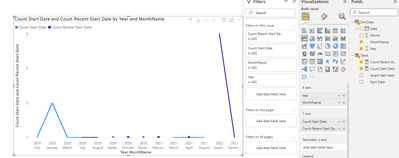
Result is as below.

RicoZhou2_0-1660205915900.png


Best Regards.


johnt75
Super User
Super User

Create a proper Date table and then create 2 relationships from the Date table to your current table, one linking to the start date and one linking to the recent start date. You can make both relationships inactive.

Create 2 measures like

Num rows using start date = CALCULATE( COUNTROWS( 'Table' ), USERELATIONSHIP( 'Date'[Date], 'Table'[Start date]) )

Num rows using recent start date = CALCULATE( COUNTROWS( 'Table' ), USERELATIONSHIP( 'Date'[Date], 'Table'[Recent start date]) )

Now you can put columns from your Date table into a line chart and add the new measures.

Helpful resources

Announcements
Power BI DataViz World Championships

Power BI Dataviz World Championships

The Power BI Data Visualization World Championships is back! Get ahead of the game and start preparing now!

December 2025 Power BI Update Carousel

Power BI Monthly Update - December 2025

Check out the December 2025 Power BI Holiday Recap!

FabCon Atlanta 2026 carousel

FabCon Atlanta 2026

Join us at FabCon Atlanta, March 16-20, for the ultimate Fabric, Power BI, AI and SQL community-led event. Save $200 with code FABCOMM.