Join us at FabCon Atlanta from March 16 - 20, 2026, for the ultimate Fabric, Power BI, AI and SQL community-led event. Save $200 with code FABCOMM.
Register now!Get Fabric Certified for FREE during Fabric Data Days. Don't miss your chance! Request now
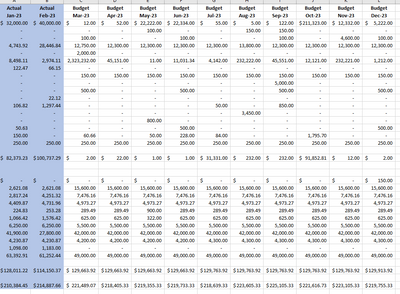
For example, In this photo I have Jan and Feb actuals and then all the budget numbers for the rest of the months of the year. Say it is April currently, I would then want only the Actual April field column to show and remove the April Budget field so on and so on.
Hello,
Thanks for the reply. However; the actual and budget columns are in seperate tables. They are connected on account number but I can't build this measure because of that.
@Anonymous , you can; to get correct the total have a measure like
Sumx(values(Account[Account]), calculate(if(isblank([Actual]), [Actual], [Budget])) )
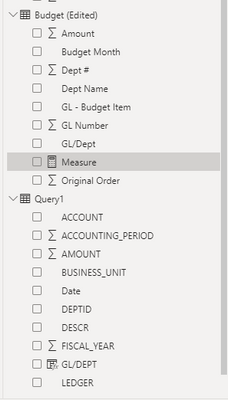
These are my two tables being connected on GL/DEPT when I tried to write your DAX measure it did not work.
Also, my Budget and Actual Amount fields are not measures they are actual fields inside my tables.
@Anonymous , Based on what I go
if(isblank([Actual]), [Actual], [Budget])
How to get a single continuous line for Actual and Target without any break: https://youtu.be/41yhZz2pNTI
Check out the November 2025 Power BI update to learn about new features.
Advance your Data & AI career with 50 days of live learning, contests, hands-on challenges, study groups & certifications and more!
| User | Count |
|---|---|
| 11 | |
| 9 | |
| 9 | |
| 6 | |
| 5 |
| User | Count |
|---|---|
| 27 | |
| 22 | |
| 19 | |
| 17 | |
| 11 |