cancel
Showing results for 
Search instead for 
Did you mean: 

The Power BI Data Visualization World Championships is back! Get ahead of the game and start preparing now! Learn more

Reply
Anonymous
Not applicable

How Many Drivers Available

Hi, 


I have jobs table listed like below:


job table.png


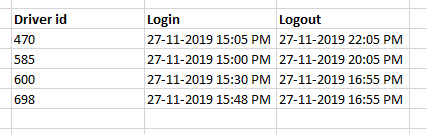
I have another table called driver log that looks like the below:

Driver Log.png


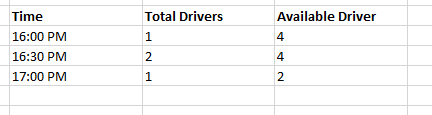
So in pivot above, how do I put a new measure called "Available Drivers".

So pivot should look like this:

Pivot Result.png


Appreciate the help.


Regards,

Bryan

1 ACCEPTED SOLUTION
Anonymous
Not applicable

@Anonymous Use this measure to include zone as well in available driver calculation. If it does not work please share sample data to reproduce the scenario

Measure = 
VAR _jobDate = MAX(Job[Job date time])
VAR _zone = SELECTEDVALUE(Job[zone])
RETURN CALCULATE(COUNT(DriverLog[Driver id]),FILTER(DriverLog,DriverLog[Login]<=_jobDate && DriverLog[Logout]>=_jobDate && DriverLog[zone]=_zone))

View solution in original post

3 REPLIES 3
Anonymous
Not applicable

@Anonymous 

please create a measure as per below

Measure = 
VAR _jobDate = MAX(Job[Job date time])
RETURN CALCULATE(COUNT(DriverLog[Driver id]),FILTER(DriverLog,DriverLog[Login]<=_jobDate && DriverLog[Logout]>=_jobDate))

Driver.png 

Anonymous
Not applicable

@Anonymous thanks so much, it seems to be working. Just 1 little issue I have.


Currently, in jobs table, there is a field called 'zone'. This field is used as a slicer in the report.


In driver log table, there is also a field called 'zone'


How to make the measure to also consider selected slicer in the report?

Anonymous
Not applicable

@Anonymous Use this measure to include zone as well in available driver calculation. If it does not work please share sample data to reproduce the scenario

Measure = 
VAR _jobDate = MAX(Job[Job date time])
VAR _zone = SELECTEDVALUE(Job[zone])
RETURN CALCULATE(COUNT(DriverLog[Driver id]),FILTER(DriverLog,DriverLog[Login]<=_jobDate && DriverLog[Logout]>=_jobDate && DriverLog[zone]=_zone))

Helpful resources

Announcements
Power BI DataViz World Championships

Power BI Dataviz World Championships

The Power BI Data Visualization World Championships is back! Get ahead of the game and start preparing now!

December 2025 Power BI Update Carousel

Power BI Monthly Update - December 2025

Check out the December 2025 Power BI Holiday Recap!

FabCon Atlanta 2026 carousel

FabCon Atlanta 2026

Join us at FabCon Atlanta, March 16-20, for the ultimate Fabric, Power BI, AI and SQL community-led event. Save $200 with code FABCOMM.