
cancel
Showing results for 
Search instead for 
Did you mean: 

The Power BI Data Visualization World Championships is back! Get ahead of the game and start preparing now! Learn more

Reply
Lightup
Regular Visitor

Hour Split Across Multiple Months

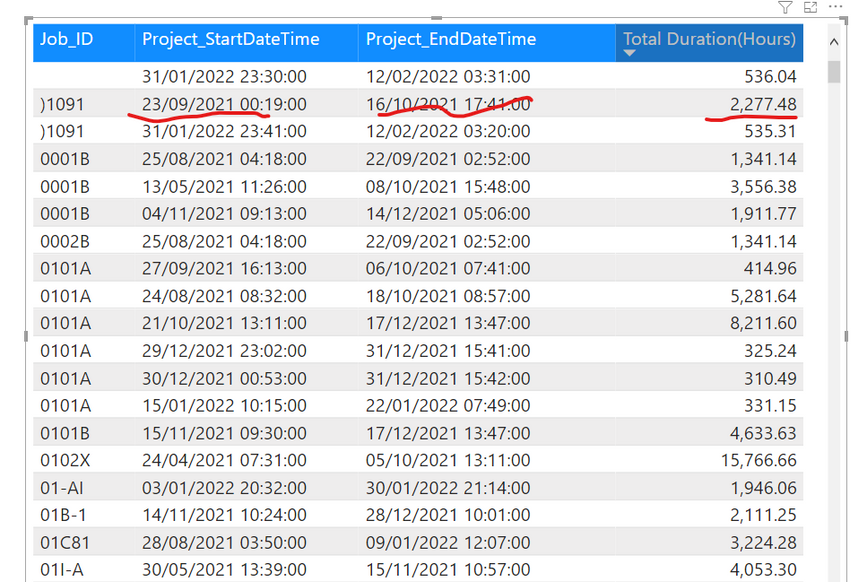
An employer may sign up for a project that may get finished a day or within a month. But other times the project may span multiple months. For example, a project started on 27/06/2021 and ended on 21/11/2021, I want to be able to see the duration spread across June to November (duration total for June, July, August etc) rather than aggregating the duration total to just June. The total should not be for June only. It should be spread across multiple months for the project duration.


Screenshot 2022-03-27 180850.png

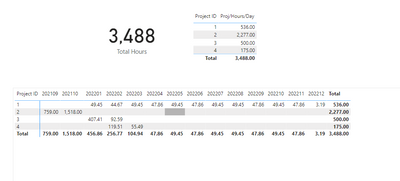
I want to be able to display results like this:

Lightup_0-1648403395460.png


1 ACCEPTED SOLUTION
Whitewater100
Solution Sage
Solution Sage

Hello:

You can give this a go. I entered in my own figures, but appear to spread correctly. Link attached.https://drive.google.com/file/d/1Jez3eD5EY8FKBicRzwyDoK0jDXdzO6-2/view?usp=sharing 


Whitewater100_0-1648472595041.png


View solution in original post

2 REPLIES 2
Whitewater100
Solution Sage
Solution Sage

Hello:

You can give this a go. I entered in my own figures, but appear to spread correctly. Link attached.https://drive.google.com/file/d/1Jez3eD5EY8FKBicRzwyDoK0jDXdzO6-2/view?usp=sharing 


Whitewater100_0-1648472595041.png


tamerj1
Super User
Super User

Hi @Lightup 
You can create a disconnected date table that will be used in your visual


Date =
CALENDAR (
    MIN ( 'Table'[Project_StartDateTime] ),
    MAX ( 'Table'[Project_EndDateTime] )
)


The use the following measure to calculate the number of hours


Duration ( Hours) =
VAR FirstDateSelected =
    MIN ( 'Date'[Date] )
VAR LaststDateSelected =
    MAX ( 'Date'[Date] )
VAR SatrtProjectDate =
    SELECTEDVALUE ( 'Table'[Project_StartDateTime] )
VAR EndProjectDate =
    SELECTEDVALUE ( 'Table'[Project_EndDateTime] )
VAR StartDateTime =
    IF (
        FirstDateSelected <= SatrtProjectDate,
        FirstDateSelected,
        SatrtProjectDate
    )
VAR EndDateTime =
    IF ( LaststDateSelected >= EndProjectDate, LaststDateSelected, EndProjectDate )
RETURN
    DATEDIFF ( StartDateTime, EndDateTime, HOUR )


Helpful resources

Announcements
Power BI DataViz World Championships

Power BI Dataviz World Championships

The Power BI Data Visualization World Championships is back! Get ahead of the game and start preparing now!

November Power BI Update Carousel

Power BI Monthly Update - November 2025

Check out the November 2025 Power BI update to learn about new features.

FabCon Atlanta 2026 carousel

FabCon Atlanta 2026

Join us at FabCon Atlanta, March 16-20, for the ultimate Fabric, Power BI, AI and SQL community-led event. Save $200 with code FABCOMM.