Fabric Data Days starts November 4th!
Advance your Data & AI career with 50 days of live learning, dataviz contests, hands-on challenges, study groups & certifications and more!
Get registered- Power BI forums
- Get Help with Power BI
- Desktop
- Service
- Report Server
- Power Query
- Mobile Apps
- Developer
- DAX Commands and Tips
- Custom Visuals Development Discussion
- Health and Life Sciences
- Power BI Spanish forums
- Translated Spanish Desktop
- Training and Consulting
- Instructor Led Training
- Dashboard in a Day for Women, by Women
- Galleries
- Data Stories Gallery
- Themes Gallery
- Contests Gallery
- Quick Measures Gallery
- Visual Calculations Gallery
- Notebook Gallery
- Translytical Task Flow Gallery
- TMDL Gallery
- R Script Showcase
- Webinars and Video Gallery
- Ideas
- Custom Visuals Ideas (read-only)
- Issues
- Issues
- Events
- Upcoming Events
Join us at FabCon Atlanta from March 16 - 20, 2026, for the ultimate Fabric, Power BI, AI and SQL community-led event. Save $200 with code FABCOMM. Register now.
- Power BI forums
- Forums
- Get Help with Power BI
- DAX Commands and Tips
- Re: Help with percentage measure with DAX
- Subscribe to RSS Feed
- Mark Topic as New
- Mark Topic as Read
- Float this Topic for Current User
- Bookmark
- Subscribe
- Printer Friendly Page

- Mark as New
- Bookmark
- Subscribe
- Mute
- Subscribe to RSS Feed
- Permalink
- Report Inappropriate Content
Help with percentage measure with DAX
Hi all,
I have the following table:
| Lots | Country | Type |
| Lot 1 | Italy | Residential |
| Lot 2 | Italy | Commercial |
| Lot 3 | France | Commercial |
| Lot 4 | Germany | Industrial |
| Lot 5 | Switzerland | Other |
| ... | ... | ... |
I must create a matrix report of the following type:
| Region | Residential | Commercial | Industrial | Other |
| Italy | % of res. in Italy | % of comm. in Italy | % of ind. in Italy | % of other in Italy |
| France | % ... | % ... | % ... | % ... |
| Germany | ... | ... | ... | ... |
| Switzerland | ... | ... | ... | ... |
| ... | ... | ... | ... | ... |
How can I calculate the percentages values with DAX?
Thanks.
Solved! Go to Solution.

- Mark as New
- Bookmark
- Subscribe
- Mute
- Subscribe to RSS Feed
- Permalink
- Report Inappropriate Content
Hey @Log2Ins,
Create the matrix with every region then for each percentage you need create a column like this:
Fact is ethe table with every "lots"
Dim the table with only regions
For other columns change the red text to mee your needs
Best regards,
Ps : I advice you to create a column nbr_total in order to not perform the variable calcultion nbr_total for each column but it is up to you ( this column would be :
)


- Mark as New
- Bookmark
- Subscribe
- Mute
- Subscribe to RSS Feed
- Permalink
- Report Inappropriate Content
In that case, I would create a second measure for the value,
And a second matrix atop the first.
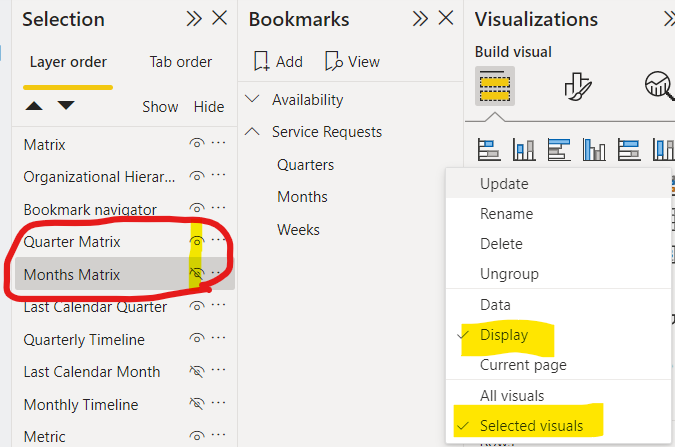
Then, I would create to bookmarks- Value, Lots.
Set each bookmark to affect just the display of these two matrix tables, by choosing just them (use view>selection for that), hiding one and displaying the other in turn.
Data analyst by day, hockey goalie by night.
Did I help? Then please hit that "kudos" or "accept as a solution" button!
- Mark as New
- Bookmark
- Subscribe
- Mute
- Subscribe to RSS Feed
- Permalink
- Report Inappropriate Content
DIVIDE(
   COUNT(Table[Lots]),
   CALCULATE(
       COUNT(Table[Lots]),
       ALL(Table[Type])
            )
)
This would return the % of each type (commercial, residential, etc...) in each country and in total.
Data analyst by day, hockey goalie by night.
Did I help? Then please hit that "kudos" or "accept as a solution" button!


- Mark as New
- Bookmark
- Subscribe
- Mute
- Subscribe to RSS Feed
- Permalink
- Report Inappropriate Content
Hi,
Juste create a Matrix with Type in columns and Country on lines and add this Measure to your matrix :
% per Type =
VAR CountType = COUNT( TableLot[Lots] )
VAR CountLots = CALCULATE( COUNT( TableLot[Lots] ) , ALL( TableLot[Type] ) )
RETURN
DIVIDE ( CountType, CountLots, 0 )

- Mark as New
- Bookmark
- Subscribe
- Mute
- Subscribe to RSS Feed
- Permalink
- Report Inappropriate Content
Hey @Log2Ins,
Create the matrix with every region then for each percentage you need create a column like this:
Fact is ethe table with every "lots"
Dim the table with only regions
For other columns change the red text to mee your needs
Best regards,
Ps : I advice you to create a column nbr_total in order to not perform the variable calcultion nbr_total for each column but it is up to you ( this column would be :
)
- Mark as New
- Bookmark
- Subscribe
- Mute
- Subscribe to RSS Feed
- Permalink
- Report Inappropriate Content
I would like to do something similar:
- Mark as New
- Bookmark
- Subscribe
- Mute
- Subscribe to RSS Feed
- Permalink
- Report Inappropriate Content
- Mark as New
- Bookmark
- Subscribe
- Mute
- Subscribe to RSS Feed
- Permalink
- Report Inappropriate Content
And if I would like to dynamically change the matrix based on different parameters?
For example, if the lots table has a column Value too and I would like to switch the percentage between the count and the value per region. Is it possible?
- Mark as New
- Bookmark
- Subscribe
- Mute
- Subscribe to RSS Feed
- Permalink
- Report Inappropriate Content
In that case, I would create a second measure for the value,
And a second matrix atop the first.
Then, I would create to bookmarks- Value, Lots.
Set each bookmark to affect just the display of these two matrix tables, by choosing just them (use view>selection for that), hiding one and displaying the other in turn.
Data analyst by day, hockey goalie by night.
Did I help? Then please hit that "kudos" or "accept as a solution" button!
- Mark as New
- Bookmark
- Subscribe
- Mute
- Subscribe to RSS Feed
- Permalink
- Report Inappropriate Content
I have another question: using the new region DIM, I lose the relationships with the other tables, except for the region name with the fact table, so the percentages are global and I can't filter them through the page filters. What's wrong?
- Mark as New
- Bookmark
- Subscribe
- Mute
- Subscribe to RSS Feed
- Permalink
- Report Inappropriate Content
I'll need to see how your model connects (tables and keys) to answer that.
In general, make sure that:
- Each regionfield in any table connects to this Dim Region table
- In any visual with region as a field (rows, columns, bars, filters, slicers...) use the Dim Region table, and not the individual region fields from fact tables.
Data analyst by day, hockey goalie by night.
Did I help? Then please hit that "kudos" or "accept as a solution" button!
- Mark as New
- Bookmark
- Subscribe
- Mute
- Subscribe to RSS Feed
- Permalink
- Report Inappropriate Content
You were right again. Thank you!!
- Mark as New
- Bookmark
- Subscribe
- Mute
- Subscribe to RSS Feed
- Permalink
- Report Inappropriate Content
Thank you very much!!

- Mark as New
- Bookmark
- Subscribe
- Mute
- Subscribe to RSS Feed
- Permalink
- Report Inappropriate Content
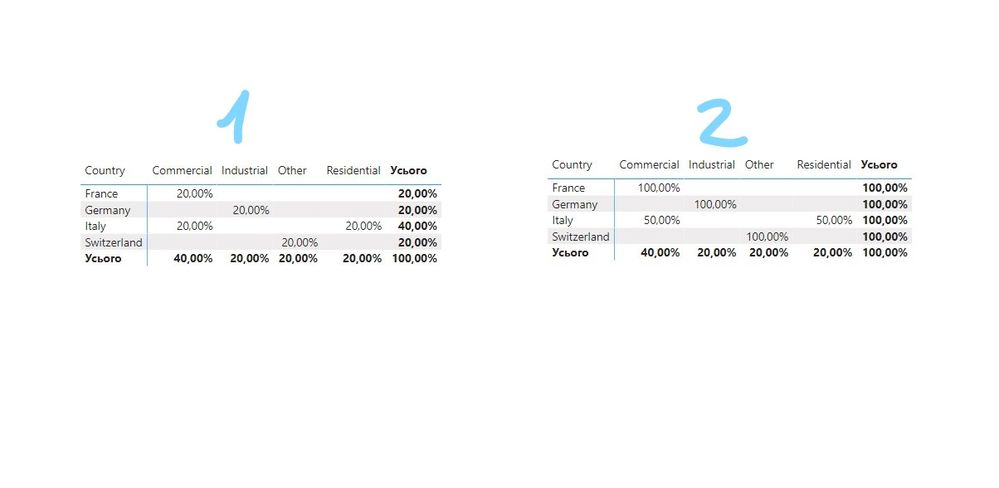
Hi @Log2Ins not quite clear what percentage you want to see? Give a more detailed example
This is your desired result 1 or 2
__________________________________________
Thank you for your like and decision
__________________________________________
Greetings from Ukraine
To help me grow PayPal: embirddima@gmail.com

Helpful resources

FabCon Global Hackathon
Join the Fabric FabCon Global Hackathon—running virtually through Nov 3. Open to all skill levels. $10,000 in prizes!

Power BI Monthly Update - October 2025
Check out the October 2025 Power BI update to learn about new features.

FabCon Atlanta 2026
Join us at FabCon Atlanta, March 16-20, for the ultimate Fabric, Power BI, AI and SQL community-led event. Save $200 with code FABCOMM.

| User | Count |
|---|---|
| 8 | |
| 6 | |
| 3 | |
| 3 | |
| 3 |


