Join us at FabCon Atlanta from March 16 - 20, 2026, for the ultimate Fabric, Power BI, AI and SQL community-led event. Save $200 with code FABCOMM.
Register now!The Power BI Data Visualization World Championships is back! Get ahead of the game and start preparing now! Learn more
Hello Team,
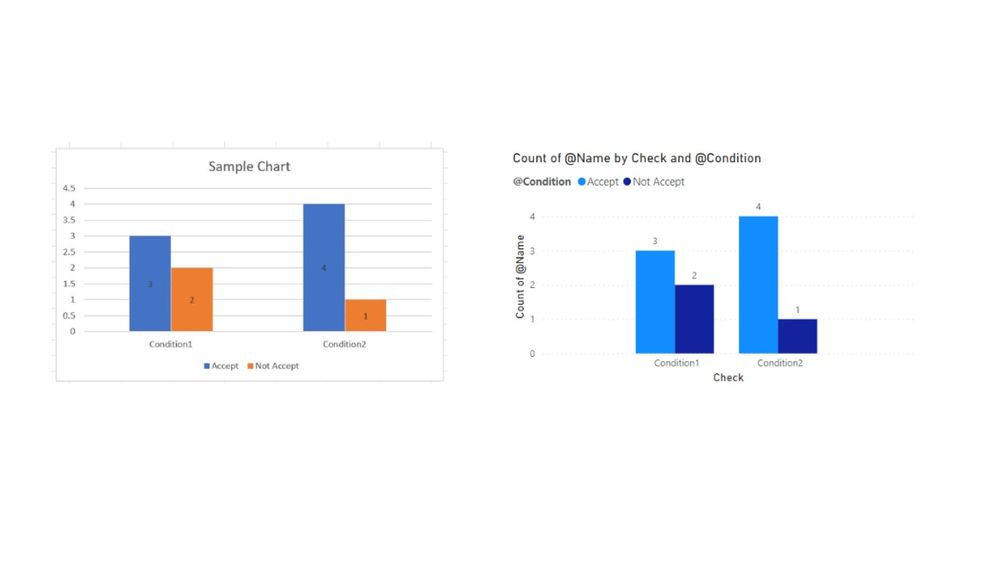
Can you please help with Dax formula(Attached PBIX file. I need graph as per screen shot provided in PBIX file
Let me know if it can be achieved in single dax formula.
PBIX: PBIX
Regards,
Chandrashekar B
Solved! Go to Solution.
Hi,
I suggest creating a new table by using the below DAX.
And visualize it by using a culumn chart / aggregating a name column as distinct-count.
Please check the attached pbix file, and the relationship between newtable and sheet2 table is shown.
NewTable =
UNION (
SELECTCOLUMNS (
Sheet1,
"@Name", Sheet1[Name],
"@Condition", Sheet1[Condition1],
"@Check", "Condition1"
),
SELECTCOLUMNS (
Sheet1,
"@Name", Sheet1[Name],
"@Condition", Sheet1[Condition2],
"@Check", "Condition2"
)
)
Hi,
I suggest creating a new table by using the below DAX.
And visualize it by using a culumn chart / aggregating a name column as distinct-count.
Please check the attached pbix file, and the relationship between newtable and sheet2 table is shown.
NewTable =
UNION (
SELECTCOLUMNS (
Sheet1,
"@Name", Sheet1[Name],
"@Condition", Sheet1[Condition1],
"@Check", "Condition1"
),
SELECTCOLUMNS (
Sheet1,
"@Name", Sheet1[Name],
"@Condition", Sheet1[Condition2],
"@Check", "Condition2"
)
)
Hello,
Thanks for the solution. Is it possible using Dax formula?
Just want to know any other method is there to acheive it.
Regards,
Chandrashekar B
The Power BI Data Visualization World Championships is back! Get ahead of the game and start preparing now!
| User | Count |
|---|---|
| 13 | |
| 5 | |
| 5 | |
| 3 | |
| 3 |
| User | Count |
|---|---|
| 25 | |
| 10 | |
| 10 | |
| 6 | |
| 6 |