Fabric Data Days starts November 4th!
Advance your Data & AI career with 50 days of live learning, dataviz contests, hands-on challenges, study groups & certifications and more!
Get registered- Power BI forums
- Get Help with Power BI
- Desktop
- Service
- Report Server
- Power Query
- Mobile Apps
- Developer
- DAX Commands and Tips
- Custom Visuals Development Discussion
- Health and Life Sciences
- Power BI Spanish forums
- Translated Spanish Desktop
- Training and Consulting
- Instructor Led Training
- Dashboard in a Day for Women, by Women
- Galleries
- Data Stories Gallery
- Themes Gallery
- Contests Gallery
- Quick Measures Gallery
- Visual Calculations Gallery
- Notebook Gallery
- Translytical Task Flow Gallery
- TMDL Gallery
- R Script Showcase
- Webinars and Video Gallery
- Ideas
- Custom Visuals Ideas (read-only)
- Issues
- Issues
- Events
- Upcoming Events
Join us at FabCon Atlanta from March 16 - 20, 2026, for the ultimate Fabric, Power BI, AI and SQL community-led event. Save $200 with code FABCOMM. Register now.
- Power BI forums
- Forums
- Get Help with Power BI
- DAX Commands and Tips
- Re: Help with DAX Allexcept filtering
- Subscribe to RSS Feed
- Mark Topic as New
- Mark Topic as Read
- Float this Topic for Current User
- Bookmark
- Subscribe
- Printer Friendly Page

- Mark as New
- Bookmark
- Subscribe
- Mute
- Subscribe to RSS Feed
- Permalink
- Report Inappropriate Content
Help with DAX Allexcept filtering
Hi,
I have a Table called Tracking, as shown below:
Category,Item Id,Work Date
A,1,1/1/2020
B,1,2/1/2020
C,1,3/1/2020
D,1,4/1/2020
A,2,7/1/2020
B,2,8/1/2020
C,2,9/1/2020
D,2,10/1/2020
Using below measure, I can get Maximum Work Date from above Table.
maxWorkDate =
CALCULATE(
MAX('Tracking'[Work Date]),
ALLEXCEPT('Tracking','Tracking'[Item Id])
)
For Item 1, the maximum work date is 4/1/2020 and for Item 2, the maximum work date is 10/1/2020.
I want to get maximum work date by Excluding Category D. So, For Item 1, the maximum work date should be 3/1/2020 and for Item 2, the maximum work date should be 9/1/2020.
I would like to exclude category D within the measure or I can also exclude it in Visual Filters. Please advise. Thanks
Solved! Go to Solution.

- Mark as New
- Bookmark
- Subscribe
- Mute
- Subscribe to RSS Feed
- Permalink
- Report Inappropriate Content
Your DAX expression was not written properly. ")" is not place right. It should be after the Item ID column.
You can review


- Mark as New
- Bookmark
- Subscribe
- Mute
- Subscribe to RSS Feed
- Permalink
- Report Inappropriate Content
[Max Work Date] =
calculate(
    max( 'tracking'[work date] ),
    distinct ( 'tracking'[item id] ),
    'tracking'[category] <> "D",
    all ( 'tracking' )
)- Mark as New
- Bookmark
- Subscribe
- Mute
- Subscribe to RSS Feed
- Permalink
- Report Inappropriate Content
It would depend on what is your requirements.
Do you want to be able filter on visual category and/or itemid to get the max date?
Adding the visual filter or slicer on canvas will work along with a change in your DAX to
CALCULATE(
MAX('Tracking'[Work Date])
)
or if you have additional columns
CALCULATE(
MAX('Tracking'[Work Date]),
ALLEXCEPT('Tracking','Tracking'[Item Id],'Tracking'[Category])
)
Is the requirement to always ignore the Category D?
again you can add in the line "ALLEXCEPT('Tracking','Tracking'[Item Id],'Tracking'[Category])" if you need to ignore filters on other columns.
Thanks
Paul
- Mark as New
- Bookmark
- Subscribe
- Mute
- Subscribe to RSS Feed
- Permalink
- Report Inappropriate Content
Hi Paul,
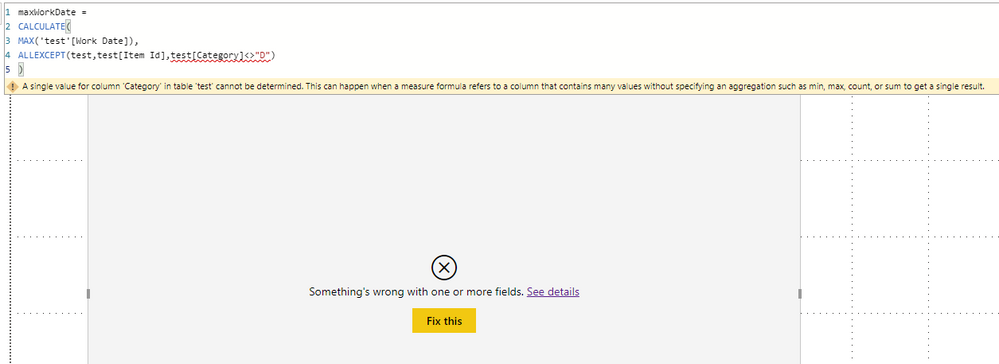
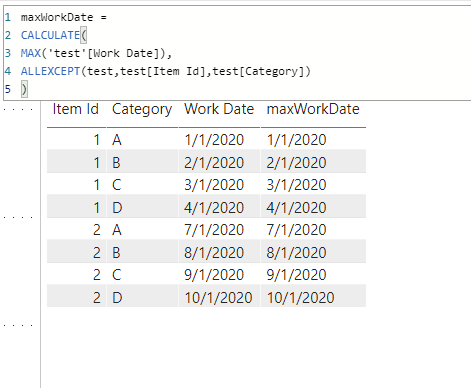
Its not working. I had tried adding the category column to ALLEXCEPT before but it changes the behavior completely. Instead of max work date from entire category it just simply repeats the work date. I can send you the file or you can try it yourself. My requirement is to simply unselect category D from visual filter and then have the measure return max date from remainin categories i.e. after excluding Category D via visual filter, for Item 1, the maximum work date should be 3/1/2020 and for Item 2, the maximum work date should be 9/1/2020.
- Mark as New
- Bookmark
- Subscribe
- Mute
- Subscribe to RSS Feed
- Permalink
- Report Inappropriate Content
- Mark as New
- Bookmark
- Subscribe
- Mute
- Subscribe to RSS Feed
- Permalink
- Report Inappropriate Content
Tried that. It didn't work
- Mark as New
- Bookmark
- Subscribe
- Mute
- Subscribe to RSS Feed
- Permalink
- Report Inappropriate Content
- Mark as New
- Bookmark
- Subscribe
- Mute
- Subscribe to RSS Feed
- Permalink
- Report Inappropriate Content
Your DAX expression was not written properly. ")" is not place right. It should be after the Item ID column.
You can review
- Mark as New
- Bookmark
- Subscribe
- Mute
- Subscribe to RSS Feed
- Permalink
- Report Inappropriate Content
Yes, you are right. I fixed it and it worked.
- Mark as New
- Bookmark
- Subscribe
- Mute
- Subscribe to RSS Feed
- Permalink
- Report Inappropriate Content



- Mark as New
- Bookmark
- Subscribe
- Mute
- Subscribe to RSS Feed
- Permalink
- Report Inappropriate Content
- Mark as New
- Bookmark
- Subscribe
- Mute
- Subscribe to RSS Feed
- Permalink
- Report Inappropriate Content
That didn't work. It brought maximum work date from the ENTIRE table i.e. 10/1/2020 whereas after excluding Category D via visual filter, for Item 1, the maximum work date should be 3/1/2020 and for Item 2, the maximum work date should be 9/1/2020.

Helpful resources

Power BI Monthly Update - October 2025
Check out the October 2025 Power BI update to learn about new features.

FabCon Atlanta 2026
Join us at FabCon Atlanta, March 16-20, for the ultimate Fabric, Power BI, AI and SQL community-led event. Save $200 with code FABCOMM.

| User | Count |
|---|---|
| 8 | |
| 5 | |
| 3 | |
| 3 | |
| 3 |


| User | Count |
|---|---|
| 13 | |
| 9 | |
| 8 | |
| 8 | |
| 7 |


