Join us at FabCon Atlanta from March 16 - 20, 2026, for the ultimate Fabric, Power BI, AI and SQL community-led event. Save $200 with code FABCOMM.
Register now!The Power BI Data Visualization World Championships is back! Get ahead of the game and start preparing now! Learn more
Hi All,
I want to create measure for below scenario but not working as expected. Can someone please assist?
Scenario:
I want to get distinct Products with either no internet sales or Offline sales
EX:
In Internet sales: 2,4 ( productID)
In Offline Sales :2,3 (ProductID)
Final Measure: 2,3,4 ( Unique product from Internet and Offline Sales
DimProduct:
| ProductId | ProductName |
| 1 | Bike |
| 2 | Car |
| 3 | Bi-Cycles |
FactInternetSales
| ProductId | SalesAmount |
| 1 | 10 |
| 2 | 0 |
| 3 | 50 |
| 4 | 0 |
FactOfflineSales
| ProductId | SalesAmount |
| 1 | 10 |
| 2 | 0 |
| 3 | 0 |
| 4 | 10 |
Thanks,
Abhiram
Hi, @abhiram342
Please correct me if I wrongly understood your question.
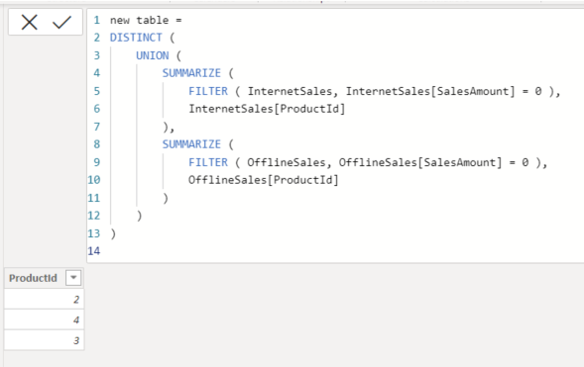
I assume you want to create a new table.
please try the below for creating a new table.
Hi, My name is Jihwan Kim.
If this post helps, then please consider accept it as the solution to help other members find it faster, and give a big thumbs up.
Linkedin: linkedin.com/in/jihwankim1975/
Twitter: twitter.com/Jihwan_JHKIM
@abhiram342 , Create a measure like
new measure =Sum(FactInternetSales[SalesAmount]) + Sum(FactOfflineSales[SalesAmount])
Then create this measure
check measure =
calculate( if( isblank([new measure]),1,blank()))
or
check measure =
countx(values(DimProduct[ProductId] ) if( isblank([new measure]),[ProductId],blank()))
The Power BI Data Visualization World Championships is back! Get ahead of the game and start preparing now!
Check out the November 2025 Power BI update to learn about new features.
| User | Count |
|---|---|
| 20 | |
| 11 | |
| 10 | |
| 4 | |
| 4 |
| User | Count |
|---|---|
| 34 | |
| 31 | |
| 19 | |
| 12 | |
| 11 |