Join us at FabCon Atlanta from March 16 - 20, 2026, for the ultimate Fabric, Power BI, AI and SQL community-led event. Save $200 with code FABCOMM.
Register now!The Power BI Data Visualization World Championships is back! Get ahead of the game and start preparing now! Learn more
Solved! Go to Solution.
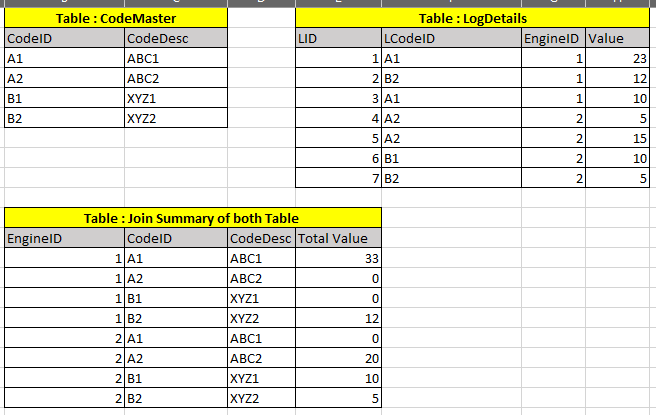
Hi, @YogiGuru ;
You could try to create a new table.
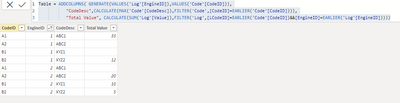
Table = ADDCOLUMNS( GENERATE(VALUES('Log'[EngineID]),VALUES('Code'[CodeID])),
"CodeDesc",CALCULATE(MAX('Code'[CodeDesc]),FILTER('Code',[CodeID]=EARLIER('Code'[CodeID]))),
"Total Value", CALCULATE(SUM('Log'[Value]),FILTER('Log',[LCodeID]=EARLIER('Code'[CodeID])&&[EngineID]=EARLIER('Log'[EngineID]))))
The final output is shown below:
Best Regards,
Community Support Team _ Yalan Wu
If this post helps, then please consider Accept it as the solution to help the other members find it more quickly.
Hi, @YogiGuru ;
You could try to create a new table.
Table = ADDCOLUMNS( GENERATE(VALUES('Log'[EngineID]),VALUES('Code'[CodeID])),
"CodeDesc",CALCULATE(MAX('Code'[CodeDesc]),FILTER('Code',[CodeID]=EARLIER('Code'[CodeID]))),
"Total Value", CALCULATE(SUM('Log'[Value]),FILTER('Log',[LCodeID]=EARLIER('Code'[CodeID])&&[EngineID]=EARLIER('Log'[EngineID]))))
The final output is shown below:
Best Regards,
Community Support Team _ Yalan Wu
If this post helps, then please consider Accept it as the solution to help the other members find it more quickly.
@YogiGuru , if there two tables are joined and you are using power bi dataset, you should be able to selected choice of your column
In DAX you have naturalinnerjoin
https://www.sqlbi.com/articles/from-sql-to-dax-joining-tables/
Check out the November 2025 Power BI update to learn about new features.
Advance your Data & AI career with 50 days of live learning, contests, hands-on challenges, study groups & certifications and more!
| User | Count |
|---|---|
| 21 | |
| 10 | |
| 9 | |
| 4 | |
| 4 |
| User | Count |
|---|---|
| 35 | |
| 31 | |
| 19 | |
| 13 | |
| 10 |