cancel
Showing results for 
Search instead for 
Did you mean: 

Data Days is here! Join us now for 60+ days of learning, challenges, and connection. Learn more

Reply
Anonymous
Not applicable

Guidance required for adding custom colomn with Toal YTD function

Hi Super User.


I am farely new to Power BI community. Recently I am preparing excel report for our organization. Report is pretty simple in excel. However to make it dynamic & automatic, I start to compile a Dashboard with Power Query. Later will shift to Power BI.


It has only 4 coloumn. Customer Code/ Month/ Sale Target Nos. / Actual Sale Nos.


My requirement:

I need to find out by Customer Status by counting no. of customers in green/ blue/ red category

Green = If Target Ach % is 100% or more

Blue = If Target Ach % is 80%~99% or more

Red = If Target Ach % is below 80%


Target Ach% = Actual Sale Nos. divided by Sale Target Nos.


 I could add Target Ach % and Customer Status by adding conditional coloumn howevr this shown each month customer status is green or red or blue.


However, my requirement is, I want to calculate YTD Target Ach% for each. For eg:


Customer code: 15700,

In Jan -> should show Jan Tgt Vs Jan Result, and

in Feb should show Jan~Feb cumm Tgt vs Jan~Feb cumm Actual


Pls. guide on how to write formula accordingly


Nikhil Gour.

2 REPLIES 2
rfigtree
Resolver III
Resolver III

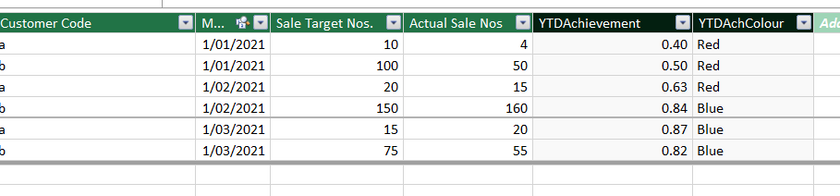
hi, i think this is what you want.

some one clever than me could probably make it simpler using one of the fancy pants dax functions.


YTDAchievement=
var _YTDTarget=CALCULATE(SUM(Table1[Sale Target Nos.]),
                         FILTER(ALLEXCEPT(Table1,Table1[Customer Code]),
                                Table1[Month]<=EARLIER(Table1[Month]) 
                                && YEAR(Table1[Month])=YEAR(EARLIER(Table1[Month]))
                         ))
var _YTDActual=CALCULATE(SUM(Table1[Actual Sale Nos]),
                         FILTER(ALLEXCEPT(Table1,Table1[Customer Code]),
                                Table1[Month]<=EARLIER(Table1[Month])
                                && YEAR(Table1[Month])=YEAR(EARLIER(Table1[Month]))
                         ))
return DIVIDE(_YTDActual,_YTDTarget)


YTDAchColour = SWITCH(true(), 
               [YTDAchievement]>=1,"Green",
               Table1[YTDAchievement]>=0.8,"Blue",
               "Red")


rfigtree_0-1614580789181.png


Anonymous
Not applicable

Brother, thanks for advise. You correctly understood my requirement.

I tried DAX as advised for only YTD Target colomn in data model.

However it is showing total of month ir-respective of customerwise wise. 


I used below mentioned DAX as per your advise:

= CALCULATE([Sum of AMC WS Target],FILTER(ALLEXCEPT('AMC WS Red Dealer Analysis','AMC WS Red Dealer Analysis'[Network Code]),'AMC WS Red Dealer Analysis'[AMC Red Dealer Month]<=EARLIER('AMC WS Red Dealer Analysis'[AMC Red Dealer Month]) && YEAR('AMC WS Red Dealer Analysis'[AMC Red Dealer Month])=YEAR(EARLIER('AMC WS Red Dealer Analysis'[AMC Red Dealer Month]))))

Regards,

Helpful resources

Announcements
Fabric Data Days is here Carousel

Fabric Data Days 2026

Don't miss out on Data Days, June 15 through August 7. Learn Fabric, Power BI, SQL, AI and more.

May Power BI Update Carousel

Power BI Monthly Update - May 2026

Check out the May 2026 Power BI update to learn about new features.

Power BI DataViz World Championships carousel

Power BI DataViz World Championships - June 2026

A new Power BI DataViz World Championship is coming this June! Don't miss out on submitting your entry.