FabCon is coming to Atlanta
Join us at FabCon Atlanta from March 16 - 20, 2026, for the ultimate Fabric, Power BI, AI and SQL community-led event. Save $200 with code FABCOMM.
Register now!- Power BI forums
- Get Help with Power BI
- Desktop
- Service
- Report Server
- Power Query
- Mobile Apps
- Developer
- DAX Commands and Tips
- Custom Visuals Development Discussion
- Health and Life Sciences
- Power BI Spanish forums
- Translated Spanish Desktop
- Training and Consulting
- Instructor Led Training
- Dashboard in a Day for Women, by Women
- Galleries
- Data Stories Gallery
- Themes Gallery
- Contests Gallery
- QuickViz Gallery
- Quick Measures Gallery
- Visual Calculations Gallery
- Notebook Gallery
- Translytical Task Flow Gallery
- TMDL Gallery
- R Script Showcase
- Webinars and Video Gallery
- Ideas
- Custom Visuals Ideas (read-only)
- Issues
- Issues
- Events
- Upcoming Events
Get Fabric Certified for FREE during Fabric Data Days. Don't miss your chance! Request now
- Power BI forums
- Forums
- Get Help with Power BI
- DAX Commands and Tips
- Grouping remainder categories after using TopN by ...
- Subscribe to RSS Feed
- Mark Topic as New
- Mark Topic as Read
- Float this Topic for Current User
- Bookmark
- Subscribe
- Printer Friendly Page


- Mark as New
- Bookmark
- Subscribe
- Mute
- Subscribe to RSS Feed
- Permalink
- Report Inappropriate Content
Grouping remainder categories after using TopN by Measure
Hello, community! I'm looking for a DAX solution to implement what this Thread explains, but I also need to add a feature to that solution: aggregating the remaining values in a category called "Others".
For example, let's say that I have 100 distinct persons for "Seller" category and I want to get the top 3 by [YTD Sales] and then group the remaining other 97 sellers in a category value named "Others". If we imagine Total Sales for $100,000, it would look like this:
Top1: $10,000
Top2: $9,000
Top3: $8,000
Others: $73,000
I've tried many ways but none has worked. And I also need to be able to apply it to a measure [Sales LY] which is already being calculated using SAMEPERIODLASTYEAR.
I would really appreciate your help
Dynamic TopN made easy with What If Parameter
Solved! Go to Solution.


- Mark as New
- Bookmark
- Subscribe
- Mute
- Subscribe to RSS Feed
- Permalink
- Report Inappropriate Content
Hi,
Thank you for your feedback.
Please check the below measure and the attached pbix file.
In my sample, I am not using dim-calendar table, so I did not use time intelligent DAX function. Instead, I tried to write like below.
I am not sure how your dim-calendar table looks like and how it is connected to your whole model, but please try something like,
CALCULATE([top3salespeople include others:], FILTER( ALL(Calendar), Calendar[Year] = MAX(Calendar[Year])-1))
Top3salespeople YoY%: =
VAR _currentyear =
    MAX ( 'Year'[Year] )
VAR _currentyeartop3sales = [Top3salespeople include others:]
VAR _previousyeartop3sales =
    CALCULATE ( [Top3salespeople include others:], 'Year'[Year] = _currentyear - 1 )
RETURN
    IF (
        HASONEVALUE ( 'Year'[Year] ),
        DIVIDE (
            _currentyeartop3sales - _previousyeartop3sales,
            _previousyeartop3sales
        )
    )
If this post helps, then please consider accepting it as the solution to help other members find it faster, and give a big thumbs up.
Click here to visit my LinkedIn page
Click here to schedule a short Teams meeting to discuss your question.
- Mark as New
- Bookmark
- Subscribe
- Mute
- Subscribe to RSS Feed
- Permalink
- Report Inappropriate Content
Hi,
I am not sure how your data model looks like, but I tried to create a sample pbix file like below.
Please check the below picture and the attached pbix file.
It is for creating a measure.
One of ways to solve this is to include "Others" in the Person Table in order to use it in Columns section in table visualization.
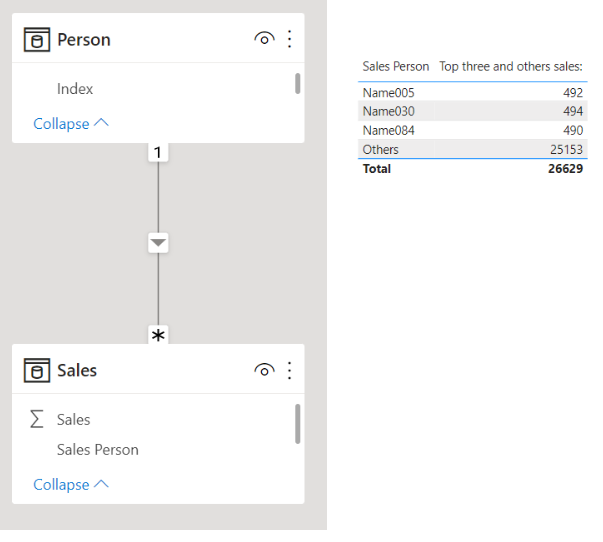
Top three and others sales: =
VAR _topthreesales =
    CALCULATE (
        SUM ( Sales[Sales] ),
        KEEPFILTERS (
            TOPN ( 3, ALL ( Person ), CALCULATE ( SUM ( Sales[Sales] ) ), DESC )
        )
    )
VAR _otherssales =
    CALCULATE ( SUM ( Sales[Sales] ), REMOVEFILTERS ( Person ) )
        - CALCULATE (
            SUM ( Sales[Sales] ),
            TOPN ( 3, ALL ( Person ), CALCULATE ( SUM ( Sales[Sales] ) ), DESC )
        )
RETURN
    IF (
        HASONEVALUE ( Person[Sales Person] ),
        IF (
            SELECTEDVALUE ( Person[Sales Person] ) = "Others",
            _otherssales,
            _topthreesales
        ),
        SUM ( Sales[Sales] )
    )
If this post helps, then please consider accepting it as the solution to help other members find it faster, and give a big thumbs up.
Click here to visit my LinkedIn page
Click here to schedule a short Teams meeting to discuss your question.
- Mark as New
- Bookmark
- Subscribe
- Mute
- Subscribe to RSS Feed
- Permalink
- Report Inappropriate Content
Thanks for your help! but I'm still facing the problem that for any given current year, the top 3 is not always the same as the last year's top 3. So, for 2021 it shows me the 2021's top 3 and same for 2022. But I need the current year's top 3 and map those same 3 persons to calculate lat year's sales. Let me show you what I mean in the next image.
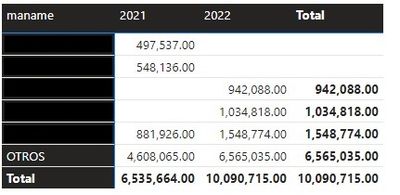
Hoping you can still enlight me, I thank you again for the help you have given me so far!
- Mark as New
- Bookmark
- Subscribe
- Mute
- Subscribe to RSS Feed
- Permalink
- Report Inappropriate Content
Hi,
Since I cannot know how your data model looks like, I created another sample pbix file like below.
Please check the attached pbix file. All measures are in the attached file.
I hope this can provide a help to create an accurate solution for your data model.
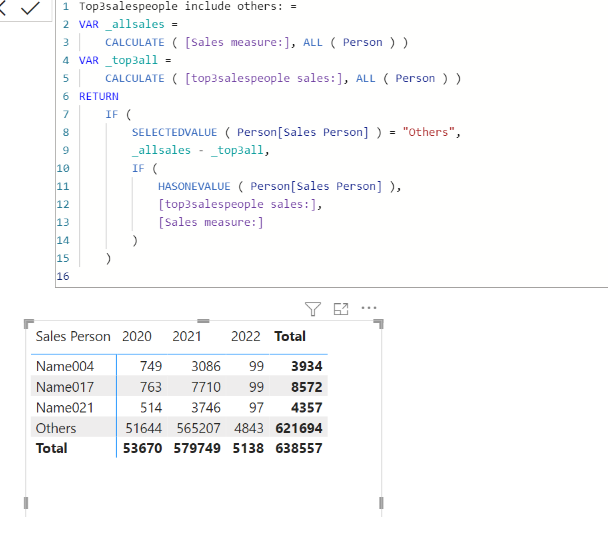
If this post helps, then please consider accepting it as the solution to help other members find it faster, and give a big thumbs up.
Click here to visit my LinkedIn page
Click here to schedule a short Teams meeting to discuss your question.
- Mark as New
- Bookmark
- Subscribe
- Mute
- Subscribe to RSS Feed
- Permalink
- Report Inappropriate Content
That's magnificent! Helps a lot to have this and even I could be calculating it manually, I would like to know if its possible to make this measure available to be used with SAMEPERIODLASTYEAR.
I tried to get the "top3salespeople include others:" measure inside a CALCULATE([top3salespeople include others:],SAMEPERIODLASTYEAR(Calendar[Date])) but it only return's a value for the "OTHERS" Category.
This is because we want to calculate YoY %Var. As I said, of course it can be done manually by just adjusting a filter, but It would help a lot too if there's a way to leave it automatically calculated for every time year changes (say, on the 1st of January of 2023)
If this is too much to ask, trust me, you have helped me a lot so far and I cannot be more grateful to you than I already am!
- Mark as New
- Bookmark
- Subscribe
- Mute
- Subscribe to RSS Feed
- Permalink
- Report Inappropriate Content
Hi,
Thank you for your feedback.
Please check the below measure and the attached pbix file.
In my sample, I am not using dim-calendar table, so I did not use time intelligent DAX function. Instead, I tried to write like below.
I am not sure how your dim-calendar table looks like and how it is connected to your whole model, but please try something like,
CALCULATE([top3salespeople include others:], FILTER( ALL(Calendar), Calendar[Year] = MAX(Calendar[Year])-1))
Top3salespeople YoY%: =
VAR _currentyear =
    MAX ( 'Year'[Year] )
VAR _currentyeartop3sales = [Top3salespeople include others:]
VAR _previousyeartop3sales =
    CALCULATE ( [Top3salespeople include others:], 'Year'[Year] = _currentyear - 1 )
RETURN
    IF (
        HASONEVALUE ( 'Year'[Year] ),
        DIVIDE (
            _currentyeartop3sales - _previousyeartop3sales,
            _previousyeartop3sales
        )
    )
If this post helps, then please consider accepting it as the solution to help other members find it faster, and give a big thumbs up.
Click here to visit my LinkedIn page
Click here to schedule a short Teams meeting to discuss your question.

Helpful resources

Power BI Monthly Update - November 2025
Check out the November 2025 Power BI update to learn about new features.

Fabric Data Days
Advance your Data & AI career with 50 days of live learning, contests, hands-on challenges, study groups & certifications and more!

FabCon Atlanta 2026
Join us at FabCon Atlanta, March 16-20, for the ultimate Fabric, Power BI, AI and SQL community-led event. Save $200 with code FABCOMM.

| User | Count |
|---|---|
| 11 | |
| 9 | |
| 9 | |
| 6 | |
| 5 |


| User | Count |
|---|---|
| 27 | |
| 22 | |
| 19 | |
| 17 | |
| 11 |


