FabCon is coming to Atlanta
Join us at FabCon Atlanta from March 16 - 20, 2026, for the ultimate Fabric, Power BI, AI and SQL community-led event. Save $200 with code FABCOMM.
Register now!- Power BI forums
- Get Help with Power BI
- Desktop
- Service
- Report Server
- Power Query
- Mobile Apps
- Developer
- DAX Commands and Tips
- Custom Visuals Development Discussion
- Health and Life Sciences
- Power BI Spanish forums
- Translated Spanish Desktop
- Training and Consulting
- Instructor Led Training
- Dashboard in a Day for Women, by Women
- Galleries
- Data Stories Gallery
- Themes Gallery
- Contests Gallery
- QuickViz Gallery
- Quick Measures Gallery
- Visual Calculations Gallery
- Notebook Gallery
- Translytical Task Flow Gallery
- TMDL Gallery
- R Script Showcase
- Webinars and Video Gallery
- Ideas
- Custom Visuals Ideas (read-only)
- Issues
- Issues
- Events
- Upcoming Events
The Power BI Data Visualization World Championships is back! Get ahead of the game and start preparing now! Learn more
- Power BI forums
- Forums
- Get Help with Power BI
- DAX Commands and Tips
- Re: Gross Margin after dividing returns enormous n...
- Subscribe to RSS Feed
- Mark Topic as New
- Mark Topic as Read
- Float this Topic for Current User
- Bookmark
- Subscribe
- Printer Friendly Page


- Mark as New
- Bookmark
- Subscribe
- Mute
- Subscribe to RSS Feed
- Permalink
- Report Inappropriate Content
Gross Margin after dividing returns enormous number
Hello,
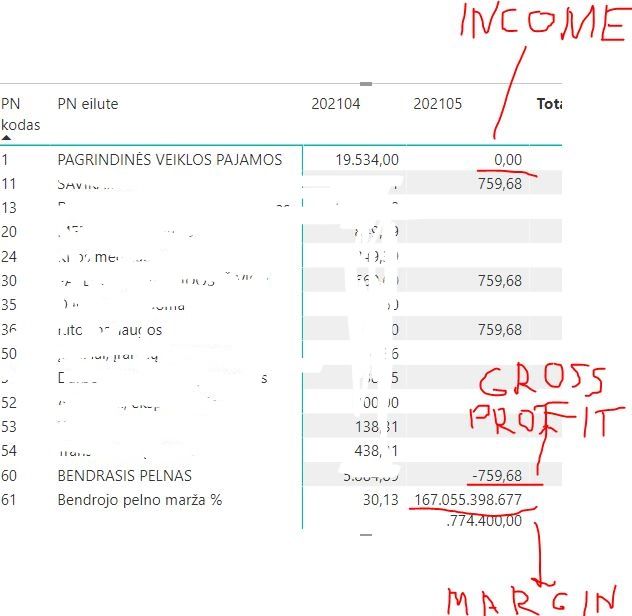
I use dax Gross profit margin =Divide (Gross profit, Income)*100 formula. My income is zero in Month of May. After division returns enormous number.
Solved! Go to Solution.


- Mark as New
- Bookmark
- Subscribe
- Mute
- Subscribe to RSS Feed
- Permalink
- Report Inappropriate Content
Try using the ROUND function on your fields before dividing. Or alternatively do the rounding in Power Query so they're stored with the right number of significant digits.
- Mark as New
- Bookmark
- Subscribe
- Mute
- Subscribe to RSS Feed
- Permalink
- Report Inappropriate Content
Hi @Justas -
DIVIDE has a 3rd parameter, which you set the value if the result would otherwise throw an error.
Gross profit margin =Divide (Gross profit, Income, 0)*100
Hope this helps
David
- Mark as New
- Bookmark
- Subscribe
- Mute
- Subscribe to RSS Feed
- Permalink
- Report Inappropriate Content
Nothing chages if I put alternate rezult 0 in Divide formula
- Mark as New
- Bookmark
- Subscribe
- Mute
- Subscribe to RSS Feed
- Permalink
- Report Inappropriate Content
Sorry, I read the question wrong.
Check your data that Income is actually 0. Often times when things are sourced from Excel or other financial applications, what looks to be 0 will be something like 1.2e-6 (.00000012) which rounds to 0 in 2 decimal places but isn't 0.
In your case Income would be approx 4.5e-7 (0.000000045) based on the results shown.
Hope this helps
David
- Mark as New
- Bookmark
- Subscribe
- Mute
- Subscribe to RSS Feed
- Permalink
- Report Inappropriate Content
In excel Credit-Debit shows 0,00E+00, but then calculates margin denominator (income) seems to be not equal to zero. I do not know what to do!
- Mark as New
- Bookmark
- Subscribe
- Mute
- Subscribe to RSS Feed
- Permalink
- Report Inappropriate Content
Try using the ROUND function on your fields before dividing. Or alternatively do the rounding in Power Query so they're stored with the right number of significant digits.
- Mark as New
- Bookmark
- Subscribe
- Mute
- Subscribe to RSS Feed
- Permalink
- Report Inappropriate Content
My new formula:
Gross profi margin %=Divide([Gross Profit],round([Revenue],2))*100
- Mark as New
- Bookmark
- Subscribe
- Mute
- Subscribe to RSS Feed
- Permalink
- Report Inappropriate Content
In excel mannualy made decimal places to check if any other numbers after comma not equal to 0. Income calculates Credit-Debit and result from operatios equals to zero (see difference below):

Is any formula or method in excel to check that data is really 0?
- Mark as New
- Bookmark
- Subscribe
- Mute
- Subscribe to RSS Feed
- Permalink
- Report Inappropriate Content
In Query I found last decimal space with number 7, but in excel shows 8873,2000000000. What to do 😞 ?


Helpful resources

Power BI Dataviz World Championships
The Power BI Data Visualization World Championships is back! Get ahead of the game and start preparing now!

Power BI Monthly Update - December 2025
Check out the December 2025 Power BI Holiday Recap!

FabCon Atlanta 2026
Join us at FabCon Atlanta, March 16-20, for the ultimate Fabric, Power BI, AI and SQL community-led event. Save $200 with code FABCOMM.

| User | Count |
|---|---|
| 14 | |
| 7 | |
| 4 | |
| 4 | |
| 3 |


| User | Count |
|---|---|
| 25 | |
| 10 | |
| 10 | |
| 6 | |
| 6 |


