cancel
Showing results for 
Search instead for 
Did you mean: 

The Power BI Data Visualization World Championships is back! Get ahead of the game and start preparing now! Learn more

Reply
isasai87
New Member

Getting the minimum day in a date column from a filtered table

Hi all!!

I am new to Power BI and DAX functions and I would be really thankful if you could help me with this!!


I am trying to recreate the following sql script with a dax function:

select id_region, min(date)
where n_products <> 0
group by id_region;


So lets say I have a product that I have just launch in the market in several regions and I am evaluating my marketing campaing. I have a record of the number of products that I sell each day in each region (each record will have a zero for the "number of products sold" until I dont start selling products)


Basically I have a table with three columns (id_region, date and num_prod --number of products sold--) so for each region I have a record of the number of products that were sold each day (for a particular product). 


--> I want to create a measure that gives me the first day that this product started being sold in each region (I dont need the region in my DAX since I will aggregate it later in Power BI)


I have created the followint DAX function but its giving me a wrong result:


prod_date1 = CALCULATE(min('productA'[date] ),
FILTER ( 'productA',
'productA'[num_prod] <> 0)
)


Thank you sooo much in advance!!!!!!!!
Isabel

2 ACCEPTED SOLUTIONS
camargos88
Community Champion
Community Champion

Hi @isasai87 ,


You can drag the region_id to the table visual and this measure:


Measure = CALCULATE(MIN('Table (2)'[date]))


However, it's better if you post some data and expected results as example. Just to check what you have so far.


Did I answer your question? Mark my post as a solution!

Proud to be a Super User!


View solution in original post

@isasai87 ,


Check it:

Capture.PNG


Did I answer your question? Mark my post as a solution!

Proud to be a Super User!


View solution in original post

4 REPLIES 4
camargos88
Community Champion
Community Champion

Hi @isasai87 ,


You can drag the region_id to the table visual and this measure:


Measure = CALCULATE(MIN('Table (2)'[date]))


However, it's better if you post some data and expected results as example. Just to check what you have so far.


Did I answer your question? Mark my post as a solution!

Proud to be a Super User!


Thanks @camargos88 , you are right, I shoudl have posted some data.

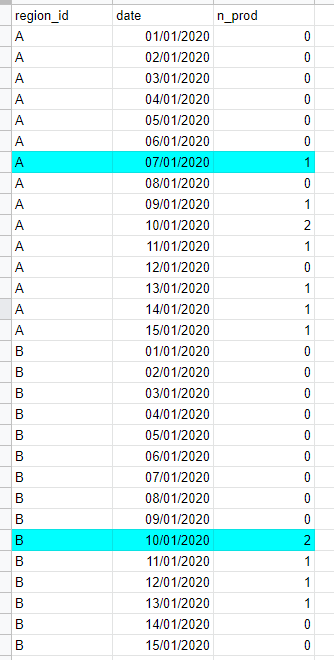
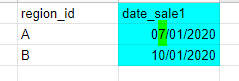
Here it is a sample of the data set and what I am expected to get:

dataset.PNG


I have more regions that this and I would like to create a measure that gets me the day when I started geting sales in each region. In PowerBI then I would use the measure that involves DATE and N_PROD and then present it in a table aggregated by region.


solution.PNG


In SQL this is somthing quit simple but I just dont get the right DAX formula to implemented in Power BI  😞 😞 😞


Thank you very much again! 🙂

Isabel

@isasai87 ,


Check it:

Capture.PNG


Did I answer your question? Mark my post as a solution!

Proud to be a Super User!


Thank you very much!!!

I cant believe it was so easy!!

I was actually close but I was complitely obsessed with using "filter" 😅


Thanks 😊

Helpful resources

Announcements
Power BI DataViz World Championships

Power BI Dataviz World Championships

The Power BI Data Visualization World Championships is back! Get ahead of the game and start preparing now!

December 2025 Power BI Update Carousel

Power BI Monthly Update - December 2025

Check out the December 2025 Power BI Holiday Recap!

FabCon Atlanta 2026 carousel

FabCon Atlanta 2026

Join us at FabCon Atlanta, March 16-20, for the ultimate Fabric, Power BI, AI and SQL community-led event. Save $200 with code FABCOMM.