FabCon is coming to Atlanta
Join us at FabCon Atlanta from March 16 - 20, 2026, for the ultimate Fabric, Power BI, AI and SQL community-led event. Save $200 with code FABCOMM.
Register now!- Power BI forums
- Get Help with Power BI
- Desktop
- Service
- Report Server
- Power Query
- Mobile Apps
- Developer
- DAX Commands and Tips
- Custom Visuals Development Discussion
- Health and Life Sciences
- Power BI Spanish forums
- Translated Spanish Desktop
- Training and Consulting
- Instructor Led Training
- Dashboard in a Day for Women, by Women
- Galleries
- Data Stories Gallery
- Themes Gallery
- Contests Gallery
- QuickViz Gallery
- Quick Measures Gallery
- Visual Calculations Gallery
- Notebook Gallery
- Translytical Task Flow Gallery
- TMDL Gallery
- R Script Showcase
- Webinars and Video Gallery
- Ideas
- Custom Visuals Ideas (read-only)
- Issues
- Issues
- Events
- Upcoming Events
The Power BI Data Visualization World Championships is back! Get ahead of the game and start preparing now! Learn more
- Power BI forums
- Forums
- Get Help with Power BI
- DAX Commands and Tips
- Re: Getting the date of following ID to calculate ...
- Subscribe to RSS Feed
- Mark Topic as New
- Mark Topic as Read
- Float this Topic for Current User
- Bookmark
- Subscribe
- Printer Friendly Page

- Mark as New
- Bookmark
- Subscribe
- Mute
- Subscribe to RSS Feed
- Permalink
- Report Inappropriate Content
Getting the date of following ID to calculate (datediff) between initial date and final date
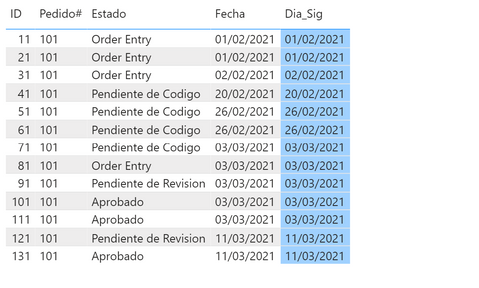
I need to get the date of the next ID in the same Order (Pedido), to make afterwards a DateDiff and have as a result the days spended in that state (Estado). For example I need to fill up the blue column (Dia_Sig) with the "correct" date. In ID "31" I should have data as shown, plus "Dia_Sig" 20/02/2021, to then calculate the days and have a next column with "18" as a result.
I need to know how many days I spend in each "Estado", having as final result that the Order (Pedido) lasted 38 days, between 01/02/2021 (Initial Date) and the (Last Date) 11/03/2021. I have the PBIX, and Excel file to attach and send, for better understanding.
Solved! Go to Solution.


- Mark as New
- Bookmark
- Subscribe
- Mute
- Subscribe to RSS Feed
- Permalink
- Report Inappropriate Content
Since you want to create a calculated column then you can write it as follows:
Dia_Sig =
Var SelectedID = 'Control Emails'[ID]
RETURN
CALCULATE (
    Min ( 'Control Emails'[Fecha] ),
    FILTER (
        ALLEXCEPT ( 'Control Emails', 'Control Emails'[Pedido#] ),
        'Control Emails'[ID] > SelectedID
    )
)
The measure to calculate he duration could be:
Duration =
IF (
    HASONEVALUE ( 'Control Emails'[Pedido#] ),
    DATEDIFF (
        MIN ( 'Control Emails'[Fecha] ),
        MAX ( 'Control Emails'[Dia_Sig] ),
        DAY
    )
)

(last column)
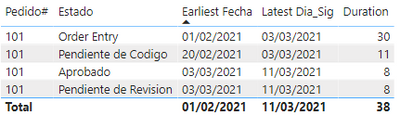
Please check the adjusted file.
- Mark as New
- Bookmark
- Subscribe
- Mute
- Subscribe to RSS Feed
- Permalink
- Report Inappropriate Content
- Mark as New
- Bookmark
- Subscribe
- Mute
- Subscribe to RSS Feed
- Permalink
- Report Inappropriate Content
Since you want to create a calculated column then you can write it as follows:
Dia_Sig =
Var SelectedID = 'Control Emails'[ID]
RETURN
CALCULATE (
    Min ( 'Control Emails'[Fecha] ),
    FILTER (
        ALLEXCEPT ( 'Control Emails', 'Control Emails'[Pedido#] ),
        'Control Emails'[ID] > SelectedID
    )
)
The measure to calculate he duration could be:
Duration =
IF (
    HASONEVALUE ( 'Control Emails'[Pedido#] ),
    DATEDIFF (
        MIN ( 'Control Emails'[Fecha] ),
        MAX ( 'Control Emails'[Dia_Sig] ),
        DAY
    )
)
(last column)
Please check the adjusted file.
- Mark as New
- Bookmark
- Subscribe
- Mute
- Subscribe to RSS Feed
- Permalink
- Report Inappropriate Content
Thank you very much, I can now go forward, with this help. Regards!!!
- Mark as New
- Bookmark
- Subscribe
- Mute
- Subscribe to RSS Feed
- Permalink
- Report Inappropriate Content
I need to calculate the Fecha_Modif as it is shown in the picture...that should be Dia_Sig, not the one I have now in blue. That should be the next (Initial) Date, for the next ID of the same Order (Pedido#). I shouldn't have Blanks!! >> Id 11 should be 01/02/2021, and Id 31 20/02/2021

- Mark as New
- Bookmark
- Subscribe
- Mute
- Subscribe to RSS Feed
- Permalink
- Report Inappropriate Content
It doesn't work or I don't understand what you want to do...Which should be the way to attach the report, and excel file. Sorry I am new in the Forum, and don't know to work with it.
- Mark as New
- Bookmark
- Subscribe
- Mute
- Subscribe to RSS Feed
- Permalink
- Report Inappropriate Content
You may upload the file to your OneDrive or GoogleDrive and share the link here
- Mark as New
- Bookmark
- Subscribe
- Mute
- Subscribe to RSS Feed
- Permalink
- Report Inappropriate Content
You can try this calculated column:
Dia_Sig =
CALCULATE (
    MAX ( [Fecha] ),
    FILTER (
        ALL ( MyTable ),
        MyTable[Pedido] = MyTable[Pedido]
            && MyTable[Fecha] > MyTable[Fecha]
    )
)
Helpful resources

Power BI Dataviz World Championships
The Power BI Data Visualization World Championships is back! Get ahead of the game and start preparing now!

Power BI Monthly Update - November 2025
Check out the November 2025 Power BI update to learn about new features.

FabCon Atlanta 2026
Join us at FabCon Atlanta, March 16-20, for the ultimate Fabric, Power BI, AI and SQL community-led event. Save $200 with code FABCOMM.

| User | Count |
|---|---|
| 19 | |
| 11 | |
| 9 | |
| 4 | |
| 4 |


| User | Count |
|---|---|
| 35 | |
| 32 | |
| 20 | |
| 12 | |
| 10 |


