cancel
Showing results for 
Search instead for 
Did you mean: 

The Power BI Data Visualization World Championships is back! Get ahead of the game and start preparing now! Learn more

Reply
Anonymous
Not applicable

Getting rid of negative 0.00

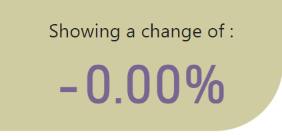
Hi, i have a measure which shows change in percentage over time. However i am currenlty getting a value of -0.00% (its due to a rounding issue as the percentage change is -0.0000000029% howvere i am only displaying to 2 DP. The measure is as below:


% Change Over Time =
CALCULATE(DIVIDE(
CALCULATE(
DISTINCTCOUNT(DQRule[PersonID]),
Filter(DQRule,DQRule[Pass/Fail]=1)),
CALCULATE(
DISTINCTCOUNT(DQRule[PersonID]))))
-
VAR EarlyDate = MIN(DQRule_Timeline_Rules[DateRun])
RETURN
CALCULATE(DIVIDE(
    SUM('DQRule_Timeline_Rules'[Pass]),
    SUM('DQRule_Timeline_Rules'[Total Execution Population])
),DQRule_Timeline_Rules[DateRun] = EarlyDate)
 
retunign this:
JGRAPBI_0-1660556652610.png


Could osmeone help me either change the measure to eliminate this issue (id like it to just show 0.00% change) or come up with a clever idea on how to stop this. 


Thanks


4 REPLIES 4
PurpleGate
Resolver III
Resolver III

You could add an IF statement


% Change Over Time =
CALCULATE (
    DIVIDE (
        CALCULATE (
            DISTINCTCOUNT ( DQRule[PersonID] ),
            FILTER ( DQRule, DQRule[Pass/Fail] = 1 )
        ),
        CALCULATE ( DISTINCTCOUNT ( DQRule[PersonID] ) )
    )
)
    -
    VAR EarlyDate =
        MIN ( DQRule_Timeline_Rules[DateRun] )
    VAR __Result =
        CALCULATE (
            DIVIDE (
                SUM ( 'DQRule_Timeline_Rules'[Pass] ),
                SUM ( 'DQRule_Timeline_Rules'[Total Execution Population] )
            ),
            DQRule_Timeline_Rules[DateRun] = EarlyDate
        )
    RETURN
        IF ( __Result < 0.0040__Result )

0.004 because then rounded to two decimal places it is 0.00 

Anonymous
Not applicable

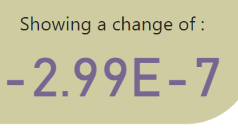
Thank you for this suggestion. I have tried the below and i am getting what i think is an incorrect result. i would epect any negative values to disply 'Less than 0' ? hoever i am getting -2.99E-7 as the reuslt (or -0.00% when i set it to percentage) Any suggestions as how to get over this?


% Change Over Time =
CALCULATE(DIVIDE(
ROUND(CALCULATE(
DISTINCTCOUNT(DQRules[PersonID]),
Filter(DQRules,DQRules[Pass/Fail]=1)),2),
ROUND(CALCULATE(
DISTINCTCOUNT(DQRules[PersonID])),2))
-
VAR EarlyDate = MIN(DQRules_Timeline_Rules[DateRun])
VAR _Result =
CALCULATE(DIVIDE(
    SUM('DQRules_Timeline_Rules'[Pass]),
    SUM('DQRules_Timeline_Rules'[Total Execution Population])
),DQRules_Timeline_Rules[DateRun] = EarlyDate)

RETURN
IF(_Result < 0,"Less than 0",_Result))
 
In essence i need the above to return 0.00% change rather than this tiny negative change.
JGRAPBI_0-1660565313772.png


Maybe you could change the last line to be  -0 ?

 
IF(_Result < -0,"Less than 0",_Result))


tamerj1
Super User
Super User

Hi @Anonymous 

try the ROUND function 

% Change Over Time =
CALCULATE (
    DIVIDE (
        CALCULATE (
            DISTINCTCOUNT ( DQRule[PersonID] ),
            FILTER ( DQRule, DQRule[Pass/Fail] = 1 )
        ),
        CALCULATE ( DISTINCTCOUNT ( DQRule[PersonID] ) )
    )
)
    -
    VAR EarlyDate =
        MIN ( DQRule_Timeline_Rules[DateRun] )
    RETURN
        ROUND (
            CALCULATE (
                DIVIDE (
                    SUM ( 'DQRule_Timeline_Rules'[Pass] ),
                    SUM ( 'DQRule_Timeline_Rules'[Total Execution Population] )
                ),
                DQRule_Timeline_Rules[DateRun] = EarlyDate
            ),
            2
        )

Helpful resources

Announcements
Power BI DataViz World Championships

Power BI Dataviz World Championships

The Power BI Data Visualization World Championships is back! Get ahead of the game and start preparing now!

December 2025 Power BI Update Carousel

Power BI Monthly Update - December 2025

Check out the December 2025 Power BI Holiday Recap!

FabCon Atlanta 2026 carousel

FabCon Atlanta 2026

Join us at FabCon Atlanta, March 16-20, for the ultimate Fabric, Power BI, AI and SQL community-led event. Save $200 with code FABCOMM.