FabCon is coming to Atlanta
Join us at FabCon Atlanta from March 16 - 20, 2026, for the ultimate Fabric, Power BI, AI and SQL community-led event. Save $200 with code FABCOMM.
Register now!- Power BI forums
- Get Help with Power BI
- Desktop
- Service
- Report Server
- Power Query
- Mobile Apps
- Developer
- DAX Commands and Tips
- Custom Visuals Development Discussion
- Health and Life Sciences
- Power BI Spanish forums
- Translated Spanish Desktop
- Training and Consulting
- Instructor Led Training
- Dashboard in a Day for Women, by Women
- Galleries
- Data Stories Gallery
- Themes Gallery
- Contests Gallery
- QuickViz Gallery
- Quick Measures Gallery
- Visual Calculations Gallery
- Notebook Gallery
- Translytical Task Flow Gallery
- TMDL Gallery
- R Script Showcase
- Webinars and Video Gallery
- Ideas
- Custom Visuals Ideas (read-only)
- Issues
- Issues
- Events
- Upcoming Events
The Power BI Data Visualization World Championships is back! Get ahead of the game and start preparing now! Learn more
- Power BI forums
- Forums
- Get Help with Power BI
- DAX Commands and Tips
- Re: Getting Rank of Text Column which has duplicat...
- Subscribe to RSS Feed
- Mark Topic as New
- Mark Topic as Read
- Float this Topic for Current User
- Bookmark
- Subscribe
- Printer Friendly Page

- Mark as New
- Bookmark
- Subscribe
- Mute
- Subscribe to RSS Feed
- Permalink
- Report Inappropriate Content
Getting Rank of Text Column which has duplicate records
I am not sure how to mention this. I have a simple table as below. I am trying to get the rank basis on 'Name' Column which has duplicate record. Can any one help whether this can be achieved in power bi? Thanks in Advance.
| Name | Desired Output (Rank) |
| A | 1 |
| A | 2 |
| A | 3 |
| A | 4 |
| B | 1 |
| B | 2 |
| B | 3 |
| C | 1 |
| C | 2 |
| C | 3 |
| C | 4 |
| C | 5 |
| C | 6 |
Solved! Go to Solution.


- Mark as New
- Bookmark
- Subscribe
- Mute
- Subscribe to RSS Feed
- Permalink
- Report Inappropriate Content
Hi @Anonymous
Once you've added your index column, you can use the DAX expression below to create your rank column:
Rank =
VAR RowName = Table1[Name]
VAR Result =
RANKX(
    FILTER(
        ALL( Table1 ),
        Table1[Name] = RowName
    ),
    Table1[Index],
    ,ASC
)
RETURN Result
Best regards,
Martyn
- Mark as New
- Bookmark
- Subscribe
- Mute
- Subscribe to RSS Feed
- Permalink
- Report Inappropriate Content
Create one index column and then create one more column as below.
Pravin Wattamwar
www.linkedin.com/in/pravin-p-wattamwar
If I resolve your problem Mark it as a solution and give kudos.


- Mark as New
- Bookmark
- Subscribe
- Mute
- Subscribe to RSS Feed
- Permalink
- Report Inappropriate Content
I have a similar problem with ranking. What I need is to have all channel_grouping_1 have the same rank. Offline Only 1 across all lines, Direct 2 across all lines etc. Can anyone help?
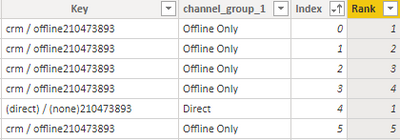
Many thanks


- Mark as New
- Bookmark
- Subscribe
- Mute
- Subscribe to RSS Feed
- Permalink
- Report Inappropriate Content
Hi @Anonymous
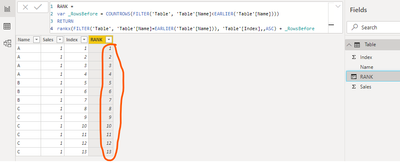
the easiest way is to add a Custom Index Column in Power Query Editor mode
then try to create a calculated DAX column like
RANK =
var _RowsBefore = COUNTROWS(FILTER('Table', 'Table'[Name]<EARLIER('Table'[Name])))
RETURN
rankx(FILTER('Table', 'Table'[Name]=EARLIER('Table'[Name])), 'Table'[Index],,ASC) + _RowsBefore
- Mark as New
- Bookmark
- Subscribe
- Mute
- Subscribe to RSS Feed
- Permalink
- Report Inappropriate Content
- Mark as New
- Bookmark
- Subscribe
- Mute
- Subscribe to RSS Feed
- Permalink
- Report Inappropriate Content
Hi @Anonymous
Once you've added your index column, you can use the DAX expression below to create your rank column:
Rank =
VAR RowName = Table1[Name]
VAR Result =
RANKX(
    FILTER(
        ALL( Table1 ),
        Table1[Name] = RowName
    ),
    Table1[Index],
    ,ASC
)
RETURN Result
Best regards,
Martyn
- Mark as New
- Bookmark
- Subscribe
- Mute
- Subscribe to RSS Feed
- Permalink
- Report Inappropriate Content
- Mark as New
- Bookmark
- Subscribe
- Mute
- Subscribe to RSS Feed
- Permalink
- Report Inappropriate Content
Create one index column and then create one more column as below.
Pravin Wattamwar
www.linkedin.com/in/pravin-p-wattamwar
If I resolve your problem Mark it as a solution and give kudos.
- Mark as New
- Bookmark
- Subscribe
- Mute
- Subscribe to RSS Feed
- Permalink
- Report Inappropriate Content
Hi @Anonymous
Perfect, This is also a solution to my concern. Thanks a lot for your help.
Regards,
Helpful resources

Power BI Monthly Update - November 2025
Check out the November 2025 Power BI update to learn about new features.

Fabric Data Days
Advance your Data & AI career with 50 days of live learning, contests, hands-on challenges, study groups & certifications and more!

FabCon Atlanta 2026
Join us at FabCon Atlanta, March 16-20, for the ultimate Fabric, Power BI, AI and SQL community-led event. Save $200 with code FABCOMM.

| User | Count |
|---|---|
| 21 | |
| 10 | |
| 9 | |
| 4 | |
| 4 |


| User | Count |
|---|---|
| 34 | |
| 31 | |
| 19 | |
| 12 | |
| 10 |


