cancel
Showing results for 
Search instead for 
Did you mean: 

The Power BI Data Visualization World Championships is back! Get ahead of the game and start preparing now! Learn more

Reply
Wilm117
Helper I
Helper I

Get previous value from index slicer dynamically DAX

Hi everybody,


I am creating a report for which I use and index slicer. I want to compare a value from the current selection with the value previous to the current selection.


IndexProjectIDValueText
1

P1

100XYZ1
1P2200XYZ2
1P3250XYZ3
2P1150XYZ4
2P2250XYZ5
2P3300XYZ6
3P1200 XYZ7
3P2300 XYZ8
3P3350 XYZ9


So if i select index "3" in my slicer i'd like to see the following for P1 and P2:

ProjectPrev. Valuecurr. valuecurr text
P1150200XYZ7
P2250300XYZ8


And if I select index "2" i'd like to see:

ProjectPrev. Valuecurr. valuecurr text
P1100150XYZ4
P2200250XYZ5

I found a lot of relative date functions that look similar, but are not sufficient for this solution. Also i need a solution for numeric values and Text values. 


Is there anybody that can help me out? 


Thanks!

2 REPLIES 2
Wilm117
Helper I
Helper I

Now i have an additional question of which I hoped would have been solved by your solution, but it isn't.


CALCULATE ( SUM ( Data[Value] ), Data[Index] = MAX ( Data[Index] ) - 1 )


There is an additional filter that I want to include to this formula. I want to add another filter in this formula in which i select for a specific value in another table. 


Previous score = 
CALCULATE( 
SUM( 'subject_score'[Score]),
 Index[index] = MAX(Index[index) - 1),
 FILTER('subject_score', 'subject_score'[subject] = "Money"))


With this addition the value does not show in my table. Am i doing something wrong while using a double filter?

new data example:

Wilm117_0-1666873406221.png


Thanks already!


Jihwan_Kim
Super User
Super User

Hi,

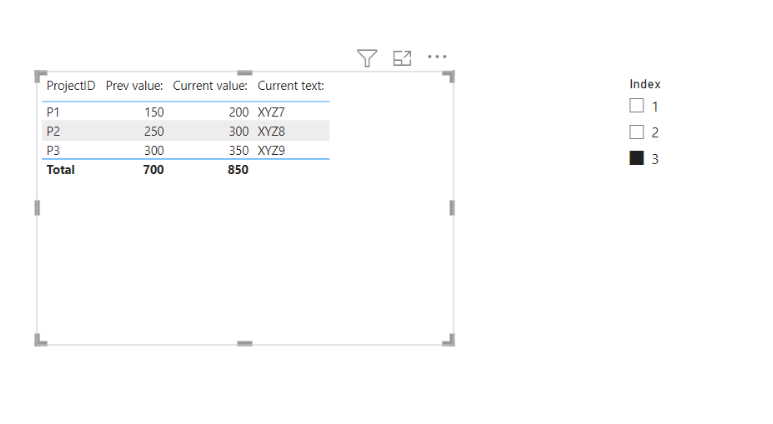
I am not sure if I understood your question correctly, but please check the below picture and the attached pbix file.


Jihwan_Kim_0-1666840728983.png


Prev value: = 
CALCULATE ( SUM ( Data[Value] ), Data[Index] = MAX ( Data[Index] ) - 1 )


Current value: = 
SUM( Data[Value] )


Current text: = 
SELECTEDVALUE( Data[Text] )

If this post helps, then please consider accepting it as the solution to help other members find it faster, and give a big thumbs up.


Click here to visit my LinkedIn page

Click here to schedule a short Teams meeting to discuss your question.

Helpful resources

Announcements
Power BI DataViz World Championships

Power BI Dataviz World Championships

The Power BI Data Visualization World Championships is back! Get ahead of the game and start preparing now!

November Power BI Update Carousel

Power BI Monthly Update - November 2025

Check out the November 2025 Power BI update to learn about new features.

FabCon Atlanta 2026 carousel

FabCon Atlanta 2026

Join us at FabCon Atlanta, March 16-20, for the ultimate Fabric, Power BI, AI and SQL community-led event. Save $200 with code FABCOMM.