Join us at FabCon Atlanta from March 16 - 20, 2026, for the ultimate Fabric, Power BI, AI and SQL community-led event. Save $200 with code FABCOMM.
Register now!The Power BI Data Visualization World Championships is back! Get ahead of the game and start preparing now! Learn more
So, I'm currently having an issue as described below:
| Company | Product | Amount | Date |
| 1 | 15 | 1500 | 2022-01-01 |
| 1 | 16 | 2000 | 2022-02-01 |
| 2 | 15 | 2000 | 2022-01-15 |
| 2 | 16 | 3000 | 2022-02-15 |
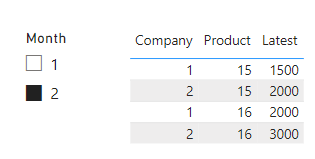
With that in mind, I need a measure which gets the product amount on the last date available. Example, if I select the february month on slicers it should show the amount 2000 (since there's no data for february, it gets the last date prior to february) for the product 15 and 3000 for the product 16.
Solved! Go to Solution.
For that, you need a separate Date/Calendar table in your model with a 1:M relationship to the Date column in your table. You can then use a measure like this one to get your result. Replact T3Dates and T3 with your Calendar table and original table, respectively.
Latest =
VAR maxdate =
MAX ( T3Dates[Date] )
RETURN
CALCULATE (
LASTNONBLANKVALUE ( T3[Date], SUM ( T3[Amount] ) ),
REMOVEFILTERS ( T3Dates ),
T3Dates[Date] <= maxdate
)
Pat
For that, you need a separate Date/Calendar table in your model with a 1:M relationship to the Date column in your table. You can then use a measure like this one to get your result. Replact T3Dates and T3 with your Calendar table and original table, respectively.
Latest =
VAR maxdate =
MAX ( T3Dates[Date] )
RETURN
CALCULATE (
LASTNONBLANKVALUE ( T3[Date], SUM ( T3[Amount] ) ),
REMOVEFILTERS ( T3Dates ),
T3Dates[Date] <= maxdate
)
Pat
Check out the November 2025 Power BI update to learn about new features.
Advance your Data & AI career with 50 days of live learning, contests, hands-on challenges, study groups & certifications and more!
| User | Count |
|---|---|
| 21 | |
| 10 | |
| 9 | |
| 4 | |
| 4 |
| User | Count |
|---|---|
| 34 | |
| 31 | |
| 20 | |
| 13 | |
| 12 |