cancel
Showing results for 
Search instead for 
Did you mean: 

The Power BI Data Visualization World Championships is back! Get ahead of the game and start preparing now! Learn more

Reply
JKVM
New Member

Get last orderdate per product per customer

I have a basic order table with many different products. I would like to generate an overview for the last orderdate per customer per product. Cannot succeed in finding the right formula. Max formula only retrieves max of one value. Should I generate a new table for this or should I do that in the orderoverview table. Risking that for every orderline again, the max value needs to be calculated.

Please advise both on the best approach and the formula to use.

CustomerIDProductIDOrderDate
111-1-2022
1231-12-2021
1325-7-2022
2115-2-2022
2112-7-2022
213-8-2022
313-8-2021
3128-2-2022
325-7-2021
321-11-2021
321-4-2022
331-6-2021
411-7-2022
421-8-2022
431-9-2022
2 ACCEPTED SOLUTIONS
Jihwan_Kim
Super User
Super User

Hi,

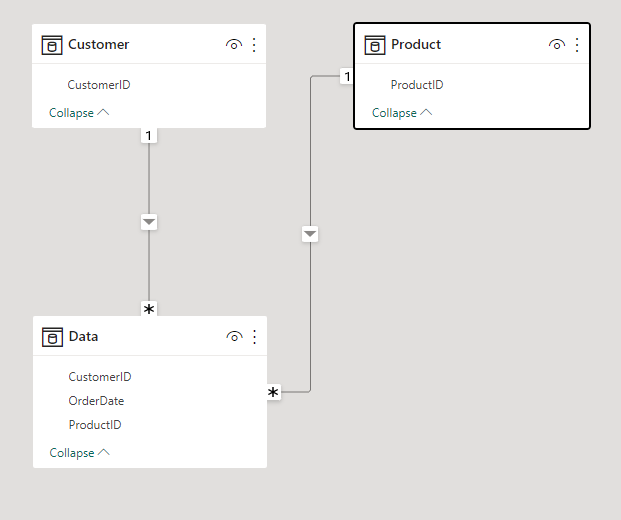
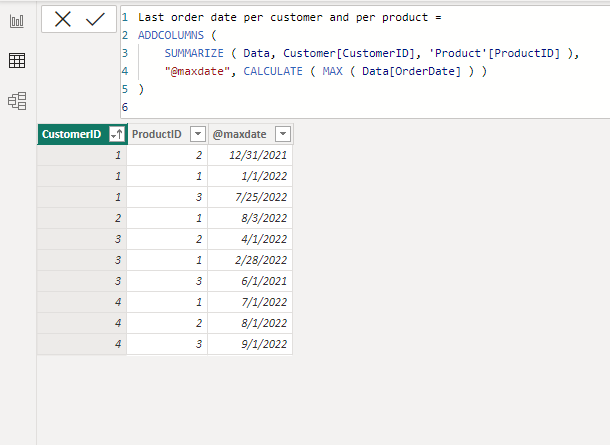
Please check the below picture and the attached pbix file.

It is for creating a new table.

Jihwan_Kim_0-1673277004771.png


Jihwan_Kim_1-1673277170442.png


Last order date per customer and per product =
ADDCOLUMNS (
    SUMMARIZE ( Data, Customer[CustomerID], 'Product'[ProductID] ),
    "@maxdate", CALCULATE ( MAX ( Data[OrderDate] ) )
)


If this post helps, then please consider accepting it as the solution to help other members find it faster, and give a big thumbs up.


Click here to visit my LinkedIn page

Click here to schedule a short Teams meeting to discuss your question.

View solution in original post

FreemanZ
Super User
Super User

hi @JKVM

In addition to Jihwan's solution, if you have all the columns in one table, you may also write a table like this:
LastTable = 
ADDCOLUMNS(
    SUMMARIZE(
        TableName, 
        TableName[CustomerID],
        TableName[ProductID]
    ),
    "LatestOrderDate",
    CALCULATE(MAX(TableName[OrderDate]))
)

Or you can simply plot a table visual with [CustomerID] column, [ProductID] column and a measure like this:
LatestOrderDate2 = MAX(TableName[OrderDate])

FreemanZ_3-1673279673298.png


View solution in original post

2 REPLIES 2
FreemanZ
Super User
Super User

hi @JKVM

In addition to Jihwan's solution, if you have all the columns in one table, you may also write a table like this:
LastTable = 
ADDCOLUMNS(
    SUMMARIZE(
        TableName, 
        TableName[CustomerID],
        TableName[ProductID]
    ),
    "LatestOrderDate",
    CALCULATE(MAX(TableName[OrderDate]))
)

Or you can simply plot a table visual with [CustomerID] column, [ProductID] column and a measure like this:
LatestOrderDate2 = MAX(TableName[OrderDate])

FreemanZ_3-1673279673298.png


Jihwan_Kim
Super User
Super User

Hi,

Please check the below picture and the attached pbix file.

It is for creating a new table.

Jihwan_Kim_0-1673277004771.png


Jihwan_Kim_1-1673277170442.png


Last order date per customer and per product =
ADDCOLUMNS (
    SUMMARIZE ( Data, Customer[CustomerID], 'Product'[ProductID] ),
    "@maxdate", CALCULATE ( MAX ( Data[OrderDate] ) )
)


If this post helps, then please consider accepting it as the solution to help other members find it faster, and give a big thumbs up.


Click here to visit my LinkedIn page

Click here to schedule a short Teams meeting to discuss your question.

Helpful resources

Announcements
Power BI DataViz World Championships

Power BI Dataviz World Championships

The Power BI Data Visualization World Championships is back! Get ahead of the game and start preparing now!

November Power BI Update Carousel

Power BI Monthly Update - November 2025

Check out the November 2025 Power BI update to learn about new features.

FabCon Atlanta 2026 carousel

FabCon Atlanta 2026

Join us at FabCon Atlanta, March 16-20, for the ultimate Fabric, Power BI, AI and SQL community-led event. Save $200 with code FABCOMM.