FabCon is coming to Atlanta
Join us at FabCon Atlanta from March 16 - 20, 2026, for the ultimate Fabric, Power BI, AI and SQL community-led event. Save $200 with code FABCOMM.
Register now!- Power BI forums
- Get Help with Power BI
- Desktop
- Service
- Report Server
- Power Query
- Mobile Apps
- Developer
- DAX Commands and Tips
- Custom Visuals Development Discussion
- Health and Life Sciences
- Power BI Spanish forums
- Translated Spanish Desktop
- Training and Consulting
- Instructor Led Training
- Dashboard in a Day for Women, by Women
- Galleries
- Data Stories Gallery
- Themes Gallery
- Contests Gallery
- QuickViz Gallery
- Quick Measures Gallery
- Visual Calculations Gallery
- Notebook Gallery
- Translytical Task Flow Gallery
- TMDL Gallery
- R Script Showcase
- Webinars and Video Gallery
- Ideas
- Custom Visuals Ideas (read-only)
- Issues
- Issues
- Events
- Upcoming Events
The Power BI Data Visualization World Championships is back! Get ahead of the game and start preparing now! Learn more
- Power BI forums
- Forums
- Get Help with Power BI
- DAX Commands and Tips
- Re: Function sign
- Subscribe to RSS Feed
- Mark Topic as New
- Mark Topic as Read
- Float this Topic for Current User
- Bookmark
- Subscribe
- Printer Friendly Page


- Mark as New
- Bookmark
- Subscribe
- Mute
- Subscribe to RSS Feed
- Permalink
- Report Inappropriate Content
Function sign
Dear power Bi community
i am trying to use the command sign. But the results is strange. Please see below :
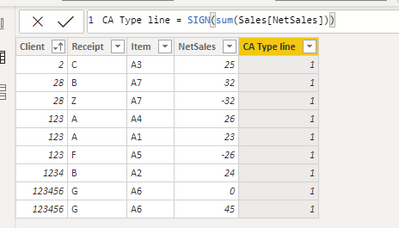
I excpected the results to be -1 on negative lines.
Thank you all
Solved! Go to Solution.

- Mark as New
- Bookmark
- Subscribe
- Mute
- Subscribe to RSS Feed
- Permalink
- Report Inappropriate Content
@Olenard
If you use SUM(...) when you have a row context, the SUM does not see any row context since it's an aggregator and only works with filter contexts. So, SUM sees ALL ROWS at the same time. Please remove SUM from the formula and it'll then work row by row. Please learn about contexts and how they behave.
By the way, SIGN does NOT need a measure: https://dax.guide/sign/
- Mark as New
- Bookmark
- Subscribe
- Mute
- Subscribe to RSS Feed
- Permalink
- Report Inappropriate Content
@Olenard
If you use SUM(...) when you have a row context, the SUM does not see any row context since it's an aggregator and only works with filter contexts. So, SUM sees ALL ROWS at the same time. Please remove SUM from the formula and it'll then work row by row. Please learn about contexts and how they behave.
By the way, SIGN does NOT need a measure: https://dax.guide/sign/
- Mark as New
- Bookmark
- Subscribe
- Mute
- Subscribe to RSS Feed
- Permalink
- Report Inappropriate Content
Hi @Anonymous ,
I think I get it. Should I use Sumx then ?
- Mark as New
- Bookmark
- Subscribe
- Mute
- Subscribe to RSS Feed
- Permalink
- Report Inappropriate Content
Hi,
but Am I not in a row contexte. Using only Sales(net sales) this does not work. The Dax formula expects a measure


- Mark as New
- Bookmark
- Subscribe
- Mute
- Subscribe to RSS Feed
- Permalink
- Report Inappropriate Content
Then you need to explain what you need better. You show a calculated column and you talk about wanting the result for each row, so this is confusing/contradictory information if you do not have a row context. IS it a measure what you need? If so, what is the measure supposed to do exactly?
Please mark the question solved when done and consider giving kudos if posts are helpful.
Contact me privately for support with any larger-scale BI needs, tutoring, etc.
Cheers

- Mark as New
- Bookmark
- Subscribe
- Mute
- Subscribe to RSS Feed
- Permalink
- Report Inappropriate Content
Thank you for your reply.
My sentence was not clear.
I am in a row context. Since I am in a row context I expected the formula to take the sign of the sales column.
Regarding the measure, the thing was that the function sign does not accept column as a reference, only measure.
how do i indicate in this column that I only want the sign of the row.
- Mark as New
- Bookmark
- Subscribe
- Mute
- Subscribe to RSS Feed
- Permalink
- Report Inappropriate Content
Sorry, I still do not understand what the problem/question is.
Please mark the question solved when done and consider giving a thumbs up if posts are helpful.
Contact me privately for support with any larger-scale BI needs, tutoring, etc.
Cheers
- Mark as New
- Bookmark
- Subscribe
- Mute
- Subscribe to RSS Feed
- Permalink
- Report Inappropriate Content
Hi @Olenard
You are applying the SIGN() function to the SUM of all the elements in the column. Try this instead:
CA Type Line = SIGN( Sales[Net Sales] )
Please mark the question solved when done and consider giving kudos if posts are helpful.
Contact me privately for support with any larger-scale BI needs, tutoring, etc.
Cheers
Helpful resources

Power BI Dataviz World Championships
The Power BI Data Visualization World Championships is back! Get ahead of the game and start preparing now!

Power BI Monthly Update - December 2025
Check out the December 2025 Power BI Holiday Recap!

FabCon Atlanta 2026
Join us at FabCon Atlanta, March 16-20, for the ultimate Fabric, Power BI, AI and SQL community-led event. Save $200 with code FABCOMM.

| User | Count |
|---|---|
| 19 | |
| 13 | |
| 8 | |
| 4 | |
| 4 |


| User | Count |
|---|---|
| 29 | |
| 19 | |
| 18 | |
| 11 | |
| 10 |


