Join us at FabCon Atlanta from March 16 - 20, 2026, for the ultimate Fabric, Power BI, AI and SQL community-led event. Save $200 with code FABCOMM.
Register now!The Power BI Data Visualization World Championships is back! Get ahead of the game and start preparing now! Learn more
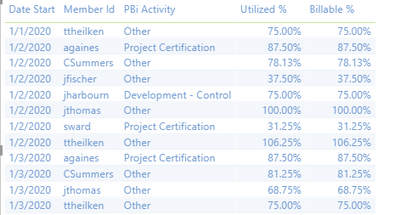
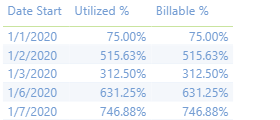
I am struggling with the visuals or possibly the formula. I want to show the percentage of utilization hours and billable hours over 8 hour working day. When reviewing the data by employees, the numbers reflect correctly. However, when I want to see the percentage per day overall, but it is adding all the percentages. Does anyone know how I can accomplish this? See below for screenshots and formula
By employee
Per day
This is the formula I am using in an added column
Utilized % =
VAR UtilizedHours = 'TimeEntries'[PBi Utilized Hours]
VAR X = UtilizedHours
VAR Y = 8
RETURN DIVIDE(x,y)
Solved! Go to Solution.
@rachaelwalker , This seem like a column, You need have a measure
example
Utilized % =
RETURN DIVIDE(sum('TimeEntries'[PBi Utilized Hours]),count('TimeEntries'[PBi Utilized Hours])*8)
or
Utilized % =
RETURN DIVIDE(sum('TimeEntries'[PBi Utilized Hours]),countrows(summarize('TimeEntries','TimeEntries'[Date],'TimeEntries'[memeberid]))*8)
Can you share sample data and sample output in table format? Or a sample pbix after removing sensitive data.
Hi Rachel,
If you want to see percentage utilisation as a percentage of sum of overall hours use
Your problem stems from the fact that you are aggregating the hours for all the employees visible in the current context but not accounting for this in the denominator where you only divide by 8. For one employee it's OK to divide by 8 but for 10 employees you have to sum up their hours and then divide by... 10 * 8 (this is the so-called nominal total man-hours). Summing up all the hours for the visible employees is called man-hours. So, in a word, what you have to do is to divide your UtilizedHours by 8 * COUNTROWS( 'Employees'), assuming that your model is a correct dimensional model. If you want to get this measure to calculate correctly also when many days are visible in the current context, you have to sum up the hours and divide by 8 * COUNTROWS( 'Employees' ) * COUNTROWS( 'Start Dates' ), again, assuming your model is correct.
@rachaelwalker , This seem like a column, You need have a measure
example
Utilized % =
RETURN DIVIDE(sum('TimeEntries'[PBi Utilized Hours]),count('TimeEntries'[PBi Utilized Hours])*8)
or
Utilized % =
RETURN DIVIDE(sum('TimeEntries'[PBi Utilized Hours]),countrows(summarize('TimeEntries','TimeEntries'[Date],'TimeEntries'[memeberid]))*8)
Can you share sample data and sample output in table format? Or a sample pbix after removing sensitive data.
@amitchandak Will this still work with a calculated column? I now need a % based off a calculated column and the calculated column is not appearing for me to select.
Calculated column
Utilized Hours =
VAR __WorkTypeID = [TimeEntries.workType.id]
VAR __UtilizationFlag = MAXX(FILTER('WorkTypes',[WorkTypes.id]=__WorkTypeID),[Utilization])
RETURN
IF(__UtilizationFlag,'TimeEntries'[TimeEntries.actualHours], 0)
I had to remove RETURN but now the numbers are appearing correctly. Thank you so much!
The Power BI Data Visualization World Championships is back! Get ahead of the game and start preparing now!
Check out the November 2025 Power BI update to learn about new features.
| User | Count |
|---|---|
| 20 | |
| 10 | |
| 9 | |
| 4 | |
| 4 |
| User | Count |
|---|---|
| 32 | |
| 31 | |
| 18 | |
| 12 | |
| 11 |