cancel
Showing results for 
Search instead for 
Did you mean: 

Vote for your favorite vizzies from the Power BI Dataviz World Championship submissions. Vote now!

Reply
Anonymous
Not applicable

Formatting color in a Dax formula

Out of curiosity are you able to conditionally format values that are formatted like 0:00:00? I'm looking to format things that are above 15 minutes. I tried including a color VAR in my DAX Formula to format it. So what I added was the VAR color and the & IF statement. It seemed to have worked, however instead of making the values red, it added the #ff0000" at the end of those that were above 15 minutes.


Avg Response Time (Mins) = VAR hours = ROUNDDOWN( 'ReadTime'[AvgResponseTime] / 3600,0) VAR minutes = ROUNDDOWN( MOD( 'ReadTime'[AvgResponseTime], 3600) / 60, 0) VAR seconds = INT( MOD ('ReadTime'[AvgResponseTime], 60) ) VAR color = "0:15:00" RETURN FORMAT(hours, "0") & ":" & FORMAT(minutes, "00") & ":" & FORMAT(seconds, "00") & IF(minutes > 15, "#ff0000", BLANK())

5 REPLIES 5
v-yalanwu-msft
Community Support
Community Support

Hi, @Anonymous ,

please provide some sample data in your tables (exclude sensitive data) with Text format and your expected result with backend logic and special examples. It is better if you can share a simplified pbix file. You can refer the following link to upload the file to the community. Thank you.

https://community.powerbi.com/t5/Desktop/How-to-upload-PBI-in-Community/m-p/1672886


Best Regards,
Community Support Team _ Yalan Wu
If this post helps, then please consider Accept it as the solution to help the other members find it more quickly.

v-yalanwu-msft
Community Support
Community Support

Hi, @Anonymous ;

You could create a column as follows:

Time in Text = 
VAR Seconds =[Column1]
VAR Minutes =
     INT(MOD(Seconds,3600)/60)
VAR Hours =
    INT(Seconds/3600)
VAR ss =
    MOD(MOD(Seconds,3600),60)
RETURN
    Hours & ":" & Minutes & ":" & ss

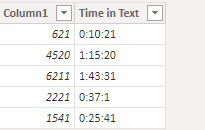
The final show:

vyalanwumsft_0-1655805751703.png

Then create a conditional measure.

Measure = IF(INT(MOD(MAX('Table (2)'[Column1]),3600)/60)>15, "#ff0000","black")

vyalanwumsft_1-1655805798829.pngvyalanwumsft_2-1655805807824.png

The final show:

vyalanwumsft_3-1655805819600.png


Best Regards,
Community Support Team _ Yalan Wu
If this post helps, then please consider Accept it as the solution to help the other members find it more quickly.

Anonymous
Not applicable

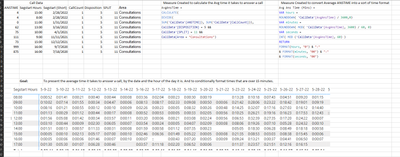
Hello! @v-yalanwu-msft Provided is a screenshot of what what I'm using, measures created, and the end goal. I attempted creating a column and measure you provided however it didn't seem to work right

PrivateAnalytic_0-1655833641299.png


Greg_Deckler
Community Champion
Community Champion

@Anonymous You should be able to use conditional formatting rules to do this.


Follow on LinkedIn
@ me in replies or I'll lose your thread!!!
Instead of a Kudo, please vote for this idea
Become an expert!: Enterprise DNA
External Tools: MSHGQM
YouTube Channel!: Microsoft Hates Greg
Latest book!:
DAX For Humans

DAX is easy, CALCULATE makes DAX hard...
Anonymous
Not applicable

I do try to do that, however when I try to click on the conditional formatting, and select the field, it blurs out the field. It is an already created calculation, so that is why I am trying to use dax to color.

Helpful resources

Announcements
Power BI DataViz World Championships

Power BI Dataviz World Championships

Vote for your favorite vizzies from the Power BI World Championship submissions!

Sticker Challenge 2026 Carousel

Join our Community Sticker Challenge 2026

If you love stickers, then you will definitely want to check out our Community Sticker Challenge!

January Power BI Update Carousel

Power BI Monthly Update - January 2026

Check out the January 2026 Power BI update to learn about new features.

FabCon Atlanta 2026 carousel

FabCon Atlanta 2026

Join us at FabCon Atlanta, March 16-20, for the ultimate Fabric, Power BI, AI and SQL community-led event. Save $200 with code FABCOMM.