cancel
Showing results for 
Search instead for 
Did you mean: 

The FabCon + SQLCon recap series starts April 14th at 8am Pacific. If you’re tracking where AI is going inside Fabric, this first session is a can't miss. Register now

Reply
MacJasem
Advocate II
Advocate II

Flatlined values in a MTD table

Hi Guys

Whats the esiest reusable method to discontinue flatlined values in YTD/MTD/WTD tables/graphs/BarCharts, such as this example:

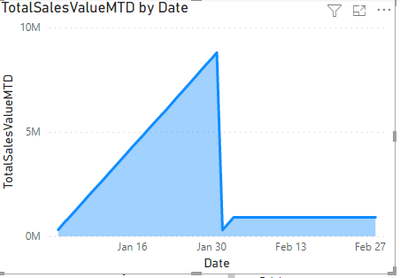
Data stops at 2. of February and thereby the chart flatlines. I wish to see only the current data as new data gets loaded to the dataset.

MacJasem_0-1665153404487.png

DAX for the MTD measure is:


TotalSalesValueMTD =
CALCULATE([SalesValue], DATESMTD('Date'[Date]))


How do you guys do it?

1 ACCEPTED SOLUTION
v-zhangti
Community Support
Community Support

Hi, @MacJasem 


You can try the following methods.

Measure = IF([TotalSalesValueMTD]=0,0,1)

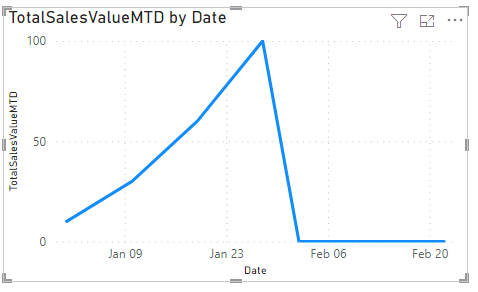
vzhangti_0-1665563143860.png

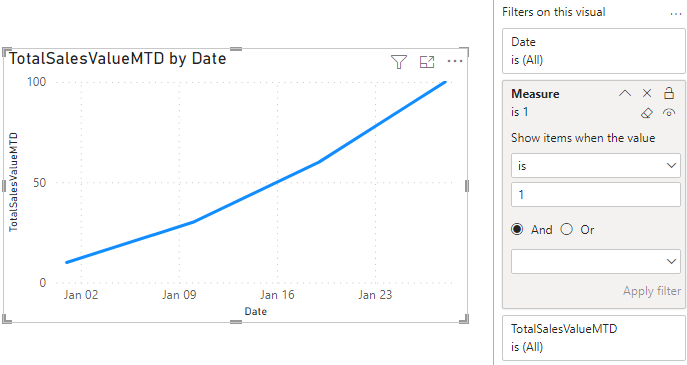
Result:

vzhangti_1-1665563166612.png

Is this the result you expect?


Best Regards,

Community Support Team _Charlotte

If this post helps, then please consider Accept it as the solution to help the other members find it more quickly.

View solution in original post

6 REPLIES 6
v-zhangti
Community Support
Community Support

Hi, @MacJasem 


You can try the following methods.

Measure = IF([TotalSalesValueMTD]=0,0,1)

vzhangti_0-1665563143860.png

Result:

vzhangti_1-1665563166612.png

Is this the result you expect?


Best Regards,

Community Support Team _Charlotte

If this post helps, then please consider Accept it as the solution to help the other members find it more quickly.

Thanks @v-zhangti 👍

MacJasem
Advocate II
Advocate II

I figured it out by entering a filter in the dax measure ny using the ALLSELECTED function like this;


TotalSalesValueMTD =
CALCULATE ([SalesValue],
    DATESMTD ( 'Date'[Date] ),
          FILTER ( ALLSELECTED ( 'Date' ), 'Date'[Date] <= MAX ( FactSales[OrderDate] )))

johnt75
Super User
Super User

You could create a measure like

Date is visible =
VAR LastSaleDate =
    CALCULATE ( MAX ( 'Sales'[Date] ), ALL ( 'Sales' ) )
VAR CurrentDate =
    MAX ( 'Date'[Date] )
RETURN
    IF ( CurrentDate <= LastSaleDate, 1 )

and add that as a filter to the visual, to only show when the value is 1.

Hi @johnt75 


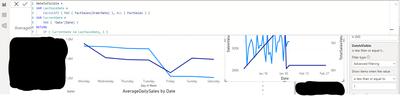
Thanks for the tip. I tried it but still didn't get the flatline discontinued. I might be doing something wrong?

MacJasem_0-1665237809813.png

Could you explain in few words, for me and perhaps for others gain, what the measure does?


The principle is that the Date table will always have dates into the future, whereas the sales table would only have dates for which there are sales. You want the chart to stop at the last date on which there are sales, so you only want to show data when the maximum date visible in the current filter context, as generated by the visual, is on or before the last ever sales date. That is what you did in your FILTER.

Helpful resources

Announcements
New to Fabric survey Carousel

New to Fabric Survey

If you have recently started exploring Fabric, we'd love to hear how it's going. Your feedback can help with product improvements.

Power BI DataViz World Championships carousel

Power BI DataViz World Championships - June 2026

A new Power BI DataViz World Championship is coming this June! Don't miss out on submitting your entry.

Join our Fabric User Panel

Join our Fabric User Panel

Share feedback directly with Fabric product managers, participate in targeted research studies and influence the Fabric roadmap.

March Power BI Update Carousel

Power BI Community Update - March 2026

Check out the March 2026 Power BI update to learn about new features.