Join us at FabCon Atlanta from March 16 - 20, 2026, for the ultimate Fabric, Power BI, AI and SQL community-led event. Save $200 with code FABCOMM.
Register now!Learn from the best! Meet the four finalists headed to the FINALS of the Power BI Dataviz World Championships! Register now
Hi All,
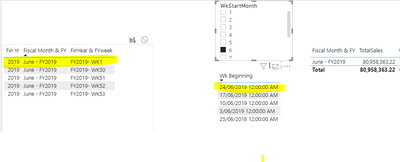
I am working with a non-standard date table in Power BI. Usually our fiscal year is July to June, but sometimes week 1 of the fiscal year actually starts in June.
When doing my calculations at the minute, all sales for week 1 are comeing into June sales, which is not accurate when it comes to June sales. I want week 1 (when in June, month 6) to fall into sales in July.
I have tried to work with my m code in the advanced editor, on the date table to manipulate, if wk1 and month = June(month 6), then override to =July(or month 7), else June. But this is giving me 2x July months in my month list.
Does anyone have any suggestions? Mcode manipulation was the 1st thing I thought of, but happy if there is a DAX caculation too.
Thanks,
Noelle.
@Nurry90 , for the calendar of your choice
1.Creating Financial Calendar - From Any Month
https://community.powerbi.com/t5/Community-Blog/Creating-Financial-Calendar-Decoding-Date-and-Calend...
For FY Week - https://www.youtube.com/watch?v=euIC0dgGTNM
or Week That Resets Yearly
https://community.powerbi.com/t5/Community-Blog/Week-That-Resets-Yearly-Decoding-Date-and-Calendar-3...
it's maybe better to provide your sample data and the calculation logic.
Hi @wdx223_Daniel ,
It won't let me load my sample pbix file. Sorry I am new here, what should I do? I have attached a screenshot of what my data is showing.
Share feedback directly with Fabric product managers, participate in targeted research studies and influence the Fabric roadmap.
Check out the February 2026 Power BI update to learn about new features.
| User | Count |
|---|---|
| 6 | |
| 3 | |
| 3 | |
| 3 | |
| 2 |
| User | Count |
|---|---|
| 8 | |
| 7 | |
| 7 | |
| 7 | |
| 6 |