Join us at FabCon Atlanta from March 16 - 20, 2026, for the ultimate Fabric, Power BI, AI and SQL community-led event. Save $200 with code FABCOMM.
Register now!The Power BI Data Visualization World Championships is back! Get ahead of the game and start preparing now! Learn more
Hi,
For a calculation I need to get value of the previous Row of the same column in PowerBI.
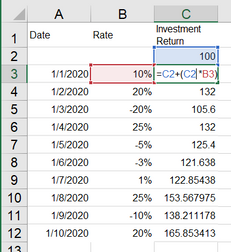
In excel it's pretty simple, the formula goes like this
| Date | Rate | Investment Return |
| 100.00 | ||
| 1/1/2020 | 10% | 110.00 |
| 1/2/2020 | 20% | 132.00 |
| 1/3/2020 | -20% | 105.60 |
| 1/4/2020 | 25% | 132.00 |
| 1/5/2020 | -5% | 125.40 |
| 1/6/2020 | -3% | 121.64 |
| 1/7/2020 | 1% | 122.85 |
| 1/8/2020 | 25% | 153.57 |
| 1/9/2020 | -10% | 138.21 |
| 1/10/2020 | 20% | 165.85 |
What I have found is DAX does not allow self-refrencing; is there any way I can get this formula to work.
Solved! Go to Solution.
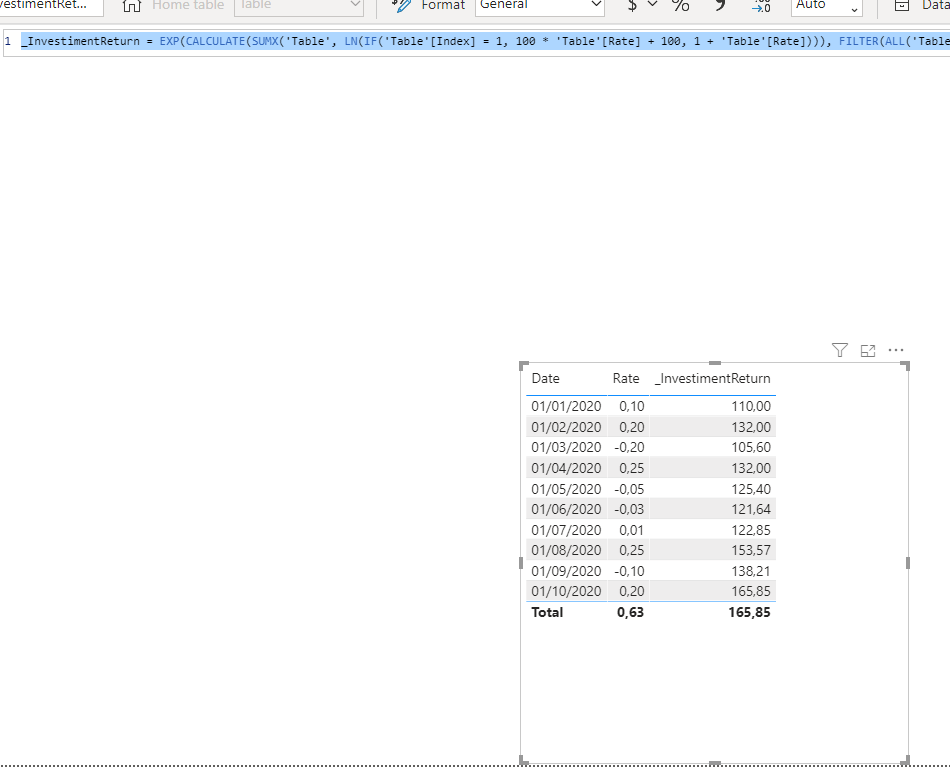
Hi @Anonymous ,
First, create an index column like:
And this measure:
Hi @Anonymous ,
First, create an index column like:
And this measure:
@Anonymous , You can last day and this day using a date table like this
Last Day Non Continous = CALCULATE(sum('order'[Qty]),filter(all('Date'),'Date'[Date] =MAXX(FILTER(all('Date'),'Date'[Date]<max('Date'[Date])),Table['Date'])))
Day behind Sales = CALCULATE(SUM(Sales[Sales Amount]),dateadd('Date'[Date],-1,Day))
or
This Day = CALCULATE(sum('order'[Qty]), FILTER(ALL('Date'),'Date'[Date]=max('Date'[Date])))
Last Day = CALCULATE(sum('order'[Qty]), FILTER(ALL('Date'),'Date'[Date]=max('Date'[Date])-1))
diff % = divide([This Day]-[Last Day],[Last Day])
To get the best of the time intelligence function. Make sure you have a date calendar and it has been marked as the date in model view. Also, join it with the date column of your fact/s. Refer :
https://radacad.com/creating-calendar-table-in-power-bi-using-dax-functions
https://www.archerpoint.com/blog/Posts/creating-date-table-power-bi
https://www.sqlbi.com/articles/creating-a-simple-date-table-in-dax/
See if my webinar on Time Intelligence can help: https://community.powerbi.com/t5/Webinars-and-Video-Gallery/PowerBI-Time-Intelligence-Calendar-WTD-YTD-LYTD-Week-Over-Week/m-p/1051626#M184
Appreciate your Kudos.
@amitchandak , the solution as suggested is doing Sum on an existing Order[Qty] column; while in my case I need the Sum from previous row. Let me explain with an Excel example
Excel Formula: C2 + (C2 * B3)
The catch is its doing a Running Total, but it needs previous row sum to multiply.
Note that i have already tried, PreviousDay, Earlier, Rankx etc... they all can get teh previous row, but other column. What I am looking is the same column. I wpuld prefer a DAX over M-Query, but if you have any solution using either, do let me know.
The Power BI Data Visualization World Championships is back! Get ahead of the game and start preparing now!
Check out the November 2025 Power BI update to learn about new features.
| User | Count |
|---|---|
| 20 | |
| 11 | |
| 10 | |
| 4 | |
| 4 |
| User | Count |
|---|---|
| 34 | |
| 31 | |
| 19 | |
| 12 | |
| 11 |