cancel
Showing results for 
Search instead for 
Did you mean: 

The Power BI Data Visualization World Championships is back! Get ahead of the game and start preparing now! Learn more

Reply
Anonymous
Not applicable

Filtering to columns that contain a certain string, & only on and after a given date

Hi community,


I was given help months ago to come up with a script; it's been working wonderfully.  I now need to expand it.  This is how it looks currently:


CALCULATETABLE (

    ADDCOLUMNS (

        SUMMARIZE ( 'CM360', 'CM360'[Date], 'CM360'[Placement ID] ),

        "Cost-per-day",

            CALCULATE( SUM(('CM360'[impressions])) / 1000) * 4

    ),

    'CM360'[site_cm360] = "Programmatic Ads"   

)

---------------------------------------------------------------------------------------------------------------------------------

You can see we've created a calculated table where we've taken the [Date] and [Placement ID] columns from an existing table, 'CM360'.  We've then created another column, "Cost-per-day", calculated by taking [impressions], dividing that by 1000, then multiplying by 4 dollars. Only where the column, 'CM360'[site_cm360], contains "Programmatic Ads".


I would now like to expand that script to something like this:


    CALCULATETABLE (

    ADDCOLUMNS (

       FILTER ( 'CM360', (CONTAINSSTRING('CM360' ['Placement'], “banner”)), 'CM360'[Date] >= 01/09/2022 ),

        SUMMARIZE ( 'CM360', 'CM360'[Date], 'CM360'[Placement ID] ),

        "Cost-per-day",

            CALCULATE( SUM(('CM360'[impressions])) / 1000) * 5.00        

    ),

    'CM360'[site_cm360] = "Programmatic Ads" OR “iAgency”

)


I wish to filter what we were doing before to rows where 'CM360' ['Placement'] column contains the string "banner".

And only where those rows have the date on or after September 1st 2022.

Additionally, in that last line, I wish to expand it so it now looks for those two different values in the column,   'CM360'[site_cm360]


Please can you look at my expanded script and help me understand how you would write it because I don't think this is how it should be written in DAX.


thank-you  🙂

1 ACCEPTED SOLUTION
FreemanZ
Super User
Super User

hi @Anonymous 

try like:

Table =
VAR _table =
CALCULATETABLE ( 
    'CM360', 
    CONTAINSSTRING('CM360' ['Placement'], “banner”), 
    'CM360'[Date] >= DATE(2022, 9, 1) 
)
RETURN
CALCULATETABLE (
    ADDCOLUMNS (
         SUMMARIZE ( 
              _table
             'CM360'[Date], 
             'CM360'[Placement ID] 
         ),
        "Cost-per-day",
        CALCULATE( SUM('CM360'[impressions]) / 1000) * 5.00        
     ),
    'CM360'[site_cm360]  IN {"Programmatic Ads", "iAgency"}
)

View solution in original post

3 REPLIES 3
Anonymous
Not applicable

thanks again @FreemanZ   I was able to take your code, modify and expand on it, then incorportate it into my larger script.  It works now, and I'm very grateful for all the help 🙂

Anonymous
Not applicable

thank-you @FreemanZ 


I inserted your block of code into my script:


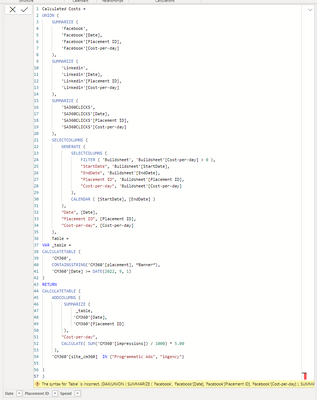
error messageerror message


PowerBI gives an error message, "Cannot find 'Table' "  "Parameter is not the correct type".  This is my full script:


Pablo_Aimar_1-1675688755273.png

I've tried various edits, including adding more parenthesis, but I just can't get Power BI to accept & execute this script.  Any suggestions would be much appreciated 🙂


Pablo


FreemanZ
Super User
Super User

hi @Anonymous 

try like:

Table =
VAR _table =
CALCULATETABLE ( 
    'CM360', 
    CONTAINSSTRING('CM360' ['Placement'], “banner”), 
    'CM360'[Date] >= DATE(2022, 9, 1) 
)
RETURN
CALCULATETABLE (
    ADDCOLUMNS (
         SUMMARIZE ( 
              _table
             'CM360'[Date], 
             'CM360'[Placement ID] 
         ),
        "Cost-per-day",
        CALCULATE( SUM('CM360'[impressions]) / 1000) * 5.00        
     ),
    'CM360'[site_cm360]  IN {"Programmatic Ads", "iAgency"}
)

Helpful resources

Announcements
Power BI DataViz World Championships

Power BI Dataviz World Championships

The Power BI Data Visualization World Championships is back! Get ahead of the game and start preparing now!

December 2025 Power BI Update Carousel

Power BI Monthly Update - December 2025

Check out the December 2025 Power BI Holiday Recap!

FabCon Atlanta 2026 carousel

FabCon Atlanta 2026

Join us at FabCon Atlanta, March 16-20, for the ultimate Fabric, Power BI, AI and SQL community-led event. Save $200 with code FABCOMM.