Join us at FabCon Atlanta from March 16 - 20, 2026, for the ultimate Fabric, Power BI, AI and SQL community-led event. Save $200 with code FABCOMM.
Register now!The Power BI Data Visualization World Championships is back! Get ahead of the game and start preparing now! Learn more
I have a project created with Measures. Can we filter red and green with measure in a matrix?
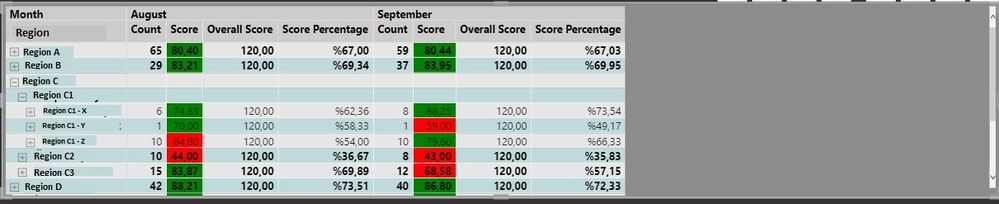
To give more detail, i would like to filter the matrix in attached image by green or red.
Ie. if i filter green, Region C1-Z August value shouldnt be visible. On the other hand, rest of the green values in August column should be visible.
Another example ie. if i filter green Region C1-Y September value shouldnt be shown. But, rest of the green values in matrix including Region C1-Y August value should be visible. The rows containing any red value should not be deleted completely.
I hope its clear. Looking forward for your suggestions.
Hi @Anonymous ,
May I ask how you set your colors? Please let me know.
Here's a similar post about filter data based on color, please refer to
Filter Data based on Color - Microsoft Power BI Community .
Best Regards,
Stephen Tao
If this post helps, then please consider Accept it as the solution to help the other members find it more quickly.
Hi @Anonymous,
I found a video related to your problem. I hope it helps you to filter by the formatting measure
Hi,
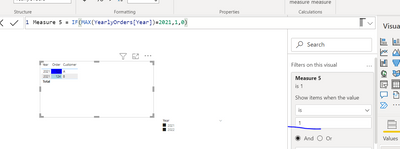
You could create a Filter measure with the same specifications as in the conditional formatting. E.g.
So here we can imagine that the condition for green is to have the year=2021. Now the visual displays the same values as this imaginary condition.
I hope this post helps to solve your issue and if it does consider accepting it as a solution and giving the post a thumbs up!
Proud to be a Super User!
The Power BI Data Visualization World Championships is back! Get ahead of the game and start preparing now!
Check out the November 2025 Power BI update to learn about new features.
| User | Count |
|---|---|
| 20 | |
| 10 | |
| 9 | |
| 4 | |
| 4 |
| User | Count |
|---|---|
| 33 | |
| 31 | |
| 20 | |
| 12 | |
| 11 |