Join us at FabCon Atlanta from March 16 - 20, 2026, for the ultimate Fabric, Power BI, AI and SQL community-led event. Save $200 with code FABCOMM.
Register now!The Power BI Data Visualization World Championships is back! Get ahead of the game and start preparing now! Learn more
Hi there all,
I'm recently returning to Power BI after a 2 year hiatus and I've forgotten a lot of basic things, like row and filter context, how calculate works... funny how all this happens, hopefully it comes back to me soon.
What I am trying to achieve is basically a KPI "card" that shows the number of customers my company currently has.
The current table looks like this:
| Client ID | LastDate (Per Client) | VenueNumber |
| 1 | 09/01/2022 | 100 |
| 1 | 09/09/2022 | 200 |
| 1 | 10/01/2022 | 300 |
| 2 | 09/01/2022 | 400 |
| 2 | 10/01/2022 | 100 |
| 3 | 08/01/2022 | 200 |
| 3 | 09/01/2022 | 300 |
| 3 | 10/01/2022 | 400 |
| 4 | 10/01/2022 | 500 |
| … | … | |
| n | n |
And this is the output I would like to achieve, using a DAX measure (eventually summing the total venue numbers), with the below table being fiterable with my date table (i.e by year, by month, etc) - its essentially a running total of venues.
| Client ID | LastDate (Per Client) | VenueNumber |
| 1 | 10/01/2022 | 300 |
| 2 | 10/01/2022 | 100 |
| 3 | 10/01/2022 | 400 |
| 4 | 10/01/2022 | 500 |
| … | … | |
| n | n |
If anyone could help me achieve this with a DAX measure it would be much appreciated!
Looking forward to hopping back into the Power BI scene (last I used this was 2018 during an internship!)
Kind regards,
StonedEdge
Solved! Go to Solution.
Hi @Stoned_Edge10 ,
Please refer to my pbix file to see if it helps you.
Create a measure.
Measure =
VAR _maxdate =
CALCULATE (
MAX ( 'Table'[LastDate (Per Client)] ),
FILTER (
ALL ( 'Table' ),
'Table'[Client ID] = SELECTEDVALUE ( 'Table'[Client ID] )
)
)
RETURN
IF ( MAX ( 'Table'[LastDate (Per Client)] ) = _maxdate, 1, BLANK () )
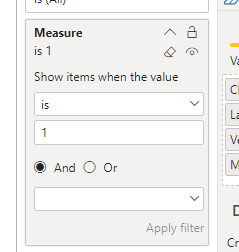
Then filter the measure.
If I have misunderstood your meaning, pleas provide more details with your desired output.
Best Regards
Community Support Team _ Polly
If this post helps, then please consider Accept it as the solution to help the other members find it more quickly.
Hi @Stoned_Edge10 ,
Please refer to my pbix file to see if it helps you.
Create a measure.
Measure =
VAR _maxdate =
CALCULATE (
MAX ( 'Table'[LastDate (Per Client)] ),
FILTER (
ALL ( 'Table' ),
'Table'[Client ID] = SELECTEDVALUE ( 'Table'[Client ID] )
)
)
RETURN
IF ( MAX ( 'Table'[LastDate (Per Client)] ) = _maxdate, 1, BLANK () )
Then filter the measure.
If I have misunderstood your meaning, pleas provide more details with your desired output.
Best Regards
Community Support Team _ Polly
If this post helps, then please consider Accept it as the solution to help the other members find it more quickly.
Why this approach doesnt work if you have matrix visual?
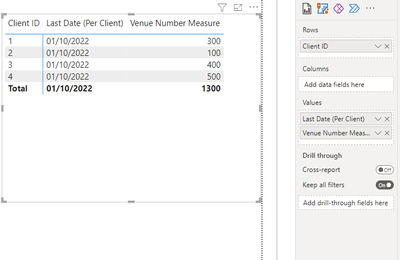
@Stoned_Edge10 create these measures:
Last Date (Per Client) Measure = MAX(Clients[Date])
Venue Number Measure =
SUMX(
VALUES(Clients[Client ID]),
VAR _current_client = Clients[Client ID]
VAR _max_date = [Last Date (Per Client)]
VAR _venue =
MAXX(
FILTER(
Clients,
Clients[Client ID] = _current_client && Clients[Date] = _max_date
),
Clients[VenueNumber]
)
RETURN
_venue
)
The Power BI Data Visualization World Championships is back! Get ahead of the game and start preparing now!
Check out the November 2025 Power BI update to learn about new features.
| User | Count |
|---|---|
| 20 | |
| 10 | |
| 9 | |
| 4 | |
| 4 |
| User | Count |
|---|---|
| 33 | |
| 31 | |
| 19 | |
| 12 | |
| 11 |