cancel
Showing results for 
Search instead for 
Did you mean: 

Try your skills in the Power BI Dataviz World Championship! Round one ends June 26. Join now

Reply
equetzal
Regular Visitor

Filtering Card Visual

Hi, 

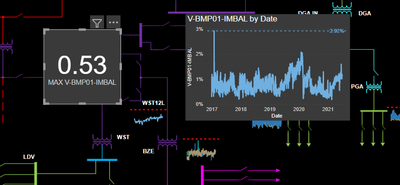
I am currently trying to use a card visual to display a measure that calculates the max of another measure as can be seen below, but i ran into a problem, the card can be filtered from the filter panel and since some of the data has spikes the spike is shown. Any suggestions on how I can filter out these spikes from the measure. Any help would be apriciated. 

equetzal_1-1627522854671.png


the card data has the max imbalance and and I have filtered the line chart using the filter panel but I can't do the same for the card. 

Below is the DAX I used to show the maxium voltage imbalance from the V-imbal measure 

MAX V-BMP01-IMBAL = 
Var MaxVImbalBMP01 =
MAXX(
V_BMP,
'Voltage Measures'[V-BMP01-IMBAL]
)
RETURN
MaxVImbalBMP01

Below is the DAX for the line chart that shows V-imbalance measure

V-BMP01-IMBAL = 
VAR ValueTableBMP01 =
UNION(
ROW("BMP01",AVERAGE(V_BMP[V-BMP01-AB])),
ROW("BMP01",AVERAGE(V_BMP[V-BMP01-BC])),
ROW("BMP01",AVERAGE(V_BMP[V-BMP01-CA]))
)
VAR BMP01ROWMAX =
MAXX(
ValueTableBMP01,[BMP01]
)
VAR BMP01ROWAVE =
AVERAGEX(
ValueTableBMP01,
[BMP01]
)
VAR BMP01IMBAL =
(BMP01ROWMAX - BMP01ROWAVE) / BMP01ROWAVE
Var MaxVImbalBMP01 =
MAXX(
V_BMP,
BMP01IMBAL
)
RETURN
MaxVImbalBMP01
5 REPLIES 5
littlemojopuppy
Community Champion
Community Champion

Hi @equetzal 


There's a couple things you can do.  Calculate as variables either: the average and standard deviation of the data OR a high and low percentile (maybe 10th and 90th?).


When you're calculating the average you can filter for values between (average +/- 2 standard deviations) or (high and low percentiles).  Either way will discard outliers.


Hope this helps!

Hi @littlemojopuppy 
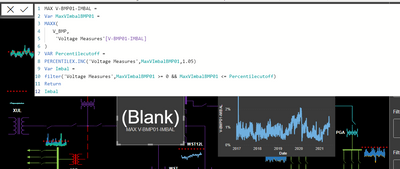
Thanks for the suggestion I have tried but the card comeout blank could you be so kind as to give an example. 

Hi @equetzal   Here's a sample from something similar I've done...

VAR PercentileCutoff =
    PERCENTILEX.INC ( CalculateDaysOpen, [DaysOpen], .99 )
RETURN
    AVERAGEX (
        FILTER ( CalculateDaysOpen, [DaysOpen] >= 0 && [DaysOpen] <= PercentileCutoff ),
        [DaysOpen]
    )


Can you share your formula?

Hi @littlemojopuppy 
sure please see below 

equetzal_0-1627665429917.png


Surprised you're not getting an error.  The PERCENTILEX.INC function requires a value between 0 and 1 for the third parameter.  You entered 1.05.

If you want to exclude the outliers from the max calculation, calculate the percentile first, and then filter the table in the MAXX calculation.  Use the code I provided as guidance for the order the steps should be in.

Helpful resources

Announcements
Fabric Data Days is here Carousel

Fabric Data Days 2026

Don't miss out on Data Days, June 15 through August 7. Learn Fabric, Power BI, SQL, AI and more.

Power BI DataViz World Championships carousel

Power BI DataViz World Championships - June 2026

A new Power BI DataViz World Championship is coming this June! Don't miss out on submitting your entry.