cancel
Showing results for 
Search instead for 
Did you mean: 

Learn from the best! Meet the four finalists headed to the FINALS of the Power BI Dataviz World Championships! Register now

Reply
jawilson808
Helper I
Helper I

Filtered Value

Hi there!


I am looking for assistance with creating a dax. What I am trying to accomplish is allow users to toggle on and off data within a line/column chart. I have created a table of the measures that i would like them to ultimately select the values to be shown within the illustration (Budget, forecast, sales, etc.). I found a dax that calculates the value based on the selection. However, I am running into an issue as to when multiple values are selected. 


To keep it simple the following formula works great. 

switch(LASTNONBLANK(_VisibleMeasures[Column1],"Blank"),"Budget Revenue",[Budget Revenue]))
 
this valule is dropped within the column valules on the column chart. If the Budget revenue is selected within the filters, the column shows, if nothing is selected it disappers.  Exactly what I desire.
 
But the end goal would to be able to have multiple values as such:
Value 1:switch(LASTNONBLANK(_VisibleMeasures[Column1],"Blank"),"Budget Revenue",[Budget Revenue]))
Value 2:switch(LASTNONBLANK(_VisibleMeasures[Column1],"Blank"),"Forecast Revenue",[Forecast Revenue]))
Value x:switch(LASTNONBLANK(_VisibleMeasures[Column1],"Blank"),"x",[x]))
 
Once the user selects 1 or multiple values, only the desired values show, however I am having no success. I have attemplted a formula with hasonevalue, but their can be multiple values. 
 
Any help would be greatly appreciated. I hope this make sense.
1 ACCEPTED SOLUTION
jawilson808
Helper I
Helper I

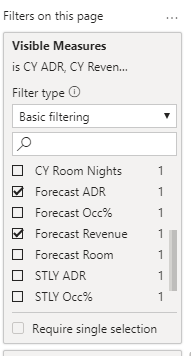
I was able to solve this by adding a table for the values I wanted to be selected within the ullustration. Then i used the following dax based on the selection. 


Visible Budget Revenue = var logicTest= countrows(distinct(filter(allselected(_VisibleMeasures[Visible Measures]),_VisibleMeasures[Visible Measures]="Budget Revenue")))=1 return if(LogicTest,[Budget Revenue],blank())
 
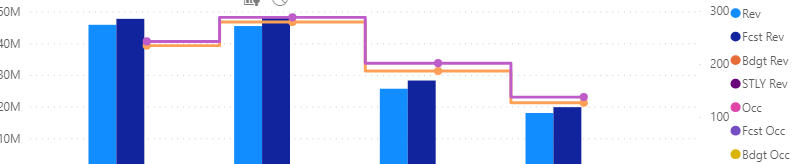
The dax was replicated for each of the measures that a user could select in the illustration. The only downside is that all possible possible measures will show even if not selected. I guess the upside to this illustrates what can be included with  visualizationimage.pngimage.png

View solution in original post

1 REPLY 1
jawilson808
Helper I
Helper I

I was able to solve this by adding a table for the values I wanted to be selected within the ullustration. Then i used the following dax based on the selection. 


Visible Budget Revenue = var logicTest= countrows(distinct(filter(allselected(_VisibleMeasures[Visible Measures]),_VisibleMeasures[Visible Measures]="Budget Revenue")))=1 return if(LogicTest,[Budget Revenue],blank())
 
The dax was replicated for each of the measures that a user could select in the illustration. The only downside is that all possible possible measures will show even if not selected. I guess the upside to this illustrates what can be included with  visualizationimage.pngimage.png

Helpful resources

Announcements
Join our Fabric User Panel

Join our Fabric User Panel

Share feedback directly with Fabric product managers, participate in targeted research studies and influence the Fabric roadmap.

February Power BI Update Carousel

Power BI Monthly Update - February 2026

Check out the February 2026 Power BI update to learn about new features.

FabCon Atlanta 2026 carousel

FabCon Atlanta 2026

Join us at FabCon Atlanta, March 16-20, for the ultimate Fabric, Power BI, AI and SQL community-led event. Save $200 with code FABCOMM.