FabCon is coming to Atlanta
Join us at FabCon Atlanta from March 16 - 20, 2026, for the ultimate Fabric, Power BI, AI and SQL community-led event. Save $200 with code FABCOMM.
Register now!- Power BI forums
- Get Help with Power BI
- Desktop
- Service
- Report Server
- Power Query
- Mobile Apps
- Developer
- DAX Commands and Tips
- Custom Visuals Development Discussion
- Health and Life Sciences
- Power BI Spanish forums
- Translated Spanish Desktop
- Training and Consulting
- Instructor Led Training
- Dashboard in a Day for Women, by Women
- Galleries
- Data Stories Gallery
- Themes Gallery
- Contests Gallery
- Quick Measures Gallery
- Notebook Gallery
- Translytical Task Flow Gallery
- TMDL Gallery
- R Script Showcase
- Webinars and Video Gallery
- Ideas
- Custom Visuals Ideas (read-only)
- Issues
- Issues
- Events
- Upcoming Events
Calling all Data Engineers! Fabric Data Engineer (Exam DP-700) live sessions are back! Starting October 16th. Sign up.
- Power BI forums
- Forums
- Get Help with Power BI
- DAX Commands and Tips
- Filter out the data when the conditions are not fu...
- Subscribe to RSS Feed
- Mark Topic as New
- Mark Topic as Read
- Float this Topic for Current User
- Bookmark
- Subscribe
- Printer Friendly Page

- Mark as New
- Bookmark
- Subscribe
- Mute
- Subscribe to RSS Feed
- Permalink
- Report Inappropriate Content
Filter out the data when the conditions are not fully match
Hi,
I'm trying to sort some rows out if those rows not match all conditions.
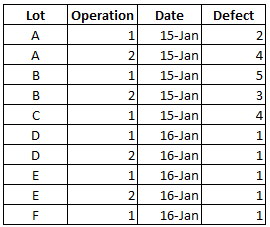
I need to compare the defect by date between 2 operations but I want to compare only the lot that already pass both operations. Is there any way to sort the rows out via power query or measure function?
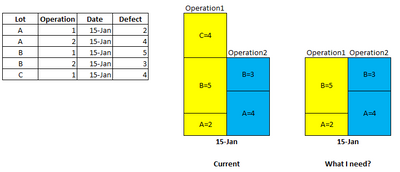
Thanks,
Solved! Go to Solution.
- Mark as New
- Bookmark
- Subscribe
- Mute
- Subscribe to RSS Feed
- Permalink
- Report Inappropriate Content
Hi @olgad ,
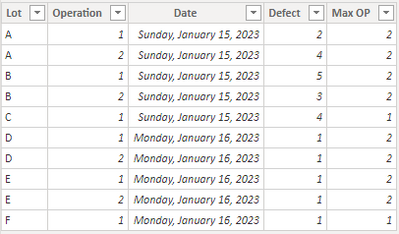
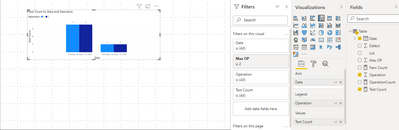
Thanks again krub. I already fix the issue. I create MAX Operation column by power query and sort the operation#1 out and use measure as below.



- Mark as New
- Bookmark
- Subscribe
- Mute
- Subscribe to RSS Feed
- Permalink
- Report Inappropriate Content
OperationCount=CALCULATE(DISTINCTCOUNT(Table[Operation]),ALLEXCEPT(Table,Table[Date],Table[Lot]))
- Mark as New
- Bookmark
- Subscribe
- Mute
- Subscribe to RSS Feed
- Permalink
- Report Inappropriate Content
hi @sumpekung
not sure if i fully get you, you may try to add a measure like this:
measure = COUNTROWS(VALUES(TableName[Operation]))
you may plot a table visual with Lot column and the measure, like this:
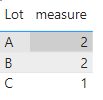
or you can feed filter pane for a visual with the measure and show the items when the value is 2, like this:

- Mark as New
- Bookmark
- Subscribe
- Mute
- Subscribe to RSS Feed
- Permalink
- Report Inappropriate Content
My whole data table contains many rows for each lot and not same row quantity in each lot, so it doesn't work with ny data.
Thank you in advance krub @FreemanZ .
- Mark as New
- Bookmark
- Subscribe
- Mute
- Subscribe to RSS Feed
- Permalink
- Report Inappropriate Content
hi @sumpekung
then could you update your sample date to fully refect the issue?
- Mark as New
- Bookmark
- Subscribe
- Mute
- Subscribe to RSS Feed
- Permalink
- Report Inappropriate Content
Thank you in advance for follow up with a great support krub. Anyway, I already fixed my problem with the idea from you and @olgad .

- Mark as New
- Bookmark
- Subscribe
- Mute
- Subscribe to RSS Feed
- Permalink
- Report Inappropriate Content
Hi,
New Count=
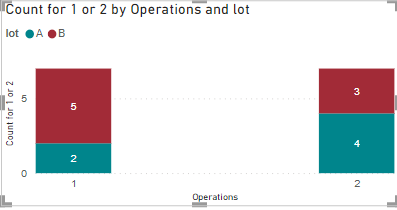
Please kudo and like the solution if it works for you.
DID I ANSWER YOUR QUESTION? PLEASE MARK MY POST AS A SOLUTION! APPRECIATE YOUR KUDO/LIKE!
PROUD TO BE A SUPER USER!
Best Stories, Interesting Cases: PowerBI Storytime Newsletter
Linkedin Profile: Linkedin
YouTube Channel: PowerBI Storytime
- Mark as New
- Bookmark
- Subscribe
- Mute
- Subscribe to RSS Feed
- Permalink
- Report Inappropriate Content
Hi @olgad ,
Thanks again krub. I already fix the issue. I create MAX Operation column by power query and sort the operation#1 out and use measure as below.
- Mark as New
- Bookmark
- Subscribe
- Mute
- Subscribe to RSS Feed
- Permalink
- Report Inappropriate Content
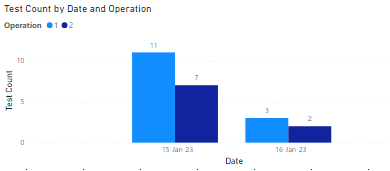
Thanks @olgad , sorry for the less information I provide. My data set contains multiple days, then it still sum defect from all lots I have. Now I'm trying to adapt your idea if it can work.

Helpful resources

FabCon Global Hackathon
Join the Fabric FabCon Global Hackathon—running virtually through Nov 3. Open to all skill levels. $10,000 in prizes!

FabCon Atlanta 2026
Join us at FabCon Atlanta, March 16-20, for the ultimate Fabric, Power BI, AI and SQL community-led event. Save $200 with code FABCOMM.

| User | Count |
|---|---|
| 10 | |
| 9 | |
| 7 | |
| 4 | |
| 4 |


