Join us at FabCon Atlanta from March 16 - 20, 2026, for the ultimate Fabric, Power BI, AI and SQL community-led event. Save $200 with code FABCOMM.
Register now!The Power BI Data Visualization World Championships is back! Get ahead of the game and start preparing now! Learn more
Hello,
I am posting because I am pretty new on Power BI and I seem to be stuck on a particular issue I hope you could help me with.
The problem is the following :
I have a list of number, related to dates. It allows me to make table with value per month.
I would like to isolate the value of the last month with a code as below but it does not work and i do not understand why...
Hi:
If you want to make a measure Total Amt = SUM(Data[Vlue])
Then you can do:
Last Month := CALCULATE([Total Amt], PREVIOUSMONTH('Dates'[Date])) or
Last Month = CALCULATE(SUM(Data[Value]), PREVIOUSMONTH('Dates'[Date]))
This should be OK for you.
Hi @Anonymous ,
Could you please tell me what is your desired output?
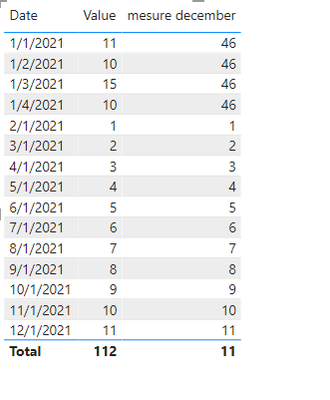
I have created a simple sample.
And the formula works well.
mesure december =
var MAXI = month(LASTDATE(Data[Date]))
return
CALCULATE(sum(Data[Value]) , month(Data[Date]) = MAXI)
If it is possible, please provide your pbix file without privacy information and desired output.
Best Regards
Community Support Team _ Polly
If this post helps, then please consider Accept it as the solution to help the other members find it more quickly.
Hello,
Sorry for the late reply.
I will attache the related document do you know how to proceed ?
The issue I have with my calculation is the following :
The total on column 2 focus on last month and is ok (310). But i don't understand why the others month that should be filter appear in the list (january to november)
Hi,
For LM calculations I recommend using functions like PREVIOUSMONTH, DATEADD or PARARALLELPERIOD.
e.g. CALCULATE(sum(Data[Value]) , PREVIOUSMONTH('Calendar'[Date]))
I hope this post helps to solve your issue and if it does consider accepting it as a solution and giving the post a thumbs up!
My LinkedIn: https://www.linkedin.com/in/n%C3%A4ttiahov-00001/
Proud to be a Super User!
Check out the November 2025 Power BI update to learn about new features.
Advance your Data & AI career with 50 days of live learning, contests, hands-on challenges, study groups & certifications and more!
| User | Count |
|---|---|
| 21 | |
| 10 | |
| 9 | |
| 4 | |
| 4 |
| User | Count |
|---|---|
| 35 | |
| 31 | |
| 19 | |
| 13 | |
| 10 |