cancel
Showing results for 
Search instead for 
Did you mean: 

Next up in the FabCon + SQLCon recap series: The roadmap for Microsoft SQL and Maximizing Developer experiences in Fabric. All sessions are available on-demand after the live show. Register now

Reply
vickyd
Helper V
Helper V

Filter by another column in a measure

The sample data below is kind of a representation of my data in it's simplest form. 


OrgAmountAmount TypeShadowOrg
A10RevenueX
A5CostX
B20RevenueY
B10CostY
C30RevenueZ
C15CostZ
X2Cost 
Y3Cost 
Z4Cost 


I mainly have 3 metrics I'm trying to get from it. The first 2, Revenue and Cost are straightfoward. 


Revenue = CALCULATE(SUM(Financials[Amount]), Financials[Amount Type] = "Revenue") 
Cost = CALCULATE(SUM(Financials[Amount]), Financials[Amount Type] = "Cost")
 
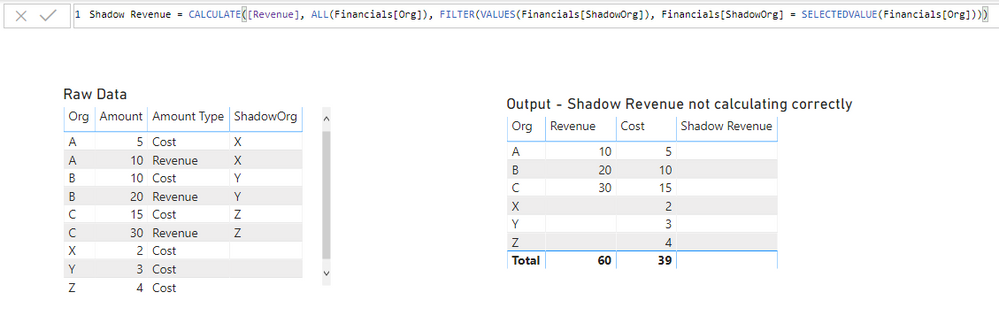
For Shadow Revenue, I want to be able to show the revenue based on the field ShadowOrg but I want to show it in a table that has the Org as one of the columns. 
Here's what I've set it up as but it doesn't work. 
 
Shadow Revenue = CALCULATE([Revenue], ALL(Financials[Org]), FILTER(VALUES(Financials[ShadowOrg]), Financials[ShadowOrg] = SELECTEDVALUE(Financials[Org])))
 
Filter.png
I expect to see the following values in the Shadow Revenue Column
X = 10
Y = 20
Z = 30
 
What am I doing wrong?


4 REPLIES 4
az38
Community Champion
Community Champion

Hi @vickyd 

try a measure

Shadow Revenue = CALCULATE([Revenue],
FILTER(ALL(Financials),Financials[ShadowOrg]=SELECTEDVALUE(Financials[Org]))
)

do not hesitate to give a kudo to useful posts and mark solutions as solution


do not hesitate to give a kudo to useful posts and mark solutions as solution
LinkedIn

Thanks @az38  for the quick response. 


Although your solution worked, I think I over-simplified my sample data. In reality, Financials is my fact table and I have several dimension tables associated to it in a star schema structure. In my sample, imagine a OrgMaster and ShadowOrgMaster table exists along with maybe few other dimension tables.

I do not want to remove all the filters from the Financial FACT table, only want to remove any filters from the OrgMaster table when calculating the Shadow Revenue.


So something like this wouldn't work giving a syntax error. 


Shadow Revenue = CALCULATE([Revenue],
FILTER(ALL(OrgMaster),ShadowOrgMaster[ShadowOrg]=SELECTEDVALUE(OrgMaster[Org]))
)


az38
Community Champion
Community Champion

@vickyd 

if  you are trying to add a measure into ShadowOrgMaster it should look like

Shadow Revenue = CALCULATE([Revenue],
FILTER(ALL(OrgMaster),OrgMaster[ShadowOrg]=SELECTEDVALUE(ShadowOrgMaster[Org]))
)

do not hesitate to give a kudo to useful posts and mark solutions as solution


do not hesitate to give a kudo to useful posts and mark solutions as solution
LinkedIn


@az38 wrote:

@vickyd 

if  you are trying to add a measure into ShadowOrgMaster it should look like


Shadow Revenue = CALCULATE([Revenue],
FILTER(ALL(OrgMaster),OrgMaster[ShadowOrg]=SELECTEDVALUE(ShadowOrgMaster[Org]))
)


do not hesitate to give a kudo to useful posts and mark solutions as solution


OrgMaster will not have ShadowOrg column and ShadowOrgMaster will not have the Org column. 


OrgMaster will have Org and say OrgName and ShadowOrgMaster will have ShadowOrg and ShadowOrgName.


Not seeing an attach file option here and have restrictions for file sharing at work else would have shared the PBIX file. Will try to share once I'm home. 


Helpful resources

Announcements
New to Fabric survey Carousel

New to Fabric Survey

If you have recently started exploring Fabric, we'd love to hear how it's going. Your feedback can help with product improvements.

Power BI DataViz World Championships carousel

Power BI DataViz World Championships - June 2026

A new Power BI DataViz World Championship is coming this June! Don't miss out on submitting your entry.

Join our Fabric User Panel

Join our Fabric User Panel

Share feedback directly with Fabric product managers, participate in targeted research studies and influence the Fabric roadmap.

March Power BI Update Carousel

Power BI Community Update - March 2026

Check out the March 2026 Power BI update to learn about new features.