Join us at FabCon Atlanta from March 16 - 20, 2026, for the ultimate Fabric, Power BI, AI and SQL community-led event. Save $200 with code FABCOMM.
Register now!The Power BI Data Visualization World Championships is back! Get ahead of the game and start preparing now! Learn more
Hello
Apologies if this has been answered in another post. I have searched but cannot find the answer I'm looking for.
I'm trying to create a measure to show the sum a value for the latest quarter in the data.
I already have a measure to sum the column I'm interested in
Rebate Sum =
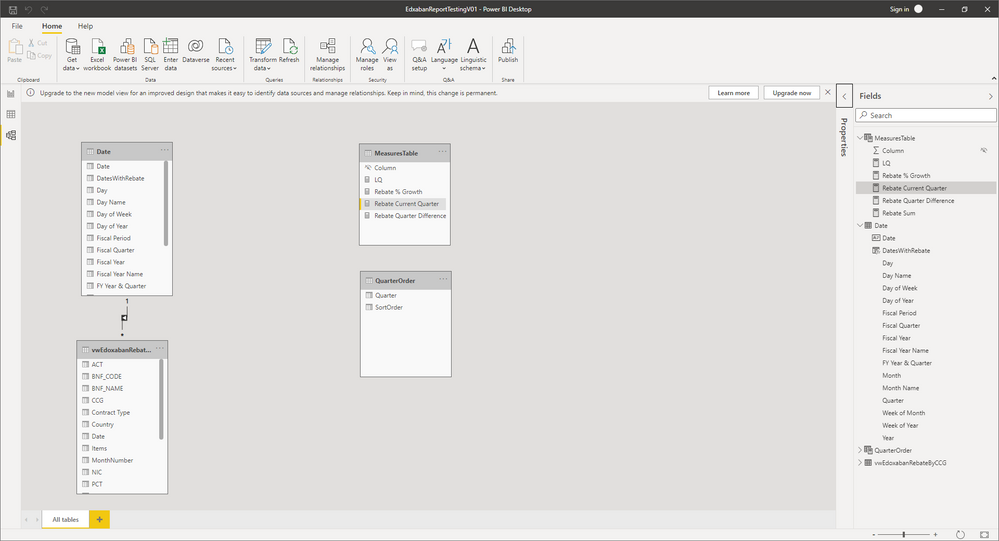
SUM ( vwEdoxabanRebateByCCG[RebateValue] )I have joined my fact table to my date table
I've tried the following which isn't giving me the result I'm after
Rebate Current Quarter =
CALCULATE (
[Rebate Sum],
FILTER ( 'Date', 'Date'[FY Year & Quarter] = MAX ( 'Date'[FY Year & Quarter] ) )
)I think its filtering to the last quarter in the Date table. I would like it to filter on the last quarter for which there is data in the fact table (vwEdoxabanRebateByCCG) without adding a quarter column to the fact table.
Thanks in advance for any help.
Solved! Go to Solution.
[Rebate Current Quarter] =
CALCULATE(
[Rebate Sum],
CALCULATETABLE(
TOPN(1,
SUMMARIZE(
YourFactTable,
'Date'[FY Year & Quarter]
),
'Date'[FY Year & Quarter],
DESC
),
ALL( YourFactTable )
),
ALL( 'Date' )
)
[Rebate Current Quarter] =
CALCULATE(
[Rebate Sum],
CALCULATETABLE(
TOPN(1,
SUMMARIZE(
YourFactTable,
'Date'[FY Year & Quarter]
),
'Date'[FY Year & Quarter],
DESC
),
ALL( YourFactTable )
),
ALL( 'Date' )
)
Thanks very much worked a treat! I'm going to have to try and understand how you did that 🤔 Would it be easy to amend to get a measure for the previous quarter?
[Rebate (Prev to Curr Quarter)] =
var CurrentQuarter =
CALCULATETABLE(
TOPN(1,
SUMMARIZE(
YourFactTable,
'Date'[FY Year & Quarter]
),
'Date'[FY Year & Quarter],
DESC
),
REMOVEFILTERS( YourFactTable )
)
var Result =
CALCULATE(
[Rebate Sum],
CALCULATETABLE(
TOPN(1,
SUMMARIZE(
YourFactTable,
'Date'[FY Year & Quarter]
),
'Date'[FY Year & Quarter],
DESC
),
ALL( YourFactTable ),
'Date'[FY Year & Quarter] <> CurrentQuarter
)
)
return
ResultThe logic will return the [Rebate Sum] for the quarter that has any data in it and is prior to the current one. Therefore if you current quarter is 2021-Q3 and there's no data for 2021-Q2, it'll return the value for 2021-Q1 if there is any data in it. I think you get the gist...
Thanks again! Worked perfectly. I'm fairly new to DAX so it will take me a while to fully understand it.
The Power BI Data Visualization World Championships is back! Get ahead of the game and start preparing now!
| User | Count |
|---|---|
| 14 | |
| 7 | |
| 4 | |
| 4 | |
| 3 |
| User | Count |
|---|---|
| 23 | |
| 10 | |
| 10 | |
| 6 | |
| 5 |