Join us at FabCon Atlanta from March 16 - 20, 2026, for the ultimate Fabric, Power BI, AI and SQL community-led event. Save $200 with code FABCOMM.
Register now!The Power BI Data Visualization World Championships is back! Get ahead of the game and start preparing now! Learn more
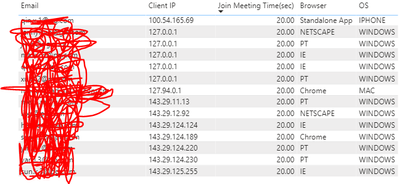
Hi! I want to ask if there is a way for me to filter the table below using DAX based on the Client IP address like the SQL query below:
select * from table
where Client IP like '%127%';
Thank you!
Solved! Go to Solution.
This Solved my question. Thanks for your help!!
https://stackoverflow.com/questions/38767000/starts-with-in-an-expression-using-dax
This Solved my question. Thanks for your help!!
https://stackoverflow.com/questions/38767000/starts-with-in-an-expression-using-dax
@Anonymous , add a measure like this with other not summarized data
calculate(countrows(Table),containsstring(Table[Client IP],"127"))
https://docs.microsoft.com/en-us/dax/containsstring-function-dax
other option
Thanks, @amitchandak! Is there a way to just filter it? So it will still return other columns like email, browser, etc.
I tried adding a filter command but this error message showed:
"The expression refers to multiple columns. Multiple columns cannot be converted to a scalar value."
Thank you!!
@Anonymous - You can, you would use SEARCH or FIND
You might want to create a "selector" like IF(SEARCH(...),1,0)
https://community.powerbi.com/t5/Quick-Measures-Gallery/The-Complex-Selector/m-p/1116633#M534
Hi @Greg_Deckler - Thanks! I shall try this solution too.
I just wanted to filter those %% items and reflect the columns to my table.
The Power BI Data Visualization World Championships is back! Get ahead of the game and start preparing now!
Check out the November 2025 Power BI update to learn about new features.
| User | Count |
|---|---|
| 20 | |
| 11 | |
| 10 | |
| 4 | |
| 4 |
| User | Count |
|---|---|
| 33 | |
| 30 | |
| 19 | |
| 11 | |
| 10 |