Join us at FabCon Atlanta from March 16 - 20, 2026, for the ultimate Fabric, Power BI, AI and SQL community-led event. Save $200 with code FABCOMM.
Register now!The Power BI Data Visualization World Championships is back! Get ahead of the game and start preparing now! Learn more
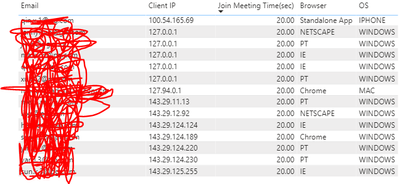
Hi! I want to ask if there is a way for me to filter the table below using DAX based on the Client IP address like the SQL query below:
select * from table
where Client IP like '%127%';
Thank you!
Solved! Go to Solution.
This Solved my question. Thanks for your help!!
https://stackoverflow.com/questions/38767000/starts-with-in-an-expression-using-dax
This Solved my question. Thanks for your help!!
https://stackoverflow.com/questions/38767000/starts-with-in-an-expression-using-dax
@Anonymous , add a measure like this with other not summarized data
calculate(countrows(Table),containsstring(Table[Client IP],"127"))
https://docs.microsoft.com/en-us/dax/containsstring-function-dax
other option
Thanks, @amitchandak! Is there a way to just filter it? So it will still return other columns like email, browser, etc.
I tried adding a filter command but this error message showed:
"The expression refers to multiple columns. Multiple columns cannot be converted to a scalar value."
Thank you!!
@Anonymous - You can, you would use SEARCH or FIND
You might want to create a "selector" like IF(SEARCH(...),1,0)
https://community.powerbi.com/t5/Quick-Measures-Gallery/The-Complex-Selector/m-p/1116633#M534
Hi @Greg_Deckler - Thanks! I shall try this solution too.
I just wanted to filter those %% items and reflect the columns to my table.
The Power BI Data Visualization World Championships is back! Get ahead of the game and start preparing now!
| User | Count |
|---|---|
| 19 | |
| 13 | |
| 9 | |
| 4 | |
| 4 |
| User | Count |
|---|---|
| 30 | |
| 27 | |
| 17 | |
| 11 | |
| 10 |