Join us at FabCon Atlanta from March 16 - 20, 2026, for the ultimate Fabric, Power BI, AI and SQL community-led event. Save $200 with code FABCOMM.
Register now!Get Fabric Certified for FREE during Fabric Data Days. Don't miss your chance! Request now
Hello,
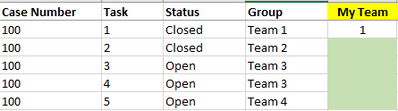
I am fairly new to Dax and find myself stuck. I have data as below in the table with a Case Number where there are individual Tasks associated with that Case. I need to do a couple of things, but believe they are all related in the Dax necessary to get my results.
I would like to create a new Column and count the number of times a Case Number has a Task = 1 and the Group = Team 1. I'm able to get a result for that specific row of 1, but would like that result of 1 to appear on the rows having Task = 2 or 3 or beyond.
When I use:
Thank you.
Solved! Go to Solution.
Hi @Anonymous ,
You can try this:
My Team =
CALCULATE (
COUNTROWS ( 'Table Name' ),
'Table Name'[Task] = 1,
'Table Name'[Group] = "Team 1",
ALLEXCEPT('Table Name','Table Name'[Case Number])
)
If this post helps, then please consider Accept it as the solution ✔️to help the other members find it more quickly.
If this post helps, then please consider Accept it as the solution to help the other members find it more quickly. Appreciate your Kudos.
Check out my latest demo report in the data story gallery.
Stand with Ukraine!
Here are official ways you can support Ukraine financially (accounts with multiple currencies):
1) Support the Armed Forces of Ukraine: https://bank.gov.ua/ua/about/support-the-armed-forces
2) Come Back Alive foundation: https://www.comebackalive.in.ua/
Thank you!
Yes, thank you! Looks like I need to read up on ALLEXCEPT.
Appreciate the feedback and help!
Hi @Anonymous ,
You can try this:
My Team =
CALCULATE (
COUNTROWS ( 'Table Name' ),
'Table Name'[Task] = 1,
'Table Name'[Group] = "Team 1",
ALLEXCEPT('Table Name','Table Name'[Case Number])
)
If this post helps, then please consider Accept it as the solution ✔️to help the other members find it more quickly.
If this post helps, then please consider Accept it as the solution to help the other members find it more quickly. Appreciate your Kudos.
Check out my latest demo report in the data story gallery.
Stand with Ukraine!
Here are official ways you can support Ukraine financially (accounts with multiple currencies):
1) Support the Armed Forces of Ukraine: https://bank.gov.ua/ua/about/support-the-armed-forces
2) Come Back Alive foundation: https://www.comebackalive.in.ua/
Thank you!
Check out the November 2025 Power BI update to learn about new features.
Advance your Data & AI career with 50 days of live learning, contests, hands-on challenges, study groups & certifications and more!
| User | Count |
|---|---|
| 11 | |
| 9 | |
| 9 | |
| 6 | |
| 5 |
| User | Count |
|---|---|
| 27 | |
| 22 | |
| 19 | |
| 17 | |
| 11 |