Join us at FabCon Atlanta from March 16 - 20, 2026, for the ultimate Fabric, Power BI, AI and SQL community-led event. Save $200 with code FABCOMM.
Register now!The Power BI Data Visualization World Championships is back! Get ahead of the game and start preparing now! Learn more
Hello,
I created a Calendar Table using DAX. I currently have a Column with the Week Number with DAX written as: Week Number = WEEKNUM('Date'[Date],1). Instead of simply showing just the Week Number (i.e. 1,2,3,4...53), I would like to format it to only show "MM/YYYY" (i.e. 01/2020). Is there a way to format the WEEKNUM DAX Date Function to only show "MM/YYYY" only while not showing the actual Week Number?
Hello @jytech ,
You can use the FORMAT function
Hi Vivek,
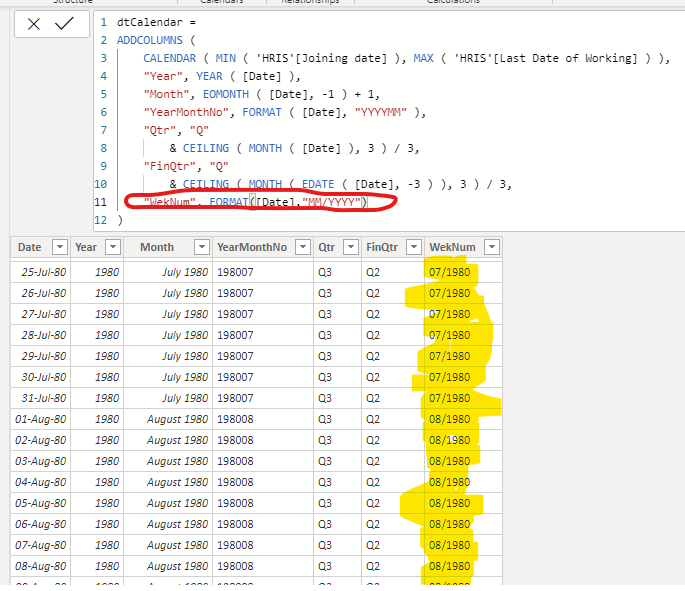
Thanks for your feedback but that FORMAT function does one of two things:
Right now, this works:
Can you share few sample output you are looking for? That would help me in understanding the requirement better.
Cheers!
Vivek
Blog: vivran.in/my-blog
Connect on LinkedIn
Follow on Twitter
Check out the November 2025 Power BI update to learn about new features.
Advance your Data & AI career with 50 days of live learning, contests, hands-on challenges, study groups & certifications and more!
| User | Count |
|---|---|
| 21 | |
| 10 | |
| 9 | |
| 4 | |
| 4 |
| User | Count |
|---|---|
| 34 | |
| 31 | |
| 20 | |
| 13 | |
| 12 |