FabCon is coming to Atlanta
Join us at FabCon Atlanta from March 16 - 20, 2026, for the ultimate Fabric, Power BI, AI and SQL community-led event. Save $200 with code FABCOMM.
Register now!- Power BI forums
- Get Help with Power BI
- Desktop
- Service
- Report Server
- Power Query
- Mobile Apps
- Developer
- DAX Commands and Tips
- Custom Visuals Development Discussion
- Health and Life Sciences
- Power BI Spanish forums
- Translated Spanish Desktop
- Training and Consulting
- Instructor Led Training
- Dashboard in a Day for Women, by Women
- Galleries
- Data Stories Gallery
- Themes Gallery
- Contests Gallery
- Quick Measures Gallery
- Notebook Gallery
- Translytical Task Flow Gallery
- TMDL Gallery
- R Script Showcase
- Webinars and Video Gallery
- Ideas
- Custom Visuals Ideas (read-only)
- Issues
- Issues
- Events
- Upcoming Events
Calling all Data Engineers! Fabric Data Engineer (Exam DP-700) live sessions are back! Starting October 16th. Sign up.
- Power BI forums
- Forums
- Get Help with Power BI
- DAX Commands and Tips
- Re: Extracting top 1 information to a card
- Subscribe to RSS Feed
- Mark Topic as New
- Mark Topic as Read
- Float this Topic for Current User
- Bookmark
- Subscribe
- Printer Friendly Page

- Mark as New
- Bookmark
- Subscribe
- Mute
- Subscribe to RSS Feed
- Permalink
- Report Inappropriate Content
Extracting top 1 information to a card
Hello All,
I have 4 recruitment campaigns and want to display on a card the campaign that is producing the most outstanding employees in the last 3 years.
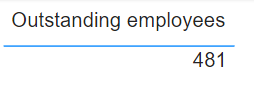
So far I have a measure that returns the total number of outstanding employees across all campaigns:
Each employee has a PerformanceID where 3 = 'Outstanding'
If I put this into a table I get:
If I then add a 'Recruitment campaign' column I get:

Ultimately, I want my card to display "Campaign 1, 281" however I can't get my head the way to do this. I assume it may be using the TOPN function and but can't get my head around the way to approach this.
Help would be greatly appreciated.
Thanks.
Solved! Go to Solution.


- Mark as New
- Bookmark
- Subscribe
- Mute
- Subscribe to RSS Feed
- Permalink
- Report Inappropriate Content
Hi @Anonymous
Please try
Best Campaign =
VAR SelectedCampaigns =
    ALLSELECTED ( 'Recruitment Data'[RecruitmentScheme] )
VAR T1 =
    ADDCOLUMNS ( SelectedCampaigns, "@Outstanding", [Outstanding employees] )
VAR T2 =
    TOPN ( 1, T1, [@Outstanding] )
RETURN
CONCATENATEX ( T2, [RecruitmentScheme] & ", " & [@Outstanding] )- Mark as New
- Bookmark
- Subscribe
- Mute
- Subscribe to RSS Feed
- Permalink
- Report Inappropriate Content
Hi @tamerj1 ,
I have the same problem and the code is really usefeul, but my value will be contains decimal, after applying the code, it shown text, how should I change it to whole number.
Thanks so much
- Mark as New
- Bookmark
- Subscribe
- Mute
- Subscribe to RSS Feed
- Permalink
- Report Inappropriate Content
Hi @Anonymous
You can replace CONCATENATEX with MAXX and delete the delimiter part
- Mark as New
- Bookmark
- Subscribe
- Mute
- Subscribe to RSS Feed
- Permalink
- Report Inappropriate Content
Hi @tamerj1 ,
RETURN
    MAXX( T2, 'Category list'[Category] & ", " & [@TotalGas] & " kWh")
Is it something like this?
Thanks for your help.
- Mark as New
- Bookmark
- Subscribe
- Mute
- Subscribe to RSS Feed
- Permalink
- Report Inappropriate Content
Hi @Anonymous
You are still concatenating using & therefore the results will be a text. Please give me an example of what are trying to achieve.
- Mark as New
- Bookmark
- Subscribe
- Mute
- Subscribe to RSS Feed
- Permalink
- Report Inappropriate Content
- Mark as New
- Bookmark
- Subscribe
- Mute
- Subscribe to RSS Feed
- Permalink
- Report Inappropriate Content
Hi @Anonymous
Please try
Best Campaign =
VAR SelectedCampaigns =
    ALLSELECTED ( 'Recruitment Data'[RecruitmentScheme] )
VAR T1 =
    ADDCOLUMNS ( SelectedCampaigns, "@Outstanding", [Outstanding employees] )
VAR T2 =
    TOPN ( 1, T1, [@Outstanding] )
RETURN
CONCATENATEX ( T2, [RecruitmentScheme] & ", " & [@Outstanding] )- Mark as New
- Bookmark
- Subscribe
- Mute
- Subscribe to RSS Feed
- Permalink
- Report Inappropriate Content
Perfect! I can't say I understand the code yet (although I will put in the work to do so) but worked exactly as I'd hoped.
Helpful resources

FabCon Global Hackathon
Join the Fabric FabCon Global Hackathon—running virtually through Nov 3. Open to all skill levels. $10,000 in prizes!

Power BI Monthly Update - October 2025
Check out the October 2025 Power BI update to learn about new features.

FabCon Atlanta 2026
Join us at FabCon Atlanta, March 16-20, for the ultimate Fabric, Power BI, AI and SQL community-led event. Save $200 with code FABCOMM.


