cancel
Showing results for 
Search instead for 
Did you mean: 

Next up in the FabCon + SQLCon recap series: The roadmap for Microsoft SQL and Maximizing Developer experiences in Fabric. All sessions are available on-demand after the live show. Register now

Reply
Avantgarde
Frequent Visitor

Evolution of value per id filtering by date

Hi,


I have been investigating on the forum but still have some issues.


I have a table like this:

IdDateValue
11/1/2020Prospect
12/2/2020Lead
15/5/2020Opportunity
23/3/2020Prospect
24/4/2020Lead
27/7/2020Opportunity


I need a measure that shows the last value by id filtering by month. For example, if I select march/2020 I need to have something like:

Idvalue
1Lead
2Prospect


Then, I need to display a chart that shows the number of distinct id´s per value filtering by month

If I select 5/5/2020, I need to see something like:

Value                           Count of id

Prospect                               0
Lead                                      1
Opportunity                          1


This means, we count the number of id´s per value, depending on the last value of an id at a certain date


6 REPLIES 6
wdx223_Daniel
Community Champion
Community Champion

wdx223_Daniel_0-1613448173060.png


Thank you @wdx223_Daniel !

It only works for the dates where it has NonBlank values.

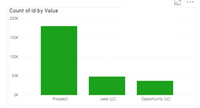
How would you display on a chart like this one the number of distinct Id´s based on their last value, filtering by Month?


Captura.PNG

lbendlin
Super User
Super User

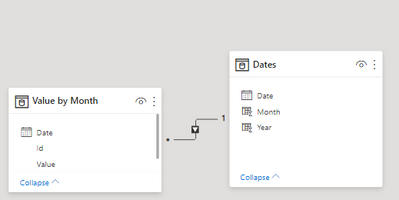
Create a Dates table for your range, and connect it to your fact table


Dates = CALENDAR("2020-01-01","2020-07-31")
 
(I also added Month and Year calculated columns)
 
 
lbendlin_1-1613438872601.png


Then create a measure


Measure =
var m = max(Dates[Month])
var d = CALCULATE(max('Value by Month'[Date]),ALLEXCEPT('Value by Month','Value by Month'[Id]),month('Value by Month'[Date])<=m)
var v= CALCULATE(max('Value by Month'[Value]),ALLEXCEPT('Value by Month','Value by Month'[Id]),'Value by Month'[Date]=d)
return v

and lastly put everything in a visual of your choice.  I omitted the year check from the solution - you can add that yourself.

lbendlin_0-1613439083709.png

If you want a more elegant (but also costlier) measure you can use


Measure =
var m = max(Dates[Month])
return  CALCULATE(LASTNONBLANKVALUE(Dates[Date],max('Value by Month'[Value])),month(Dates[Date])<=m)
 
EDIT: after playing with this some more and reading some italian lyrics here's a better version
 
Measure =
var m = max(Dates[Month])
var d = CALCULATE(max('Value by Month'[Date]),Dates[Month]<=m)
return CALCULATE(max('Value by Month'[Value]),TREATAS({d},Dates[Date]))

Thank you very much @lbendlin , it works.

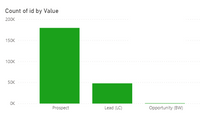
How can I display this measure on a chart like this one?:

pbi screenshot.PNG

I want to replicate your measure on this chart so that I can see the number of distinct Id´s based on their last value, filtering by Month.


I don't understand your request. Please show the expected outcome.

Hi @lbendlin 


Assuming the first data table of the post.


If I select 5/5/2020 for instance, I need to see something like:

Value                           Count of id

Prospect                               0
Lead                                      1
Opportunity                          1


This means, we count the number of id´s per value, depending on the last value of an id at a certain date

Helpful resources

Announcements
New to Fabric survey Carousel

New to Fabric Survey

If you have recently started exploring Fabric, we'd love to hear how it's going. Your feedback can help with product improvements.

Power BI DataViz World Championships carousel

Power BI DataViz World Championships - June 2026

A new Power BI DataViz World Championship is coming this June! Don't miss out on submitting your entry.

Join our Fabric User Panel

Join our Fabric User Panel

Share feedback directly with Fabric product managers, participate in targeted research studies and influence the Fabric roadmap.

March Power BI Update Carousel

Power BI Community Update - March 2026

Check out the March 2026 Power BI update to learn about new features.