
Join us at FabCon Atlanta from March 16 - 20, 2026, for the ultimate Fabric, Power BI, AI and SQL community-led event. Save $200 with code FABCOMM.
Register now!The Power BI Data Visualization World Championships is back! Get ahead of the game and start preparing now! Learn more
Hola:
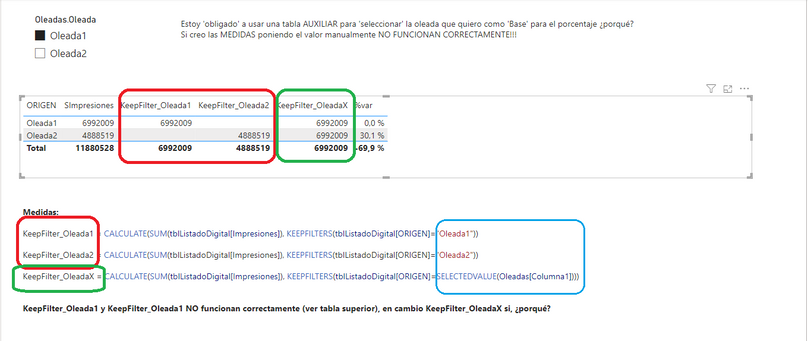
Tengo una tabla sencilla y quiero entender como funciona KEEPFILTERS para hacer % de variación y no entiendo porque las dos primeras Medidas NO funcionan como quiero:
Las 2 medidas en ROJO no funcionan 'bien' (no muestran datos en la oleada que no le corresponde), y la medida en Verde si, pero me obliga a tener una tabla auxiliar. La única diferencia es la condición del filtro (zona azul)
¿Estoy haciendo algo mal?
Un saludo
Solved! Go to Solution.
Hi @luis_garcia ,
I think this is not an issue. I can reproduce this on myside.
As far as I know, I think the difference should be casued by that [Columna] in SELECTEDVALUE() comes from the unrelated Oleadas table.
Measure [KeepFilter_Oleada1/2] use keepfilter equal to determind Oleada type, so your measure will return correct result in that Oleada type.
There is no relationship between two tables, so measure [KeepFilter_OleadaX] will return result in all Oleada type.
Best Regards,
Rico Zhou
If this post helps, then please consider Accept it as the solution to help the other members find it more quickly.
Hi @luis_garcia ,
I think this is not an issue. I can reproduce this on myside.
As far as I know, I think the difference should be casued by that [Columna] in SELECTEDVALUE() comes from the unrelated Oleadas table.
Measure [KeepFilter_Oleada1/2] use keepfilter equal to determind Oleada type, so your measure will return correct result in that Oleada type.
There is no relationship between two tables, so measure [KeepFilter_OleadaX] will return result in all Oleada type.
Best Regards,
Rico Zhou
If this post helps, then please consider Accept it as the solution to help the other members find it more quickly.
The Power BI Data Visualization World Championships is back! Get ahead of the game and start preparing now!
Check out the November 2025 Power BI update to learn about new features.
| User | Count |
|---|---|
| 20 | |
| 10 | |
| 9 | |
| 4 | |
| 4 |
| User | Count |
|---|---|
| 34 | |
| 31 | |
| 20 | |
| 12 | |
| 11 |